
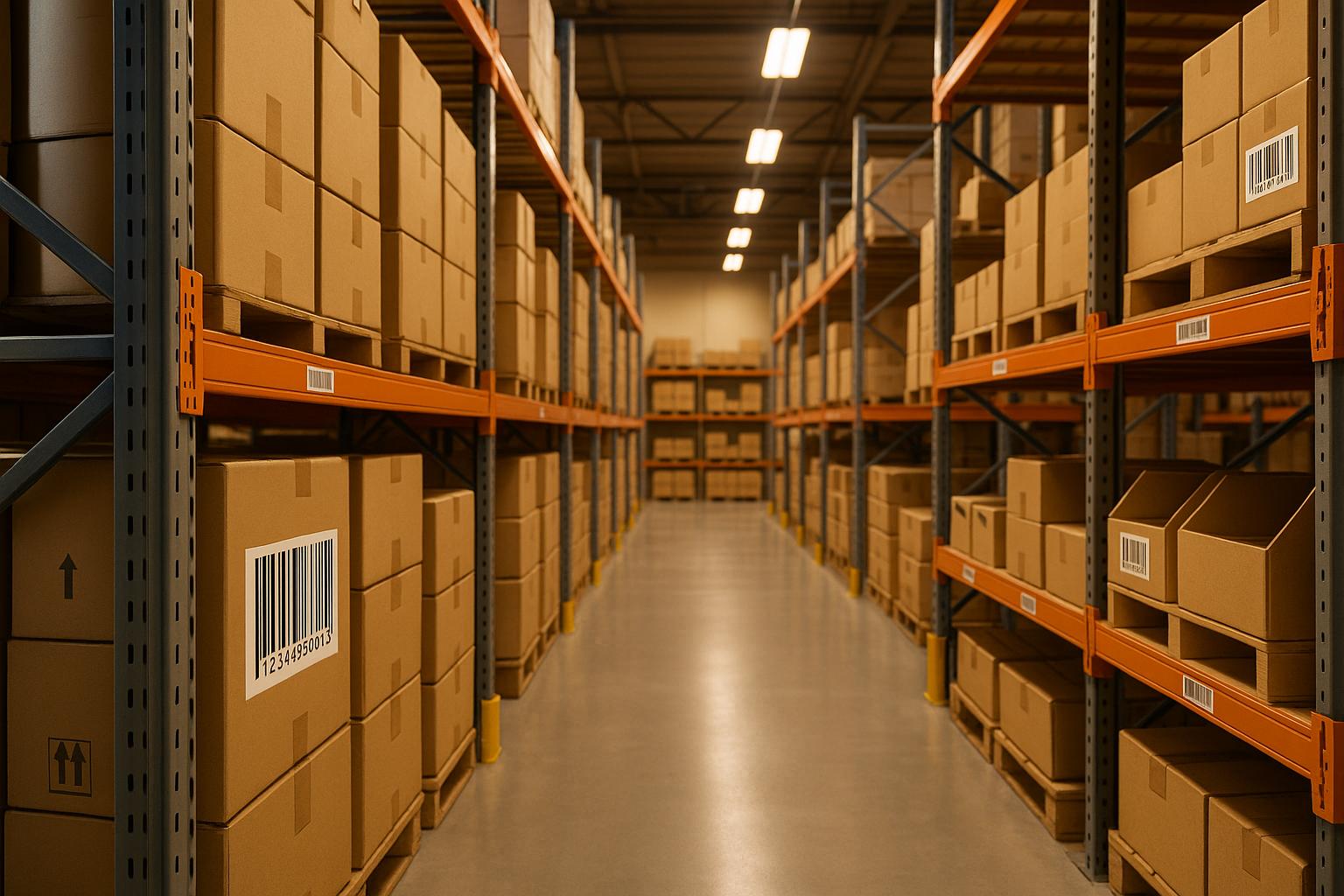
A barcode-friendly warehouse layout ensures fast, accurate scanning to streamline inventory management and reduce errors. Here's what you need to know:
- Key Features: Clear, consistent barcode placement; scanner-friendly aisles; and efficient traffic flow.
- Why It Matters: Boosts accuracy, reduces picking errors by up to 60%, and keeps inventory data synced in systems like QuickBooks Desktop.
- Steps to Get Started:
- Clean up item and location data.
- Map your warehouse to scale, marking zones and bottlenecks.
- Optimize storage for fast-moving items and ergonomic scanning.
- Use durable, scannable labels with standardized codes.
- Plan traffic flow with one-way paths and avoid congestion.
- Leverage tools like Rapid Inventory for real-time updates.
Analyzing Your Current Warehouse Layout and Material Flow
Creating a Scaled Warehouse Map
Start by drawing a scaled floor plan of your warehouse. This should include building dimensions, aisle widths, ceiling heights, and any structural obstacles like columns, doors, loading docks, or mezzanines. Use imperial measurements, such as 1 inch equaling 10 feet, for accuracy. If you already have CAD drawings or fire-evacuation maps, use them as a starting point. Then, walk through the warehouse with a measuring tool to verify key dimensions and aisle spacing.
On your map, clearly mark all core process zones: receiving, quality check, putaway, storage (organized by rack type and bin setup), picking, packing, staging, and shipping. Include details like existing rack and bay IDs, and note where barcode labels are located - whether on rack uprights, bins, doors, floor markers, or equipment. Also, map out the positions of wireless access points, printers, and charging stations. This will help you identify any gaps in Wi-Fi coverage or power availability that could disrupt operations. Capture photos of each zone to cross-check barcode placement, signage, and device locations later.
Finding Bottlenecks in Product Flow
Once your warehouse map is complete, analyze how materials actually move through the space to identify delays and inefficiencies. To do this, follow real orders and receipts in progress by shadowing a picker and receiver. Take note of key pain points like scanning delays, unnecessary backtracking, visible queues (e.g., pallets piling up at receiving or totes accumulating near pack stations), and congestion at busy intersections where inbound and outbound routes overlap.
Dive deeper by pulling timestamped transaction logs from your inventory system for activities like receiving, putaway, picking, moving, and shipping. Look for long dwell times between scans for the same order or pallet - these often signal inefficiencies such as excessive walking, trouble finding unlabeled locations, or issues with damaged barcodes. Review error codes from scanning events, such as "location not found", "SKU mismatch", or frequent inventory adjustments in specific areas. These codes can uncover problems with labeling or layout. Real-time reports can then validate your observations and reveal patterns across shifts.
This analysis will provide the insights needed to fine-tune storage locations based on historical order data.
Using Inventory Data to Optimize Storage Locations
Gather at least three to twelve months of order history to calculate lines picked per SKU, total units shipped, and the number of orders each SKU appears in. Use this data to classify SKUs into categories like fast-movers, medium-movers, and slow-movers. Place fast-moving items close to main pick paths, medium-movers nearby, and slow-movers in less accessible areas. For SKUs with seasonal demand spikes, plan for temporary storage adjustments rather than permanent changes.
Position fast-moving SKUs in "golden zones", which are waist-to-shoulder height on racks closest to pick paths and packing stations. Ensure these locations have clear, scannable barcodes for quick identification. Use order composition data to group SKUs that are frequently picked together in nearby locations, reducing travel time and scanning distances. Finally, update your inventory system promptly after any physical moves to ensure that scanned data matches the actual layout.
Inventory control in visual warehouse floor plan | Barcode scanner
Designing Zones and Traffic Patterns for Barcode Scanning
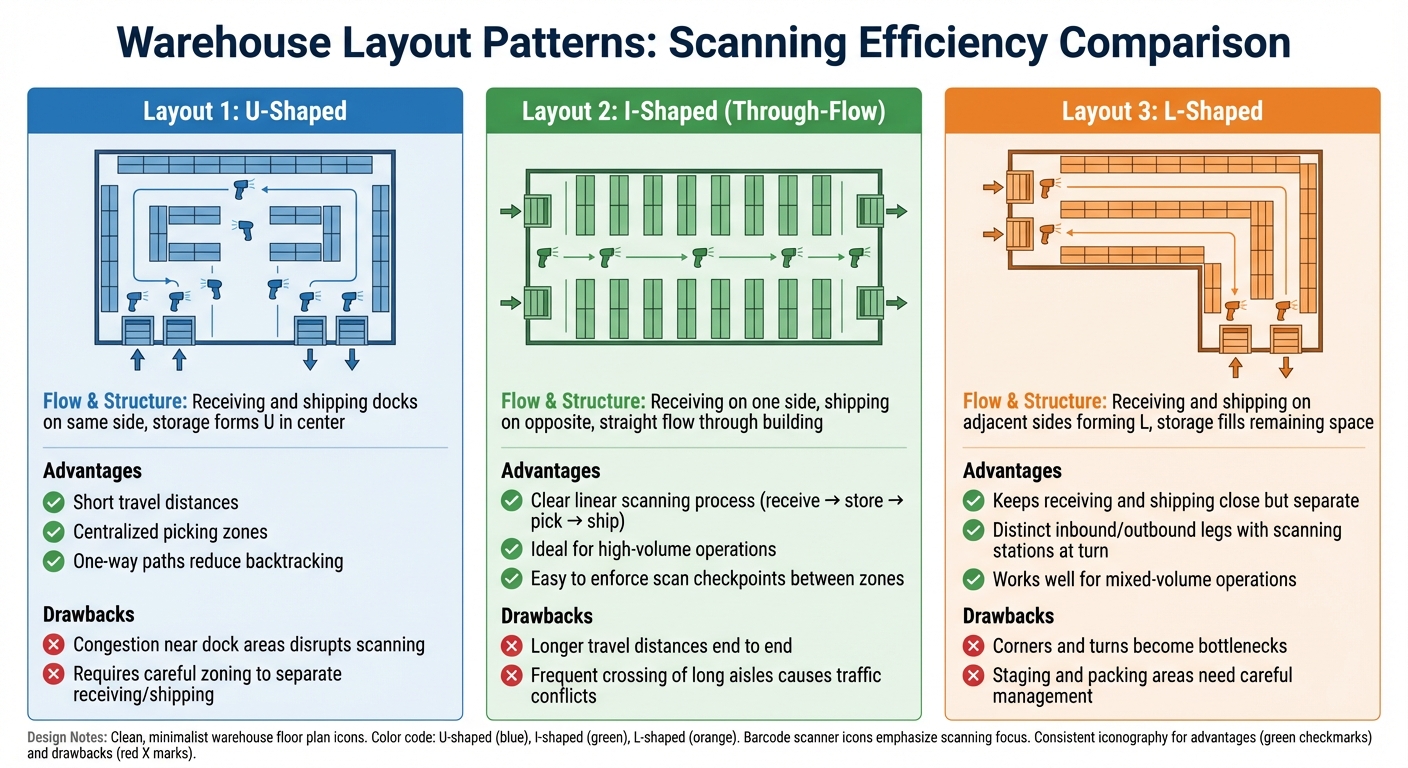
Warehouse Layout Patterns Comparison for Barcode Scanning Efficiency
Setting Up Key Zones for Efficient Operations
To keep barcode scanning workflows smooth and organized, designate specific zones for tasks like receiving, putaway, picking, packing, and shipping. Each zone should serve a clear purpose: receiving is where purchase orders and inbound pallets are scanned, putaway and cycle counts happen in storage, and picking zones are reserved for pick confirmation scans.
Use floor tape, posts, or signs with clear names and scannable barcodes (e.g., "RCV-01") to mark zone boundaries. This helps workers quickly identify where they are and what scanning process applies. Stick to consistent labeling conventions, such as "R-###" for racks, to make scanning faster and more intuitive. Standardizing barcode heights and formats across zones ensures that scanner prompts are straightforward, reducing confusion and speeding up workflows. This consistency is especially helpful when workers use mobile devices or vehicle-mounted scanners.
Arrange zones in a logical sequence to minimize unnecessary movement. For example, place receiving near the inbound docks, storage close to receiving for quick putaway, forward picking near packing areas, and packing next to the shipping docks. This linear setup cuts down on backtracking and reduces both travel time and the likelihood of scanning errors.
Once zones are in place, the next step is planning traffic patterns to keep everything running smoothly.
Planning Traffic Flow to Avoid Congestion
After defining zones, focus on traffic flow to avoid bottlenecks and maintain smooth operations. Design one-way travel paths in high-traffic areas, like picking zones, to prevent collisions and delays. For instance, you could establish a clockwise route for pallet jacks in dense picking aisles, with clear entry and exit points marked by overhead barcode signs. Limit cross-aisles to specific intersections to prevent random traffic from disrupting workers who are scanning.
Aisle widths should be tailored to the equipment being used - 6–7 feet for specialized trucks and 10–12 feet for standard forklifts. Ensure there’s enough clear space in front of fixed scan stations, dock doors, and packing areas so workers can scan without being forced into unsafe or awkward positions. Separate forklift-only lanes from pedestrian walkways using paint and signage to avoid congestion in busy rack and picking zones.
Keep scan stations and mobile chargers off main paths to prevent them from blocking traffic. For high-priority lanes, like those used for same-day shipping or cross-docking, allow for larger turning areas, fewer intersections, and closer proximity to dock doors and staging scan points. Regularly review scan data to identify bottlenecks and adjust layouts as needed.
The overall layout of the warehouse also plays a big role in how efficiently workers can move and scan.
Comparing Layout Patterns for Scanning Efficiency
The shape of your warehouse - whether U-shaped, I-shaped, or L-shaped - affects scanning routes and traffic flow. Each layout comes with its own pros and cons for barcode workflows and traffic management.
| Layout Pattern | Flow & Structure | Advantages | Drawbacks |
|---|---|---|---|
| U-shaped | Receiving and shipping docks are on the same side, with storage forming a U in the center | Short travel distances, centralized picking zones, and one-way paths that reduce backtracking | Congestion near dock areas can disrupt scanning; requires careful zoning to keep receiving and shipping separate |
| I-shaped (through-flow) | Receiving is on one side, shipping is on the opposite side, with a straight flow through the building | Clear and linear scanning process (receive → store → pick → ship); ideal for high-volume operations; easy to enforce scan checkpoints between zones | Longer travel distances from end to end; frequent crossing of long aisles can cause traffic conflicts unless well-planned |
| L-shaped | Receiving and shipping docks are on adjacent sides, forming an L, with storage filling the remaining space | Keeps receiving and shipping close but separate; allows for distinct inbound and outbound legs with scanning stations at the turn; works well for mixed-volume operations | Corners and turns can become bottlenecks for traffic and scanning if staging and packing areas aren’t carefully managed |
Choose the layout that best fits your operational demands to ensure barcode scanning remains efficient and seamless throughout the warehouse.
Optimizing Storage, Labeling, and Barcode Placement
Selecting Storage Solutions for Barcode Visibility
The type of storage you choose can directly impact how easily and accurately barcodes are scanned. Selective pallet racks are ideal for fast-moving items because they keep each pallet face visible and accessible. To ensure smooth scanning, place labels on rack beams at eye level or on the edges of pallets where scanners can easily reach. For high bays, consider adding duplicate ground-level labels on uprights or posts so workers can scan safely from the ground.
For high-velocity SKUs, carton flow racks are a great option. These racks keep items within the ergonomic range of 28–52 inches off the ground, making barcodes easy to scan with handheld devices. Labels should be placed on the rack face or shelf lips at the pick point, ensuring they remain visible as cartons move forward. Static shelving works well for smaller items, as long as each bin or tote has a clearly visible label at a consistent height. This eliminates unnecessary bending and "label hunting."
In areas where workers have limited access, use long-range scanners paired with large, reflective labels. This setup ensures reliable scanning from forklifts or other vehicles. Avoid placing barcodes on top surfaces or in spots that might be obstructed by column protectors, pallet overhang, or safety netting.
Once your storage setup is optimized, the next step is to carefully plan barcode placement using a structured coding system.
Designing and Placing Location Barcodes
An efficient coding system is key to keeping operations smooth and organized. A good location code mirrors the physical layout of your storage area, typically following a hierarchical structure like Aisle–Bay–Level–Position. For example, 03-12-02-04 would represent Aisle 3, Bay 12, Level 2, Position 4. Number aisles starting from the dock, increase bay numbers along the travel path, and count levels from the floor up. This system ensures that screen prompts align with the worker’s path, minimizing confusion. Use leading zeros (e.g., 03 instead of 3) to maintain consistent code lengths and prevent sorting errors in software.
Each location code should be printed as a 1D barcode with human-readable text beneath it. This allows workers to visually confirm the location if a scanner malfunctions or a label gets damaged. Keep codes under 12–14 characters so they fit neatly on standard label sizes, such as 4×2 inches or 4×6 inches. Reserve specific ranges - like aisle "90" - for staging, returns, or quality-hold areas, making exceptions easy to identify.
Mount labels on visible, consistent surfaces, such as the front of rack beams or shelf edges. Avoid placing them on undersides. For multi-level racks, use vertical stacks or "totem" labels with clearly separated codes for each level. This prevents scanners from accidentally picking up multiple codes at once. For floor locations, such as staging or dock doors, use durable floor labels or plates placed just ahead of pallet positions. Ensure these are oriented upright for easy scanning when approached from the main travel direction.
Once barcode locations are set, adding visual cues can further streamline navigation and minimize errors.
Using Visual Cues to Improve Barcode Navigation
Adding visual cues to your storage system can make navigation faster and more accurate. Color-coding zones, aisles, or levels is an effective way to guide workers. For example, Zone A might use blue rack labels and overhead signs, while Zone B uses orange. This helps workers confirm they’re in the right area before scanning. Levels can also be color-coded with horizontal bands - red for Level 1, yellow for Level 2 - to reduce mistakes when picking from different heights. Extend these colors to floor tape or painted paths to guide common pick routes.
For legibility, use high-contrast colors like black on white and choose a simple, sans-serif font (e.g., Arial) with text sizes between 0.25–0.5 inches. Keep all barcodes consistently oriented - such as vertical with text below - so workers can scan without hesitation. Larger labels (4×6 inches) are ideal for long-range scanning on high racks, while smaller labels (1×3 inches or 2×1 inches) work well for close-range picking. Mixing label sizes is fine as long as they’re readable from their intended distances.
Choose durable label materials that can withstand the demands of your environment. For high-traffic areas, polyester or anodized aluminum labels resist wear and tear, including abrasion and exposure to cleaning chemicals. In cold storage or freezer settings, use adhesives rated for low temperatures to prevent peeling. Position labels on protected surfaces, like rack uprights above impact zones or recessed floor plates, to minimize damage from forklifts or pallets.
Train staff to avoid covering labels with tape, documents, or shrink wrap, as this can interfere with scanning. Regularly audit labels to replace those that are faded, torn, or losing contrast. Keeping labels in good condition is essential for maintaining efficiency and accuracy in your operations.
sbb-itb-19ed50f
Implementing Scanning Workflows and Integrating Technology
Once you’ve set up efficient storage and labeling, the next step is to establish scanning workflows and integrate supporting technology.
Defining Scanning Points in Core Workflows
To keep inventory data accurate and up-to-date, scanning should be incorporated into every movement within the warehouse. Here’s how it works for key processes:
- Receiving: Start by scanning the purchase order (or ASN), followed by each inbound pallet or case, and then the staging location.
- Putaway: Scan the item or pallet, then the destination location barcode to ensure proper placement.
- Picking: Scan the pick ticket or wave ID, the location barcode, and each item barcode to confirm SKU, quantity, and - when applicable - lot or serial number.
- Packing and Shipping: Scan the order ID, all picked items, and the shipping label or pallet ID to finalize the order.
- Cycle Counting: Follow a similar method - scan the location barcode first, then all item barcodes to reconcile counts.
Configure your system to enforce these scan sequences, ensuring workers complete all necessary steps. For FIFO (First In, First Out) or FEFO (First Expired, First Out) protocols, include compliance scans that validate the correct lot barcodes.
With workflows defined, the next focus is on ensuring the technology infrastructure supports seamless scanning.
Placing Technology for Uninterrupted Scanning
Start by conducting a wireless site survey to identify areas with weak signals, often caused by metal racks or heavy equipment. Install access points to provide overlapping coverage across critical zones like aisles, docks, staging areas, and mezzanines. Design your network to allow smooth roaming between access points, and keep network equipment in low-risk areas, protecting it with enclosures where needed.
Strategically position charging stations and device cradles in high-traffic areas, such as receiving docks, packing stations, and entry points to main pick paths. Set up centralized charging hubs for overnight use, with smaller satellite chargers near active work zones. Keep spare batteries readily available at supervisor stations for quick replacements. Mount device cradles at ergonomic heights on workbenches or posts, and label them clearly to ensure accountability.
Using Rapid Inventory for Workflow Integration
Rapid Inventory streamlines barcode-driven workflows by integrating mobile scanning with real-time updates. Every scan instantly adjusts on-hand quantities and locations within the system. Its two-way sync with QuickBooks Desktop ensures a seamless flow of data - item catalogs, purchase orders, and sales orders move from QuickBooks into Rapid Inventory, while completed receipts and shipments sync back as item receipts and invoices. This eliminates the need for manual data entry, keeping financial records aligned with physical stock.
The platform’s multi-location and warehouse tracking lets you assign detailed location barcodes and monitor inventory down to the aisle or bin level. Lot and serial number tracking ensures traceability, which is crucial for compliance or recalls. Built-in FIFO and FEFO picking strategies guide workers to select the correct lot or oldest inventory, requiring barcode scans for accuracy.
Rapid Inventory is web-based, making it easy to roll out across multiple U.S. warehouses. It also includes free training and onboarding, simplifying deployment. Additional features like cycle counting, backorder tracking, partial shipping and receiving, and label printing are all accessible directly from handheld scanners or mobile devices on the warehouse floor. This enables a smooth, efficient workflow that keeps your inventory operations running like clockwork.
Training and Continuous Improvement
Rolling Out the New Layout in Phases
Instead of overhauling your entire warehouse at once, start with a pilot zone. Choose a high-activity area like the main picking aisle or receiving dock. These spots are active enough to quickly highlight any issues but won't paralyze your operations if something doesn't go as planned. Run the pilot for 2–4 weeks, setting clear goals such as achieving a 25% reduction in pick time and fewer than one error per 1,000 order lines.
During this trial period, gather feedback from workers on key aspects like label clarity, scanner functionality, and traffic patterns. Address any hiccups - whether it's torn labels, Wi-Fi dead zones, or confusing location codes - before expanding the changes. Once the pilot zone consistently meets your targets for several weeks, roll out the new layout one zone at a time during off-peak hours or weekends. Keep the old processes running alongside the new ones until the pilot proves successful. After the layout is in place, the next focus is ensuring your team is fully equipped to handle the changes.
Training Staff on Scanning and Safety
Once the pilot is a success, shift gears to training your staff thoroughly to maintain the updated workflow. Hands-on training on the warehouse floor is a must. Teach workers how to scan effectively, including proper scanning distances, reading location barcodes, and troubleshooting scan failures. Make sure they understand how location codes correspond to physical locations - for instance, "A03-B02-L02-BIN05."
Safety training should be integrated into these sessions. Show workers the new one-way traffic lanes, pedestrian zones, and forklift yield points. Highlight safe device use near moving equipment and demonstrate proper ladder techniques for accessing higher shelves. To reinforce this learning, provide laminated quick-reference cards and post visual aids in key areas. Additionally, assign experienced team members as "champions" for each shift. These champions can answer questions and model correct practices on the floor.
Using Data to Refine Your Layout
After completing training, use real-time data to tweak and improve the layout and scanning processes. Monitor key metrics in your inventory system, such as pick accuracy, pick times per line, travel distances, and cycle count discrepancies. If certain zones show more scan errors or slower pick times, dig into the causes. The issue could be anything from poorly placed labels to overcrowded aisles or unclear location codes.
Leverage movement data to optimize storage continuously. Relocate fast-moving SKUs closer to packing stations and store them at waist-to-shoulder height for easier access. Group items that are frequently ordered together to minimize travel distances. Plan monthly or quarterly layout reviews using barcode data and worker feedback to identify and resolve new bottlenecks as your product mix or volume changes. Small changes - like repositioning a high-demand SKU, widening a tight aisle, or adjusting label angles - can lead to noticeable improvements. Measure the impact of these adjustments by comparing performance data before and after implementation over a few weeks.
Conclusion
Creating a barcode-friendly warehouse layout brings together physical space, labeling, traffic flow, and technology into a seamless system. Start by mapping out your space to scale, document each workflow from receiving to shipping, and redesign zones and picking paths with one critical question in mind: "Can my team scan here efficiently without delays or errors?" This method lays the groundwork for measurable improvements in both accuracy and productivity.
Barcode systems have the potential to cut picking errors by up to 99%, reduce picker travel time by 40–60%, and boost overall productivity by 25–50%. These gains lead to fewer shipping mistakes, quicker order processing, and lower overtime costs - all essential for staying competitive in today’s fast-paced fulfillment landscape.
By integrating inventory software like Rapid Inventory, you can transform your layout and labeling into real-time operational insights. This software bridges the gap between physical operations and digital tracking. For QuickBooks Desktop users, Rapid Inventory offers features like two-way sync, multi-location tracking, mobile barcode scanning, and FIFO/FEFO picking strategies. Pairing this system with strong Wi‑Fi coverage and reliable mobile devices ensures uninterrupted scanning across all warehouse zones.
However, even the best layout can fall short without proper training and a phased rollout. Equip your team with the skills to master scanning and maintain safety standards. Test changes in a pilot phase, gather feedback, and refine processes as needed. Ongoing training and regular feedback loops are essential. Use scanning and inventory data to identify issues and make precise adjustments over time, ensuring your layout evolves alongside your operational needs.
Think of your barcode-friendly layout as a living system that drives efficiency and enhances customer satisfaction. Regularly analyze data to make strategic changes, like repositioning high-demand SKUs or optimizing aisle widths. By combining thoughtful layout design, powerful tools like Rapid Inventory, and consistent staff training, your warehouse can become a streamlined, data-driven operation that delivers on customer expectations every time.
FAQs
What’s the best way to identify and fix bottlenecks in my warehouse layout?
To identify bottlenecks, begin by analyzing real-time inventory data, keeping an eye on traffic patterns, and tracking picking and packing times. Look out for telltale signs like frequent delays, overcrowded aisles, or repetitive tasks that drag down productivity.
Addressing these challenges often involves rearranging equipment placement, improving traffic flow, and tweaking storage layouts to cut down on congestion. Even small adjustments, such as adding clear labels to zones or widening aisles, can significantly boost efficiency and help operations run more smoothly.
What are the best practices for placing barcodes to ensure easy and efficient scanning?
To make barcode scanning quicker and easier, ensure barcodes are placed at eye level or in a spot that's simple to reach. This minimizes physical strain and keeps the process smooth. Always position barcodes on flat, smooth surfaces to avoid any distortion, and keep them clearly visible by removing any surrounding clutter. Stay away from reflective or shiny materials, as these can mess with the scanner's ability to read the code.
Consistency also plays a big role - placing barcodes in the same location on similar items helps workers become familiar with where to look, saving time. Be sure to leave enough clear space around the barcode to reduce the chance of accidental misreads. Additionally, use durable labels that can withstand wear and tear, especially in busy areas. These small tweaks can significantly improve the efficiency of your workflow.
How can using technology like Rapid Inventory improve warehouse efficiency?
Integrating Rapid Inventory can take your warehouse operations to the next level. With real-time inventory tracking and mobile barcode scanning, it helps cut down on errors while keeping everything running smoothly.
This tool automates essential tasks like syncing with QuickBooks and simplifies processes such as cycle counting and order management. By fine-tuning picking routes and ensuring accurate inventory records, Rapid Inventory boosts productivity, reduces mistakes, and saves valuable time - making your warehouse more efficient and dependable.



