

Cycle counting is a practical way to improve inventory accuracy without halting daily operations. Instead of performing a full physical inventory count, you audit smaller portions of stock on a regular schedule. This method helps businesses using QuickBooks Desktop ensure their inventory records align with physical stock, reducing errors and improving efficiency.
Key Takeaways:
- What it is: Cycle counting involves counting specific inventory sections (daily, weekly, or monthly) instead of shutting down for a full count.
- Why it matters: It ensures accurate stock movement tracking, preventing issues like shipping delays, stockouts, or overstocking.
- How it works: Focus on high-value items (A-items) more frequently, use tools like QuickBooks Advanced Inventory, and track discrepancies in real-time.
- Benefits: Saves time, reduces costs, and supports better purchasing and operational decisions.
For QuickBooks users, leveraging tools like mobile scanners and syncing features simplifies the process, ensuring reliable inventory data and fewer disruptions.
QuickBooks Enterprise Cycle Count Tutorial: A Step-by-Step Guide to Efficient Inventory Management

Common Problems in Stock Movement Tracking
Even with QuickBooks Desktop, inventory records often fail to match up with physical stock. This can disrupt order fulfillment, cash flow, and purchasing decisions. Here are three common issues that make stock movement tracking more difficult.
Mismatched Inventory Records
Manual data entry - whether on paper or spreadsheets - frequently leads to transcription errors, especially during stock movement. These errors tend to escalate as items move through the warehouse. As Ben Oliveri from the QuickBooks Blog points out:
Errors are most likely to occur during movement. Hence, cycle count trigger events can be when an item is ordered, when a shipment arrives, after a shipment is stocked, or when the stock drops below a certain threshold.
These inaccuracies can throw off operations. For example, QuickBooks might show negative inventory (Quantity on Hand less than zero), signaling a disconnect between digital records and actual stock. Many businesses set a tolerance threshold for discrepancies - usually between 2% and 5%. Anything beyond that prompts an investigation. Even minor errors can snowball, resulting in poor order fulfillment and shipping delays.
Limited Visibility Across Multiple Locations
Errors in data entry are just one part of the problem. Managing inventory across multiple locations adds another layer of complexity. Without real-time updates, tracking stock across locations becomes a guessing game, often leading to "false variances" between system records and physical inventory.
This challenge grows when a single SKU is stored in multiple bin locations. Each bin requires separate tracking, and without the best inventory management software for QuickBooks Desktop, staff may waste valuable time searching for misplaced items [2,6].
Bill Conway, NetSuite Practice Director at Blue Horseshoe Solutions, explains:
Cycle counting is an inventory management option that allows you to count items in a designated area of the warehouse without stopping operations to perform a complete physical inventory.
However, without proper visibility across all sites, even targeted cycle counts can fall short. While a 90% Inventory Record Accuracy (IRA) might sound good, the industry standard aims closer to 100%.
Manual Processes That Waste Time
Delayed updates to digital systems - sometimes taking hours or even days - turn reconciliation into a frustrating and time-consuming task. Staff often have to sift through scattered paperwork to locate unlogged transactions.
QuickBooks Desktop also lacks built-in tools for scheduling, automating, and monitoring cycle counts. This forces many businesses to rely on external spreadsheets, which can quickly become outdated. When data is eventually imported from Excel, mismatches appear as "Pending Review", requiring additional effort to resolve. These delays can cause ripple effects, leading to poor order fulfillment, excess stock, and lost revenue [3,8].
These obstacles highlight the importance of adopting systematic processes like cycle counting to improve inventory tracking and reduce inefficiencies.
How Cycle Counting Fixes Inventory Tracking Problems
Cycle counting swaps out the hassle of annual full inventory counts for more frequent, focused checks. Instead of halting operations once a year to tally everything, businesses break the task into smaller, manageable chunks - counting specific inventory sections weekly or monthly. This way, errors are caught and corrected as they happen, rather than months down the line when the impact has already snowballed.
The method works by categorizing inventory into A, B, and C groups based on their value and how quickly they move. Typically, A items - about 20% of SKUs - make up 70% to 80% of total inventory value and are counted weekly. B items, which account for 30%, are checked monthly, while C items, the remaining 50%, are reviewed quarterly. This structured focus ensures time and resources are spent where discrepancies are likely to be the most expensive.
The Cycle Counting Process
Cycle counting starts with freezing all activity in the area being counted, ensuring no stock is moved during the process. A "blind count" is then performed, where counters only record what they physically see - no peeking at expected numbers to avoid bias. This approach ensures an honest snapshot of inventory levels.
When discrepancies show up, they’re logged with reason codes like "receiving error", "wrong bin", "damage", or "shrinkage." These codes help pinpoint recurring problems. For instance, if items frequently end up in the wrong bin, it could signal issues with how pickers are locating products. By freezing movement, conducting unbiased counts, and tracking patterns through reason codes, cycle counting tackles inventory errors at their root. Ideally, a well-run program keeps adjustment rates below 5%. If rates climb above 10%, it’s a clear sign deeper issues need attention. Pairing this process with digital tools further boosts accuracy.
Real-Time Updates and QuickBooks Integration
For QuickBooks Desktop users, the Advanced Inventory module makes cycle counting even smoother. It sends tasks straight to mobile scanners, syncing data instantly and removing the need for manual data entry. These real-time updates ensure physical counts and digital records stay aligned, making inventory tracking more reliable.
When physical counts don’t match QuickBooks records, the system flags them as "Pending Review." Managers can quickly approve fixes through the "Batch Actions" menu, which automatically updates the general ledger. This seamless reconciliation keeps inventory accuracy above the industry benchmark of 97%, with top-performing systems often hitting over 99%.
Raeann Salter, a QuickBooks Advanced ProAdvisor, highlights the value of this approach:
Implementing cycle counts helps maintain accurate inventory without the need for full physical counts. Regularly conducting them allows you to spot and fix discrepancies, ensuring your inventory data stays accurate and reliable.
Benefits of Cycle Counting for QuickBooks Desktop Users

More Accurate Stock Movement Data
With QuickBooks Enterprise Advanced Inventory, stock discrepancies are flagged automatically and moved to a "Pending Review" status for immediate follow-up. This real-time detection ensures errors are addressed promptly - within days or weeks - rather than waiting for an annual review. For items stored across multiple bin locations, the system creates separate tasks, making it easier to track stock movement accurately throughout the warehouse.
Once counts are finalized, mobile scanners sync the data directly to the QuickBooks dashboard. This process eliminates transcription errors and automatically updates inventory quantities and values. Many distributors and manufacturers set a tolerance threshold - typically between 2% and 5% - to trigger investigations into stock discrepancies.
Improved Efficiency and Lower Costs
Cycle counting isn’t just about accuracy; it also streamlines operations and reduces costs. Unlike full year-end inventory counts that require shutting down the entire warehouse, cycle counting allows businesses to keep fulfilling orders and receiving goods, avoiding disruptions to sales and revenue. By spreading the workload throughout the year, companies can skip the need for expensive overtime or hiring temporary staff to handle a massive annual count.
Bill Conway, NetSuite Practice Director at Blue Horseshoe Solutions, highlights the advantage:
Large companies with thousands of items typically halt operations for up to a week or more to perform a full physical inventory count. Cycle counting is an inventory management option that allows you to count items in a designated area of the warehouse without stopping operations.
Frequent checks also help catch issues like damage, theft, or discrepancies early, reducing the risk of holding onto obsolete inventory or facing large write-offs at year-end. Plus, real-time data prevents overstocking, freeing up capital and cutting down on storage costs.
Smarter Business Decisions
Robert Brandon from inFlow Inventory explains the purchasing advantage:
Having more detailed and accurate records means that you're much less likely to purchase inventory that you don't need. This can free up capital in the short term and prevent waste in the long term.
With up-to-date data, managers can align inventory levels with demand forecasts, minimizing stockouts (lost sales) and overstock situations (excess carrying costs). Routine cycle counts also reveal patterns in errors or discrepancies, helping businesses address the root causes of inventory leaks. While some may settle for 90% accuracy, the industry standard for effective cycle counting aims for nearly 100%. To support this goal, QuickBooks Enterprise organizes cycle counts into groups of 200 line items, making the process more manageable for warehouse teams. These practices pave the way for smoother inventory management and better overall efficiency.
sbb-itb-19ed50f
Using Cycle Counting with Rapid Inventory
Manual vs Automated Cycle Counting Comparison for QuickBooks
Cycle counting becomes even more efficient when paired with Rapid Inventory's digital tools and automation features.
How Rapid Inventory Simplifies Cycle Counting
Rapid Inventory takes the guesswork out of cycle counting with its two-way QuickBooks sync and mobile barcode scanning. Using Android devices or scanners like the Zebra TC21/TC26, workers can scan items directly on the warehouse floor, reducing errors tied to manual data entry. No more juggling spreadsheets - this system eliminates the need for importing or exporting data manually.
When items are stored in multiple bin locations, Rapid Inventory automatically creates individual tasks for each spot, ensuring no location is overlooked. Managers benefit from a real-time dashboard that tracks progress as workers update counts directly from their mobile devices. The process stays active and visible, giving teams full transparency.
Once a count is completed, the system flags any mismatches for review and adjusts inventory quantities and values across all locations instantly. For larger inventories, Rapid Inventory breaks cycle counts into smaller, manageable groups of 200 line items and limits each count to 5,000 tasks. This ensures smooth performance, no matter the size of the inventory. Completed counts remain accessible on the dashboard for 30 days, offering a clear audit trail.
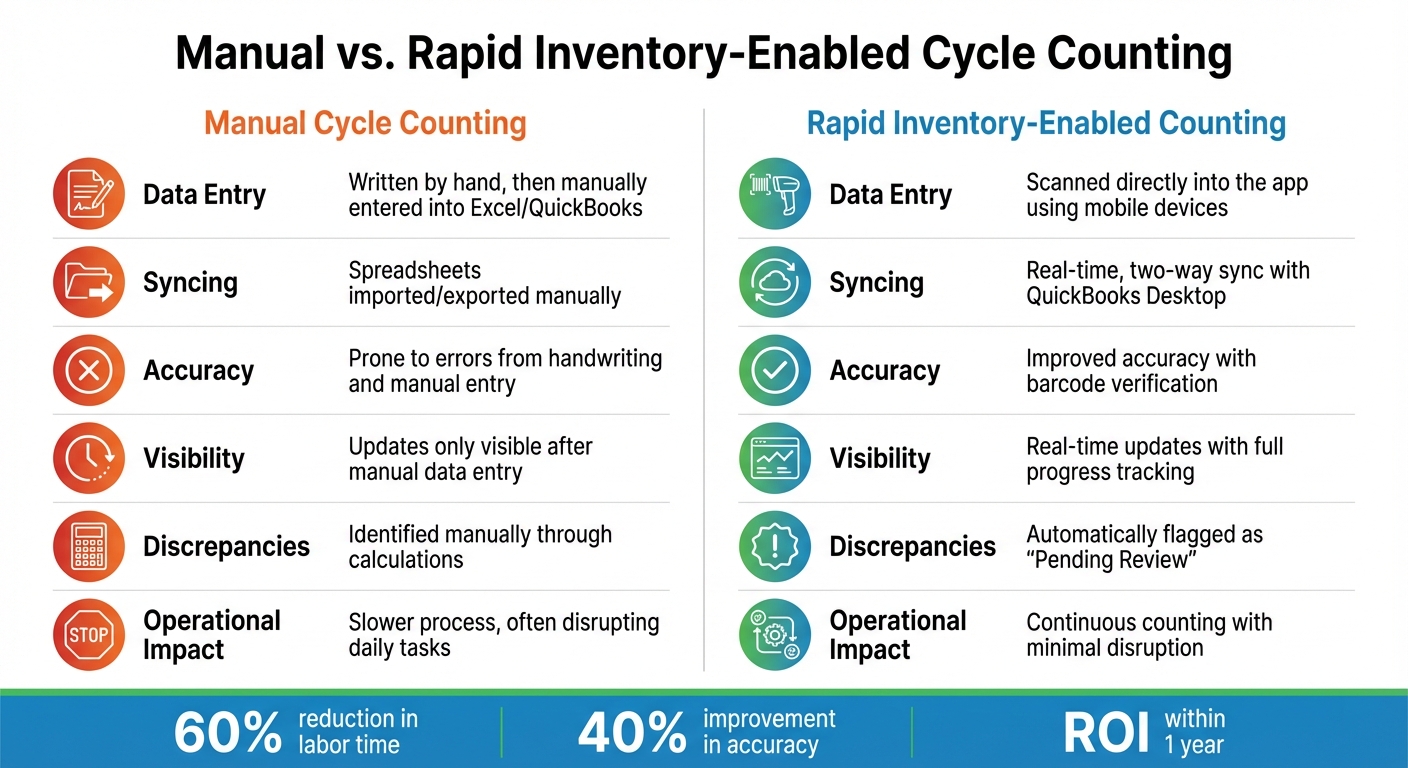
Manual vs. Rapid Inventory-Enabled Cycle Counting
Here’s a side-by-side look at how Rapid Inventory improves upon traditional cycle counting:
| Feature | Manual Cycle Counting | Rapid Inventory-Enabled Counting |
|---|---|---|
| Data Entry | Written by hand, then manually entered into Excel/QuickBooks | Scanned directly into the app using mobile devices |
| Syncing | Spreadsheets imported/exported manually | Real-time, two-way sync with QuickBooks Desktop |
| Accuracy | Prone to errors from handwriting and manual entry | Improved accuracy with barcode verification |
| Visibility | Updates only visible after manual data entry | Real-time updates with full progress tracking |
| Discrepancies | Identified manually through calculations | Automatically flagged as "Pending Review" |
| Operational Impact | Slower process, often disrupting daily tasks | Continuous counting with minimal disruption |
Best Practices for Cycle Counting
Use ABC Analysis to Prioritize Inventory
ABC analysis is a practical way to apply the Pareto Principle, which states that about 20% of your items are responsible for 80% of your revenue. This method ensures your cycle counting efforts focus on the inventory that has the biggest impact on your QuickBooks Desktop accuracy.
- Category A items: These are your high-value, fast-moving products, making up roughly 20% of your SKUs but driving 80% of your sales. Aim to count these weekly or bi-weekly.
- Category B items: These contribute about 15% of sales and represent around 30% of your inventory. A monthly count is typically sufficient for these.
- Category C items: These are the low-priority items, making up 50% of your stock but only 5% of sales. Quarterly or even annual counts are enough for these.
When classifying items, consider factors beyond just cost. For example, a $2 screw that’s vital for production could qualify as a Category A item due to its operational importance. Since product demand can change with seasons or market trends, review and adjust your ABC classifications every quarter. Once your items are categorized, you can plan your counting schedule accordingly.
Set Up Regular Counting Schedules
To keep counts manageable and accurate, schedule them based on the priority levels established through ABC analysis. For example, count A-items weekly, B-items monthly, and C-items quarterly. Spread these counts throughout the week - daily for A-items, and reserve lighter workdays for B and C items.
Timing matters too. Conduct counts during off-peak hours, such as before the morning shipping wave or after the last shipment of the day, to avoid disrupting operations. Using blind counting is another effective strategy; it ensures counters rely solely on physical counts, without being influenced by expected quantities. This minimizes errors caused by confirmation bias. Address any discrepancies within 24 hours and use reason codes (like mis-picks, receiving errors, or theft) to identify and resolve root causes.
Automating your counting schedules can make this process even smoother.
Use Automation Tools
Relying on manual methods like paper or spreadsheets can lead to errors and slow down reconciliation. Tools like barcode scanners and mobile apps not only eliminate re-keying mistakes but also update your system in real time. Case studies have shown that mobile barcoding can cut labor time by 60%, while improving accuracy by up to 40% compared to paper-based methods.
"A single barcode scan can replace minutes of manual work." – Elias Schoelmann, Author, RFgen
In many cases, mobile data collection technology pays for itself within a year. If you’re using QuickBooks Desktop, tools like Rapid Inventory can simplify the process further. With features like two-way syncing and mobile barcode scanning, these tools automate the creation of count lists, flag variances instantly, and eliminate the need for manual data transfers. This turns cycle counting into an efficient, ongoing process.
Conclusion
Cycle counting turns the hassle of annual inventory audits into a smooth, ongoing process that keeps QuickBooks Desktop records up-to-date. By counting inventory in smaller, regular increments - and focusing more on high-value items - you can catch errors early. Pair this with mobile barcode scanning that updates QuickBooks in real time, and you’ve got a system that minimizes mistakes while supporting quicker, smarter decisions.
The results speak for themselves: businesses that adopt cycle counting report 68% lower costs compared to traditional physical counts. Plus, leading operations often reach inventory accuracy rates of over 97%.
For QuickBooks Desktop users, Rapid Inventory simplifies the entire process. With features like seamless QuickBooks syncing, mobile barcode scanning, and automatic error detection, it transforms manual inventory management into an efficient, real-time system. From creating count lists to posting adjustments, the platform handles it all - freeing up your time to focus on growing your business.
FAQs
How do I choose which items to cycle count first?
Start with items that are either high in value or have a fast turnover, as these play a key role in maintaining accurate inventory records. One effective approach is using ABC analysis: focus on A items (those with the highest value or the fastest movement) and count them more often. Meanwhile, B and C items - which are less critical - can be reviewed less frequently. Another good starting point is selecting a specific aisle or product category to run a pilot test of your cycle counting process. This allows you to fine-tune your methods before scaling up.
What should I do when a cycle count doesn’t match QuickBooks?
If your cycle count doesn’t align with QuickBooks, it's important to investigate and correct the issue to maintain accurate inventory records. When discrepancies occur, the status may shift to "Pending Review," giving you the chance to manually adjust or reconcile the data. QuickBooks offers tools like the Verify and Rebuild features, which can help pinpoint and address errors. To avoid mismatches in the future, make it a habit to reconcile counts regularly and review detailed inventory reports.
How can I run cycle counts without slowing down shipping and receiving?
To conduct cycle counts without interfering with shipping and receiving, target specific sections of your inventory rather than halting all activities. Incorporate mobile barcode scanners to make the process faster and more precise. Another helpful tip is to plan these counts during off-peak hours, minimizing disruptions to daily operations. These strategies ensure your inventory remains accurate while keeping workflows uninterrupted.



