

Order picking errors can cost businesses thousands of dollars annually and damage customer trust. These mistakes - like selecting the wrong item, quantity, or picking from the wrong bin - are often caused by outdated inventory data, manual processes, poor warehouse layouts, inconsistent labeling, and inadequate training. For QuickBooks Desktop users, limited inventory visibility and manual workflows make these issues worse.
Key Takeaways:
- Common Causes: Inaccurate stock data, paper-based picking, inefficient layouts, unclear product labels, and training gaps.
- Solutions: Use mobile barcode scanning, organize warehouses with better layouts, adopt real-time inventory systems, and improve staff training.
- For QuickBooks Desktop Users: Integrating tools like Rapid Inventory can add features like bin tracking, real-time updates, and guided workflows to reduce errors.
Addressing these problems with better processes and tools ensures accurate order fulfillment, reduces costs, and improves customer satisfaction.
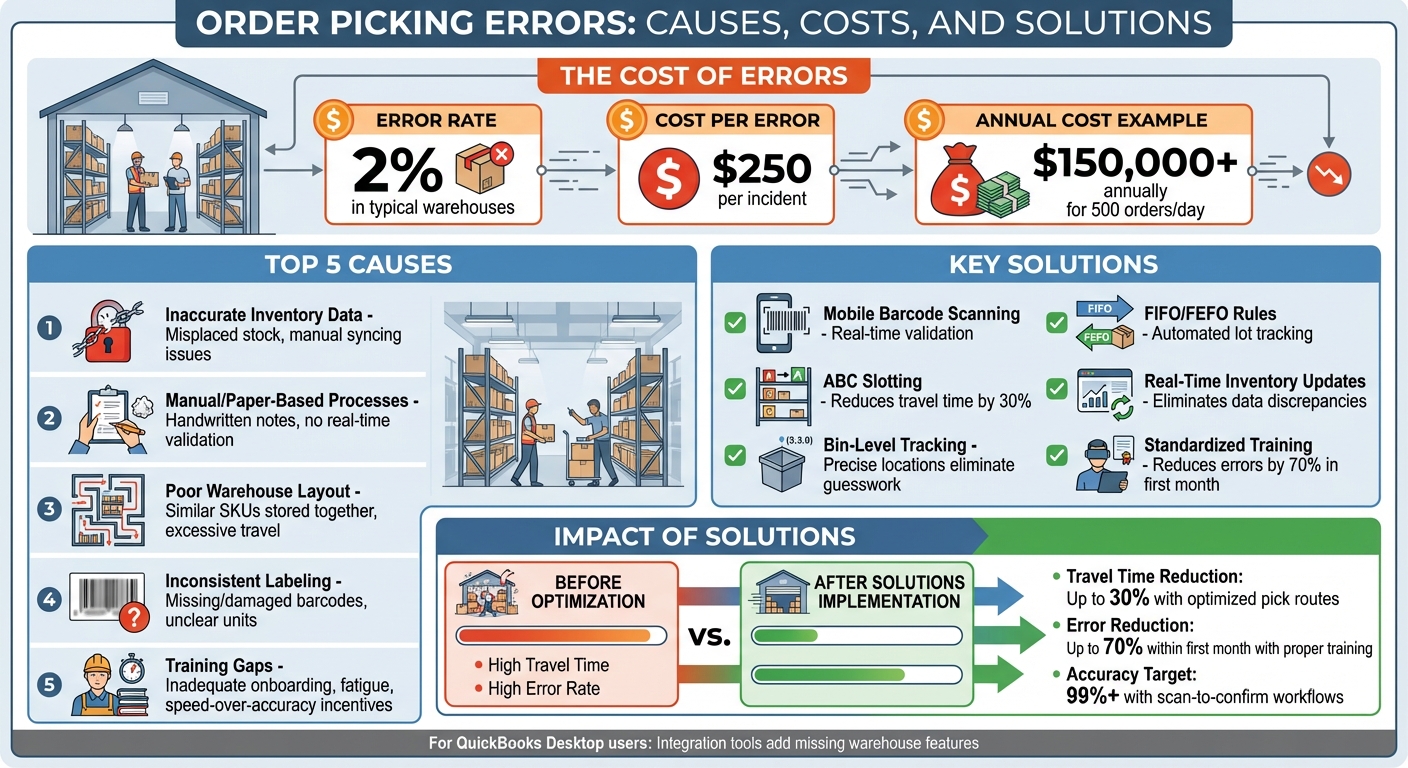
Order Picking Errors: Causes, Costs, and Solutions
Common Causes of Order Picking Errors
Inaccurate Inventory Data and Misplaced Stock
When QuickBooks Desktop indicates an item is in stock, but it’s either not available or stored in the wrong place, pickers often encounter empty bins. This leads to delays or incorrect picks. Such errors usually stem from mistakes during receiving - like logging items incorrectly or placing them in temporary spots without updating the system. For QuickBooks Desktop users, manual syncing can worsen these discrepancies. Improperly labeled or mixed storage areas further complicate things, prompting pickers to substitute similar items or ship partial orders, which often results in costly follow-up shipments. Managers can identify these problems by monitoring "location not found" events, cycle count mismatches, and orders requiring re-picks. High rates of manual quantity adjustments in QuickBooks and frequent emergency restocking are clear signs that data accuracy, not picker performance, is the core issue.
Manual or Paper-Based Picking Processes
Using paper-based methods - like printed pick tickets, handwritten notes, or relying on memory - leaves no room for real-time validation. Workers reading small SKU codes from printed lists are more likely to misread, skip lines, or pick the wrong items. Without built-in checks, these errors can go unnoticed until packing or shipping. Memory-based picking, which depends on workers knowing the layout by heart, becomes unreliable when warehouse configurations change or new SKUs are introduced, leading to higher error rates.
Poor Warehouse Layout and Slotting
A poorly organized warehouse layout increases travel time and fatigue, which raises the likelihood of mistakes. When similar-looking SKUs are stored close together without clear separation, rushed pickers may grab the wrong item. Mixing fast-moving and slow-moving inventory - especially on tall racks - forces pickers to climb and reach more frequently, further increasing error risks. Common warning signs include excessive backtracking, congestion in busy areas, and long walking times compared to active picking. If errors tend to occur in specific areas, the layout is likely contributing to the problem.
Inconsistent Product Labeling
Unclear or inconsistent labeling makes it harder for pickers to identify the correct SKUs, sizes, or quantities, increasing the chance of mistakes. Missing or damaged barcodes prevent scan-based validation, leading to manual entry errors. Labels that fail to clearly define units - like cases versus individual items - can cause quantity mismatches. Additionally, small fonts, poor contrast, or labels placed at awkward heights slow down the picking process and increase error rates. To avoid these issues, it’s essential to standardize SKU naming, use large, high-contrast text, and include both human-readable details and scannable barcodes on all products and bins. Poor labeling practices often exacerbate training gaps, making errors even more frequent.
Training Gaps and Human Factors
Insufficient training is a major factor in picking errors. New or temporary workers may not receive adequate onboarding, and experienced staff might not be properly trained to handle exceptions or interpret pick documents. Physical fatigue from long shifts and repetitive tasks can also reduce focus, leading to more mistakes. Additionally, incentive systems that prioritize speed over accuracy encourage rushed work and overlooked errors. In workplaces that rely on memory or informal processes, the absence of experienced employees often results in spikes in errors, as newer staff lack clear, standardized procedures. Solutions include structured training programs, visual aids in picking zones, shorter shifts to combat fatigue, and performance metrics that reward accuracy rather than speed.
Solutions to Prevent Picking Errors
Improving Inventory Accuracy
Accurate inventory data is the backbone of error-free picking. Start by enforcing strict receiving procedures - scan incoming items, verify quantities, and assign each SKU to a specific bin location before placing it in active storage. This step prevents upstream errors from snowballing into picking mistakes. Introduce a cycle counting program that prioritizes high-value or fast-moving items, rather than relying solely on annual physical inventories, which often catch problems too late. Real-time inventory updates, enabled by integrated software, help avoid surprises like empty bins or forced substitutions. For date-sensitive or regulated products, lot and serial number tracking ensures pickers select the correct batch, supporting FIFO (First In, First Out) or FEFO (First Expired, First Out) rules. This approach minimizes the risk of shipping expired products and reduces costly write-offs.
Optimizing Warehouse Layouts and Processes
An efficient warehouse layout can significantly reduce travel time and picking errors. Implement ABC slotting by placing fast-moving items (A-movers) in easily accessible locations, such as near packing and shipping areas and at waist-to-shoulder height. Slower-moving items (C-items) can be stored in less accessible spots. Manual picking routes can be up to 30% longer without proper planning. To address this, consider methods like zone picking, where workers focus on specific areas, or batch picking, which groups orders with overlapping SKUs to minimize repeated trips. Clearly marked staging areas for partially picked or consolidated orders help prevent mix-ups. Additionally, separating visually similar SKUs and using large, high-contrast labels on aisles, bays, and bins make it easier for pickers to confirm they’re in the right location. Incorporating technology into these processes can take efficiency to the next level.
Using Barcode Scanning and Mobile Picking
Mobile barcode scanning is a game-changer for preventing errors. In a scan-to-confirm workflow, pickers scan the location barcode, then the item barcode, and verify the quantity. If there’s a mismatch, the device immediately alerts the picker, stopping errors like incorrect SKUs, wrong quantities, or picking from the wrong lot or serial number. Mobile devices can also display guided pick paths, showing workers the most efficient routes and reducing the need to rely on memory. As each pick is confirmed, the system updates inventory in real time, ensuring everyone has an accurate view of stock levels. This also makes it easier to identify short-picks quickly. A final scan at the packing station serves as an extra layer of verification, catching any lingering mistakes before items are shipped.
Adding Inventory Software for QuickBooks Desktop

QuickBooks Desktop has its limitations, such as the lack of bin-level tracking, mobile picking, and real-time updates. Integrating a warehouse-focused inventory system bridges these gaps. Systems like Rapid Inventory enhance QuickBooks Desktop by adding features like multi-location tracking (down to specific bins and aisles), FIFO/FEFO picking rules, mobile barcode scanning, and guided workflows. With two-way syncing, item and order data stay aligned between your accounting software and warehouse operations. This integration allows you to manage lot and serial tracking, apply FIFO/FEFO strategies, and generate real-time inventory reports, all through a web interface accessible from anywhere. By eliminating manual data entry and spreadsheet management, this setup ensures pickers have accurate, up-to-date information, reducing errors and improving efficiency across the board.
How Technology Supports Picking Accuracy
Key Features of Warehouse-Aware Inventory Systems
Warehouse-aware inventory systems tackle picking errors with three essential features. First, bin-level tracking assigns precise storage spots (like "Bin A-12-3"), removing the guesswork that often leads to misplaced items or incomplete orders. Instead of wandering aimlessly through aisles, pickers receive clear directions to exact locations. Second, guided pick routes rely on algorithms to organize picking tasks efficiently, cutting unnecessary travel by as much as 30% compared to manual methods. This approach not only reduces physical strain but also minimizes errors by grouping similar items and clearly distinguishing between visually alike products. Lastly, real-time reporting offers instant updates on stock levels, item locations, and order progress. This visibility helps flag shortages before pickers begin their tasks, allows for dynamic adjustments - like relocating high-demand items closer to packing areas - and ensures picks are verified before shipping, catching mistakes early and avoiding costly returns.
Throughout the process, pickers use mobile devices to scan barcodes for item locations and quantities. If there’s a mismatch - like the wrong SKU, incorrect lot number, or outdated count - the system sends an immediate alert. This scan-to-confirm method ensures errors are caught before items reach the packing stage, where fixing mistakes becomes far more expensive. These features form a solid framework that Rapid Inventory uses to enhance operations for QuickBooks Desktop users.
How Rapid Inventory Supports QuickBooks Desktop Users
Rapid Inventory builds on these technological advantages to strengthen QuickBooks Desktop functionality. QuickBooks Desktop, while robust in accounting, lacks key warehouse tools like bin tracking, mobile workflows, and real-time updates. Rapid Inventory bridges these gaps with features tailored for warehouse operations. For example, two-way QuickBooks sync ensures that inventory data in both systems stays aligned. When pickers complete tasks like orders, cycle counts, or handling backorders, these updates are instantly reflected in QuickBooks Desktop, eliminating errors caused by outdated information.
Mobile barcode scanning transforms picking from a manual, paper-based process into a streamlined, guided workflow. Using mobile devices, pickers scan items against orders, immediately flagging incorrect quantities or SKUs. The system also supports multi-warehouse tracking and reduces mistakes with visually similar products by providing clear instructions. Features like lot and serial number tracking add another layer of accuracy, ensuring items are uniquely identified and preventing mix-ups, especially in bins with similar-looking SKUs. Mobile scanning also enforces FIFO (First In, First Out) or FEFO (First Expired, First Out) rules, while real-time visibility helps avoid substitution errors during busy periods. To make the transition seamless, Rapid Inventory offers free training and onboarding, allowing teams to quickly adapt without disrupting daily workflows.
sbb-itb-19ed50f
Training and Continuous Improvement for Long-Term Success
Standardizing Training and Procedures
Consistency is key when it comes to warehouse operations. Clear, standardized workflows ensure that every team member, whether seasoned or new, follows the same reliable steps. Step-by-step checklists can guide pickers through essential tasks, such as barcode scanning during both receiving and picking, to confirm SKUs and quantities. Visual aids, like zone maps, can be a game-changer for new hires, helping them navigate the warehouse more efficiently. Additionally, practices like double-counting during put-away can catch potential errors early, preventing them from snowballing into larger issues. This structured approach not only minimizes mistakes but also shortens onboarding time - especially critical when temporary staff join during busy periods.
As Jacob, CEO, remarked: "My team was up and running in a few days. Very straightforward and easy to use."
By implementing these standardized procedures, you create a solid foundation for improving picking accuracy across the board.
Measuring Accuracy Instead of Speed
Once training is standardized, it’s time to rethink performance metrics. Instead of focusing on how fast tasks are completed, shift the emphasis to quality. Replace traditional metrics like picks-per-hour with ones that prioritize order accuracy. For instance, set benchmarks such as achieving a 99% accuracy rate or keeping error rates below 1%. To reinforce this focus, tie incentives like bonuses or recognition programs to these goals. Real-time dashboards can help supervisors monitor accuracy trends and quickly address emerging issues. By rewarding precision, pickers are encouraged to take the necessary time to scan and verify items correctly. This not only reduces costly errors but also maintains productivity without cutting corners.
Using Reporting Tools for Continuous Improvement
Data is a powerful tool for identifying and solving problems. Reporting tools can turn raw numbers into actionable insights, helping you spot patterns in errors. For example, if certain zones consistently generate mispicks or specific SKUs are frequently mixed up, you can investigate further. Perhaps a poorly lit area needs better lighting, or high-demand items need to be relocated for easier access. Tools like Rapid Inventory’s real-time reports and activity logs can track picking accuracy across multiple locations, flagging issues such as FIFO/FEFO deviations or lot number mismatches.
These reports don’t just highlight problems - they enable ongoing improvements. By establishing baseline error rates and measuring progress after training, you can create feedback loops that refine processes over time. For instance, phased training combined with reporting has been shown to reduce picking errors by up to 70% within the first month. Regular cycle counts and root-cause analyses, like the "5 Whys" method, ensure that these gains are sustained well beyond the initial rollout. This kind of continuous improvement keeps operations running smoothly and efficiently in the long term.
Mistake-Proof Your Warehouse: How to Eliminate Picking Errors #SupplyChain #Logistics #College
Conclusion: Reducing Picking Errors for Better Warehouse Performance
Mistakes in order picking often stem from process inefficiencies and outdated technology. Issues like inaccurate inventory data, manual picking methods, poor warehouse layouts, and inconsistent labeling can lead to costly errors - up to $250 per mistake. With a 2% error rate in a warehouse handling 500 orders daily, these mistakes can rack up over $150,000 annually. And that doesn’t even account for lost customers or the damage to your reputation.
Addressing these challenges effectively requires a two-pronged approach: refining processes and adopting modern tools. For example, reorganizing your warehouse using velocity-based slotting can cut travel time by as much as 30%. Meanwhile, implementing barcode scanning and mobile picking ensures real-time validation of items and quantities, significantly reducing the chances of selecting the wrong SKU. When standardized procedures are paired with the right technology, errors can be caught before they ever impact the customer.
For QuickBooks Desktop users, bridging the gap between financial systems and warehouse operations is essential. Manual processes and outdated data often increase the likelihood of errors, but Rapid Inventory offers a solution tailored to these challenges. By integrating features like multi-location tracking, FIFO/FEFO strategies, lot tracking, and mobile scanning, Rapid Inventory syncs seamlessly with QuickBooks Desktop, eliminating manual mistakes and ensuring accurate, real-time data. These tools work together to create a streamlined, error-resistant order fulfillment system.
FAQs
How does mobile barcode scanning help prevent order picking mistakes?
Mobile barcode scanning plays a key role in reducing order picking mistakes by offering real-time checks on locations, items, and quantities. This system ensures tasks like receiving, transferring, and packing are handled with precision, cutting down on human errors.
With barcode scanning, workers can instantly verify they're selecting the right items in the correct quantities. This not only simplifies workflows but also boosts both efficiency and accuracy across operations.
What are the advantages of using inventory software with QuickBooks Desktop?
Integrating inventory software with QuickBooks Desktop allows for two-way synchronization, which takes the hassle out of manual data entry and minimizes the chance of errors. This integration ensures that your inventory and financial records stay updated in real time, streamlining the management of orders and stock levels.
With features such as barcode scanning, multi-location tracking, and real-time reporting, the process becomes much more straightforward and accurate. These tools empower you to make smarter decisions, save valuable time, and boost the efficiency of your warehouse or business operations.
Why is having real-time inventory data important for preventing order errors?
Real-time inventory data plays a key role in reducing order errors by keeping stock information current at all times. This minimizes the chances of issues like selecting the wrong items, running out of stock, or overstocking. As a result, the entire process of picking, packing, and shipping becomes more precise and efficient.
When inventory updates happen in real time, warehouse teams can locate and allocate products with confidence, which boosts order accuracy and enhances customer satisfaction. It also empowers businesses to react swiftly to shifts in demand or inventory levels, ensuring smoother operations and helping to avoid expensive errors.



