I’d budget for the whole RFID system - not just the readers. Passive UHF labels can cost $0.05–$0.15 each at high volumes, but your first-year total also includes equipment, setup, software, and replacement tags.
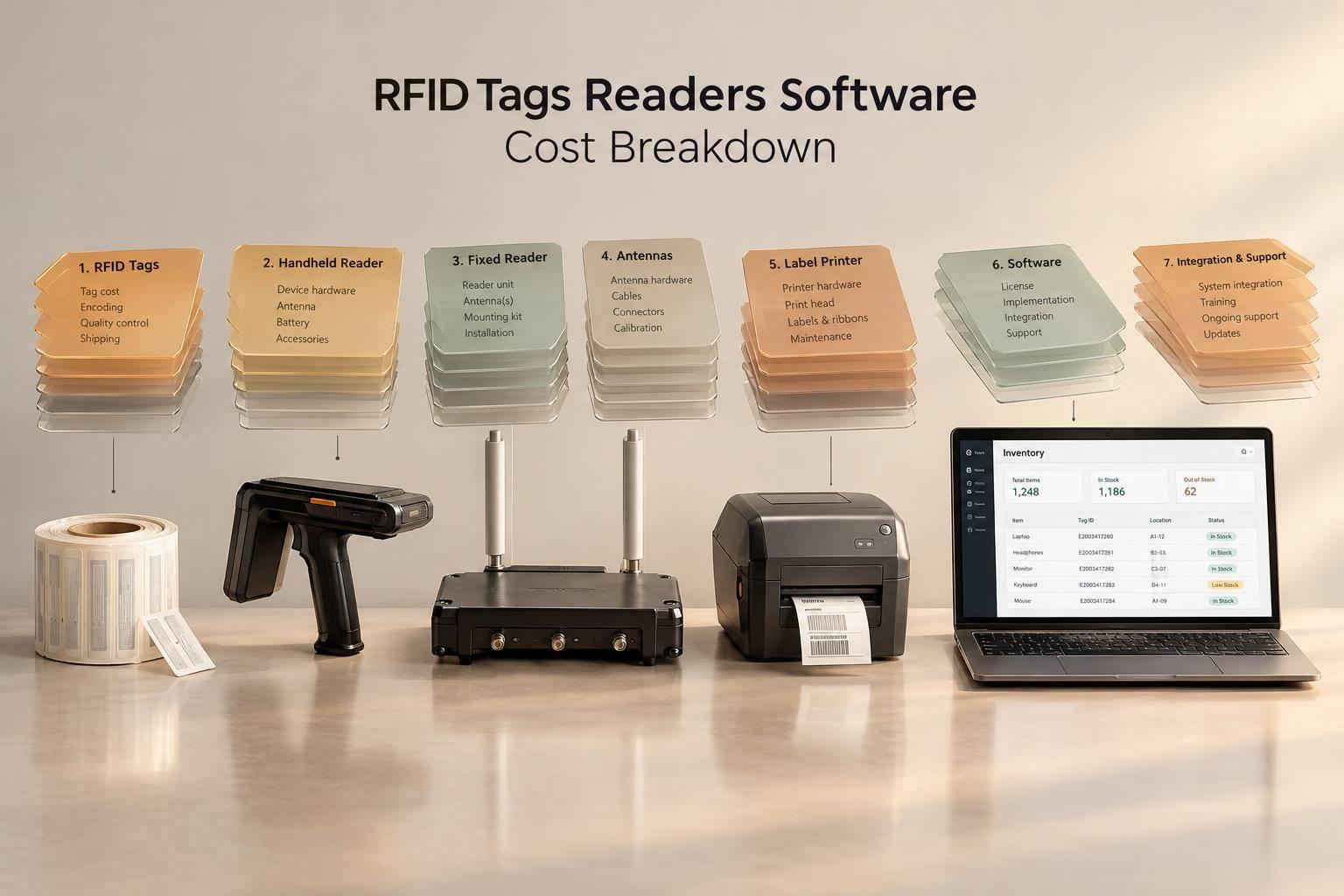
I break the budget into seven parts:
- Tags: Initial tagging, replenishment, and application labor.
- Handheld readers: Mobile counting devices, accessories, and staff time.
- Fixed readers: Permanent checkpoints, installation, power, and networking.
- Antennas: Read-zone coverage, mounting, and tuning.
- Printers and encoders: Label production, supplies, and maintenance.
- Middleware: Read filtering, business rules, and system connections.
- Inventory software: Stock records, subscriptions, and RFID integration.
My starting formula is simple: <u>first-year cost = one-time costs + first-year recurring costs</u>. I’d check bundles for duplicate charges, then run a small pilot before buying the full system.
The main trade-off? Handhelds require counting labor; fixed readers require more installed equipment. For QuickBooks Desktop users considering Rapid Inventory, I’d verify RFID support separately - existing sync does not confirm reader compatibility.
All prices are U.S. planning estimates as of October 21, 2026, not vendor quotes.

RFID System Costs: The Complete Budget
1. RFID Tags
Upfront Cost
Choose tags based on the surface they’ll attach to and how long they need to last - not just the unit price. Chip platforms such as Impinj Monza and NXP UCODE, memory needs, materials, order quantity, and customization all affect cost.
Passive UHF apparel labels typically cost $0.05–$0.15 each at high volumes. Labels for general retail can cost up to $0.50 each. Specialty tags work with metal, liquids, and high heat, while rugged reusable asset tags suit returnable containers, tools, and equipment.
Durability and usage conditions drive the biggest price differences.
| Tag type | Estimated unit cost | Warehouse use and spending pattern |
|---|---|---|
| Passive UHF labels | $0.05–$0.15 at high apparel volumes; up to $0.50 for general merchandise | Used for apparel, cartons, and packaged goods. Disposable labels require repeat purchases and can tear or wear out. |
| Specialty tags | Cost more than standard labels | Used with metal, liquids, and high heat. Replacement needs depend on the adhesive, housing, and rating for those conditions. |
| Reusable asset tags | $2–$5 for durable tool or asset tags | Used for returnable containers, tools, and equipment. The upfront cost covers repeated use, with replacements needed for lost or damaged tags. |
Recurring Cost
For disposable labels, budget for newly tagged units plus a 1%–5% buffer for damage or encoding failures. As warehouse throughput grows, so does replacement demand - and even small per-tag price differences add up.
For reusable tags, budget for losses, damage, and additions to the asset pool, rather than a new tag for every trip. Recovering and re-encoding tags also adds labor and handling costs.
Quantity and Scale
SKU count isn’t tag volume. Base orders on the number of units you’ll tag each year, not the number of SKUs.
Integration and Deployment
Budget separately for application labor, encoding, extra adhesives, and protective overlays. These costs sit outside the tag price. Manual warehouse tagging adds labor, while source tagging can reduce application work at the warehouse.
Tag costs set the spending baseline. Readers and antennas turn tag reads into usable data.
sbb-itb-19ed50f
2. Handheld RFID Readers
Upfront Cost
Integrated rugged readers typically cost $2,000–$3,000 each, compared with $500–$1,500 for a sled reader plus host device. Integrated units suit docks and teams that count frequently. Sleds work well on the sales floor when staff already carry compatible phones or tablets.
Recurring Cost
Set aside funds for replacement batteries, repairs, maintenance contracts, software licenses, technical support, and device replacement cycles. With sleds, staff must also track battery levels on both the host device and reader and keep the two connected.
Quantity and Scale
Plan your fleet around peak simultaneous use - not total headcount. Account for receiving stations, counting teams, overlapping shifts, and spare readers to cover repairs or missed charging.
Budget separately for host devices, spare batteries, multi-slot chargers, and protective cases. Check that charging capacity can keep up with shift handoffs.
Integration and Deployment
Start with a 2–4 week pilot focused on one process, such as cycle counting, before purchasing the full fleet. Test host compatibility, battery runtime, connection reliability, and performance in Wi-Fi dead zones.
Include staff training in the budget. IT integration can account for 15%–25% of the total RFID project cost. For QuickBooks Desktop workflows, confirm that the software batches scans before posting inventory transactions.
Handheld readers support mobile counts, while fixed readers serve permanent read points.
3. Fixed RFID Readers
Upfront Cost
Budget for the full read point - not just the reader. Permanent read points need hardware and installation. A fixed RFID read point with a reader and antennas costs $1,500–$3,000. Readers alone can cost up to $3,000 each.
| Cost item | Budget allowance | What to include |
|---|---|---|
| Fixed reader | $500–$3,000 each | Port count, tag throughput, and rugged housing |
| Antennas | $200–$600 each | Number needed for coverage |
| Cabling and mounts | $200–$500 per read point | Cables and mounting hardware |
| Power and networking | Variable | PoE capacity and network drops |
| Installation and read testing | $500–$1,500 per read point | Setup and performance checks |
| Site survey, if separate | $1,000–$5,000+ | Site assessment when installation doesn’t include it |
Check what the installation fee covers. Don’t count cabling, mounts, power, or network work twice if they’re already included.
Recurring Cost
Allow for maintenance, firmware updates, software support, and middleware fees. These costs grow with the number of read points. Before buying, check the warranty length, which repairs it covers, and whether continued support needs a separate contract.
Quantity and Scale
Plan permanent read points around dock doors, portals, and conveyors - not portable counting tasks. A 4-port reader can serve multiple antennas.
Integration and Deployment
Start with one dock door before adding more read points. Test loads near metal and liquids, which may call for different antenna placement or mounts. Confirm PoE support before ordering hardware, and budget for middleware separately.
Antenna count affects read-point cost. The next section breaks down antenna pricing and coverage.
4. RFID Antennas
Upfront Cost
Antenna count and placement determine the total cost of each fixed read point. Budget the antennas and reader together as one read zone. Standard antennas usually cost less upfront. Ruggedized models cost more but are better suited to moisture, dust, and impact.
Recurring Cost
Budget for routine inspections and performance checks.
Quantity and Scale
Dock-door portals often need two to four antennas to read tags on passing pallets. A conveyor read zone may need just one or two to cover a narrow path.
Circular polarization helps read tags at different orientations. Controlled conveyor paths may work well with linear polarization or near-field antennas. Antenna placement - not just price - determines whether the read zone works as planned.
Integration and Deployment
Before finalizing the layout, test for missed tags and unwanted reads from nearby goods. Adjust antenna direction and reader power to keep coverage within the read zone. Coverage beyond that zone increases false reads and costs. Include initial tuning in the deployment budget.
RFID Strategy: How to Plan & Build a Scalable RFID System
5. RFID Printers and Encoders
After tag pricing, printing and encoding add the next layer of cost. Printers and encoders turn blank label stock into usable RFID tags, with costs for hardware, consumables, and labor.
Upfront Cost
Plan for $500–$3,000 per unit for RFID printers and encoders. Industrial models built for high-volume warehouses can cost more. If you don’t need on-site printing or encoding, pre-encoded tags let you skip the printer/encoder purchase.
Recurring Cost
For in-house encoding, budget for RFID label stock, thermal transfer ribbons where needed, calibration labor, data verification, maintenance, and failed-label waste.
Budget for blank RFID label stock or pre-encoded tags - not both. Compare the cost per usable label, including labor and waste, rather than the stock price alone.
Quantity and Scale
In-house encoding lets you print labels as needed, handle returns, and add custom item data. Pre-encoded tags suit standardized, high-volume workflows. They reduce on-site labor but add supplier lead time. Ready-to-apply labels still need application labor unless the manufacturer applies them.
Integration and Deployment
Budget for printer setup, middleware mapping, and ERP/WMS testing. Before rollout, check that the label stock suits its intended setting and that encoded data matches the correct item record. Bad encoding leads to waste, rework, and software errors. Include calibration, waste, and printhead replacement in the budget.
This setup connects to middleware, which checks encoded data before it reaches inventory software.
6. RFID Middleware
Middleware filters raw reader data, removes duplicate events, and applies business rules to identify movements such as transfers or sales. It sends validated transactions - not every raw read - to inventory software, which updates inventory records. Middleware handles the filtering; the inventory software that receives those transactions is the next cost layer.
Upfront Cost
Budget separately for licensing, configuration, and custom development. Middleware integration and configuration can make up 15% to 25% of the total RFID project cost. Ask for an itemized quote so you don’t count bundled services twice.
Recurring Cost
Annual middleware fees can start at several thousand dollars and increase with reader count, number of sites, and transaction volume. Check whether hosting, updates, support, and analytics are included or billed separately.
| Cost item | Responsibility | Charge to confirm |
|---|---|---|
| Middleware software | Filters reads, removes duplicates, applies rules, and sends validated events | License or subscription |
| Integration | Connects middleware to inventory, ERP, or WMS systems | Upfront connector and integration fees |
| Configuration and custom development | Sets filtering rules and builds custom workflows | Separately priced project work |
| Implementation onboarding | Trains staff and supports process changes | One-time implementation fee |
| Support and maintenance | Handles troubleshooting and software updates | Annual fee or included subscription service |
Use this table when checking quotes, since each vendor bundles services differently.
Quantity and Scale
Ask what sets the price and what triggers the next tier. For high-volume operations, confirm that middleware can buffer and batch transactions so it doesn’t overwhelm the inventory system.
Integration and Deployment
Start with one product category to check read rates and transaction mapping before expanding. Test duplicate removal and business rules, then verify that accepted events create the correct inventory transactions.
Once the middleware rules are tuned, budget for the inventory system that records those transactions.
7. Inventory Management Software
Once middleware filters the reads, inventory software turns validated events into stock records. Rapid Inventory offers QuickBooks Desktop users two-way sync, multi-location tracking, and warehouse workflows. It’s the final software cost layer, but RFID ingestion support still needs verification.
Upfront Cost
The subscription includes training, onboarding, and support. Budget separately for RFID-specific development and deployment.
Recurring Cost
Pro costs $90 per user per month. Unlimited costs $900 per month for unlimited users. Confirm current pricing with the vendor before budgeting - the cheaper plan depends on your user count.
Quantity and Scale
At 10 users, both plans cost $900 per month. At 11 users, Unlimited saves $90 per month compared with Pro.
Integration and Deployment
Mobile barcode scanning and QuickBooks Desktop sync don’t confirm RFID ingestion support. Before buying, verify which reader models the software supports and what integration work you’ll need.
How RFID Costs Add Up
Once you’ve priced each RFID category, add the costs into first-year and recurring totals.
Upfront Cost
Calculate hardware costs as quantity × unit price, then add installation. Treat device prices as planning estimates. Before adding separate charges, check whether bundles already include antennas, cables, and installation. For recurring costs, volume and contract terms determine the total.
| Cost group | What you pay for upfront | What to confirm |
|---|---|---|
| Tags | Initial tags for untagged inventory | Match the tag type to the item and environment |
| Handheld readers | Devices for mobile counts | Include required host devices and accessories |
| Fixed readers | Devices for permanent read points | Separate device-only prices from bundled read points |
| Antennas | Coverage hardware | Exclude antennas already included in bundles |
| Printers and encoders | Equipment for producing RFID labels | Budget only for the printing stations you need |
| Middleware and inventory software | Any initial licenses and configuration | Keep subscription charges separate from setup |
Recurring Cost
Tag spending depends on inventory turnover. Software spending depends on license terms.
| Cost group | Recurring expense | Calculation basis |
|---|---|---|
| Tags | Replenishment | Newly tagged items × tag price |
| Readers and antennas | Maintenance, support, and replacements | Contract terms and planned replacements |
| Printers and encoders | Ribbons and printhead replacement | Printing volume and replacement needs |
| Middleware | Subscription or license support | Contracted sites, devices, or system licenses |
| Inventory software | Rapid Inventory subscription | About $1,080 per Pro user per year or $10,800 for Unlimited, pending vendor confirmation |
Quantity and Scale
Map receiving doors, shipping doors, and internal checkpoints into separate read zones, then count each zone once. A four-port reader can drive up to four antennas, but port count alone doesn’t guarantee coverage. Check the layout during the site survey.
| Category | Quantity basis | Scaling check |
|---|---|---|
| Tags | Initial untagged stock + newly tagged arrivals | Count each item only once |
| Handheld readers | Concurrent operators | Use simultaneous demand, not total headcount |
| Fixed readers | Validated zone-to-reader layout | Readers don’t need to match doors one-for-one |
| Antennas | Antennas required across all zones | Check available ports and coverage |
| Printers and encoders | Printing stations | Match capacity to labeling volume |
| Inventory software | License tier | Confirm whether charges follow users, sites, or devices |
Integration and Deployment
Set aside a separate allowance for surveys, mounting, cabling, pilot testing, and RFID-specific training. Budget integration and custom development separately unless the quote already includes them. Before full deployment, test the RFID data path when you try Rapid Inventory for free.
| Workstream | Scope to price | Double-counting check |
|---|---|---|
| Physical installation | Mounting, power, network, cables | Remove work already included in read-point bundles |
| Middleware configuration | Read filtering and event mapping | Separate configuration labor from licensing |
| Application integration | Inventory updates and synchronization testing | Don’t assume existing QuickBooks sync covers RFID |
| Pilot and training | Read-rate testing and RFID workflows | Exclude standard onboarding already included |
Consolidated Ownership Budget
Count each expense once: First-year cost = one-time costs + first-year recurring costs. Later annual budgets exclude setup and initial tagging but still include replenishment, subscriptions, support, and replacements.
| Category | One-time cost | Recurring cost | Quantity formula | Total-price effect |
|---|---|---|---|---|
| RFID tags | Initial stock tagging | Replenishment | Initial untagged units × price; then newly tagged units/year × price | Scales with inventory flow |
| Handheld readers | Device purchase | Contracted support; replacements | Concurrent operators × device price | Upfront cost to equip operators |
| Fixed readers | Reader purchase | Contracted support; replacements | Validated reader count × unit price | Scales with read-zone design |
| RFID antennas | Unbundled antennas | Planned replacements | Required antenna count × unit price | Adds coverage; exclude bundled units |
| Printers and encoders | Equipment purchase | Contracted service | Printing stations × unit price | Adds labeling capacity |
| Middleware | Initial license, if applicable | Subscription or license support | Licensed units × applicable rate | Separate software layer |
| Inventory software | Separate setup, if quoted | Rapid Inventory subscription | Pro users × annual rate, or Unlimited annual rate above | Recurring application cost |
| Implementation | Installation, configuration, integration, pilot | Only separately contracted work after deployment | Quoted labor and materials by task | Adds to first-year cost |
| Recurring supplies | N/A | Ribbons and printheads | Annual usage × supply price | Excludes RFID labels already counted as tags |
These totals also shape the handheld-versus-fixed reader trade-off.
RFID Category and Reader Trade-Offs
Use the category totals above to weigh workflow gains against added labor, infrastructure, and software costs.
| Category | Workflow benefit | Cost disadvantage | Best-fit use | Budget risk |
|---|---|---|---|---|
| RFID tags | Item-level visibility without line-of-sight | Recurring tag replenishment | Item and asset tracking | Replenishment costs versus recovery labor |
| Handheld readers | Mobile audits and item searches | Requires operator labor | Cycle counts and locating stock | Device damage and battery life |
| Fixed readers | Hands-free automation at checkpoints | Site surveys, cabling, and installation | Dock doors and conveyors | Interference or poor read-zone design |
| RFID antennas | Extends read range and coverage | Requires precise mounting and tuning | Portals and zonal tracking | Missed or false reads |
| Printers and encoders | Creates tags on demand | Recurring ribbon and label media costs | Initial tagging and re-tagging | Media jams and data-mapping errors |
| Middleware | Filters raw data for ERP/WMS use | Complex configuration and mapping | Large-scale or complex IT setups | Custom coding and API maintenance |
| Inventory software | Guides decisions and maintains a single inventory record | Subscription fees | System-wide inventory management | Data-mapping errors, sync lag, and low adoption |
Disposable tags put the cost into replenishment. Reusable tags put it into recovery labor.
The biggest layout choice is usually handhelds versus fixed readers: pay for mobile labor or invest in fixed automation.
| Decision factor | Handheld-led system | Fixed-reader-led system |
|---|---|---|
| Automation | Operator-led bulk reading | Automatic reads at configured checkpoints |
| Coverage | Follows the operator’s route | Covers specific portals or zones |
| Operator labor | Requires walking, counting, and resolving exceptions | Reduces checkpoint scanning, but exceptions still need attention |
| Deployment complexity | Less physical infrastructure; mobile workflows still need setup | More mounting, cabling, and tuning |
| Budget drivers | Device count, operator hours, ruggedness, and training | Read-point infrastructure, installation labor, middleware, and site surveys |
| Best-fit workflow | Periodic counts and item searches | Shipping and receiving at choke points |
A mixed system can use handhelds for counts and fixed readers for checkpoints. Both approaches still need inventory software.
Compare systems by how much manual work they replace and their total cost. Savings depend on replacing existing scanning work, not adding RFID checks while leaving manual steps unchanged.
Conclusion: Plan the Complete RFID Budget
Build separate budgets for equipment, recurring costs, and implementation - not just the equipment quote. Include readers, antennas, printers/encoders, and cabling; tag replenishment, software subscriptions, and maintenance; plus surveys, installation, integration, and training.
Match each workflow to these cost categories so your estimate covers the right hardware, software, and labor.
| Workflow | Budget priority | Pilot check |
|---|---|---|
| Receiving | Fixed readers and installation | Test read-zone accuracy at dock doors |
| Counting | Handheld readers and item-level tags | Test tag performance in dense stacks |
| Zone movement | Antenna coverage and middleware | Validate zone-based tracking and ERP/QuickBooks integration |
| Shipping | Inventory software and read points | Confirm transaction accuracy and error reduction |
Before scaling, use the pilot to check read rates, transaction accuracy, and integration effort. Then use the results to build a realistic first-year budget and estimate payback.
Simple payback (years) = upfront investment ÷ (annual verified savings − annual added operating costs). Use this formula only when savings exceed added costs.
For QuickBooks Desktop users, Rapid Inventory can serve as the inventory layer, but budget for RFID connectivity and implementation separately.
FAQs
Which RFID costs should I prioritize on a tight budget?
Start with a small pilot in one receiving area or product category. This keeps hardware costs down while you test read rates and software integration.
Buy only the hardware you need: a few mobile readers or one fixed read point. Choose low-cost passive RFID tags, and confirm that your inventory software, such as Rapid Inventory for QuickBooks Desktop, supports the integration. Train staff to keep inventory records accurate and cut down on manual reconciliation and rework.
How can I estimate RFID savings before investing?
Start by adding up the annual costs of shrinkage, manual cycle counts, and inventory reconciliation. Then compare that total with the savings you expect from fewer labor hours and better inventory accuracy.
Use a savings calculator to estimate the potential payoff. Before a full rollout, run a small, phased pilot at one location or within one workflow to measure return on investment (ROI). Track metrics such as count hours per location and pick error rates to see how the results compare with your estimates.
What pilot results justify a full RFID rollout?
A pilot should target about 98% inventory accuracy or higher, with missed and false reads kept within acceptable limits through tuned filtering. It should also show a reported 70–90% reduction in counting time, faster receiving, and fewer incorrect transactions.
Approved RFID events must post accurately to QuickBooks without duplicates and reconcile with accounting and inventory records. Expand one zone or product category at a time, with approval at each step and signed-off reconciliation of quantities and valuations.