

When managing inventory, you have two main options: cycle counting and full audits. Both aim to ensure inventory accuracy but differ in approach, frequency, and impact:
- Cycle Counting: Involves counting smaller portions of inventory regularly (daily, weekly, or monthly) without disrupting operations. It helps detect errors quickly and improves accuracy over time. Best for businesses with frequent transactions.
- Full Audits: Requires counting all inventory at once, often during slower periods, and typically halts operations. It’s essential for financial reporting, tax compliance, and resetting inventory records.
Quick Comparison
| Factor | Cycle Counting | Full Inventory Audit |
|---|---|---|
| Frequency | Continuous (daily/weekly/monthly) | Periodic (annual/semi-annual) |
| Operational Impact | Minimal; no shutdown | High; requires a pause |
| Main Objective | Ongoing accuracy | Financial compliance |
| Error Detection | Rapid (days/weeks) | Slower (months/yearly) |
| Cost Profile | Spread throughout the year | Concentrated, often with overtime |
Each method serves a unique purpose. Cycle counting is ideal for maintaining accuracy during daily operations, while full audits are necessary for compliance and creating a clean inventory baseline. Many businesses benefit from a hybrid approach, combining both methods for optimal results.
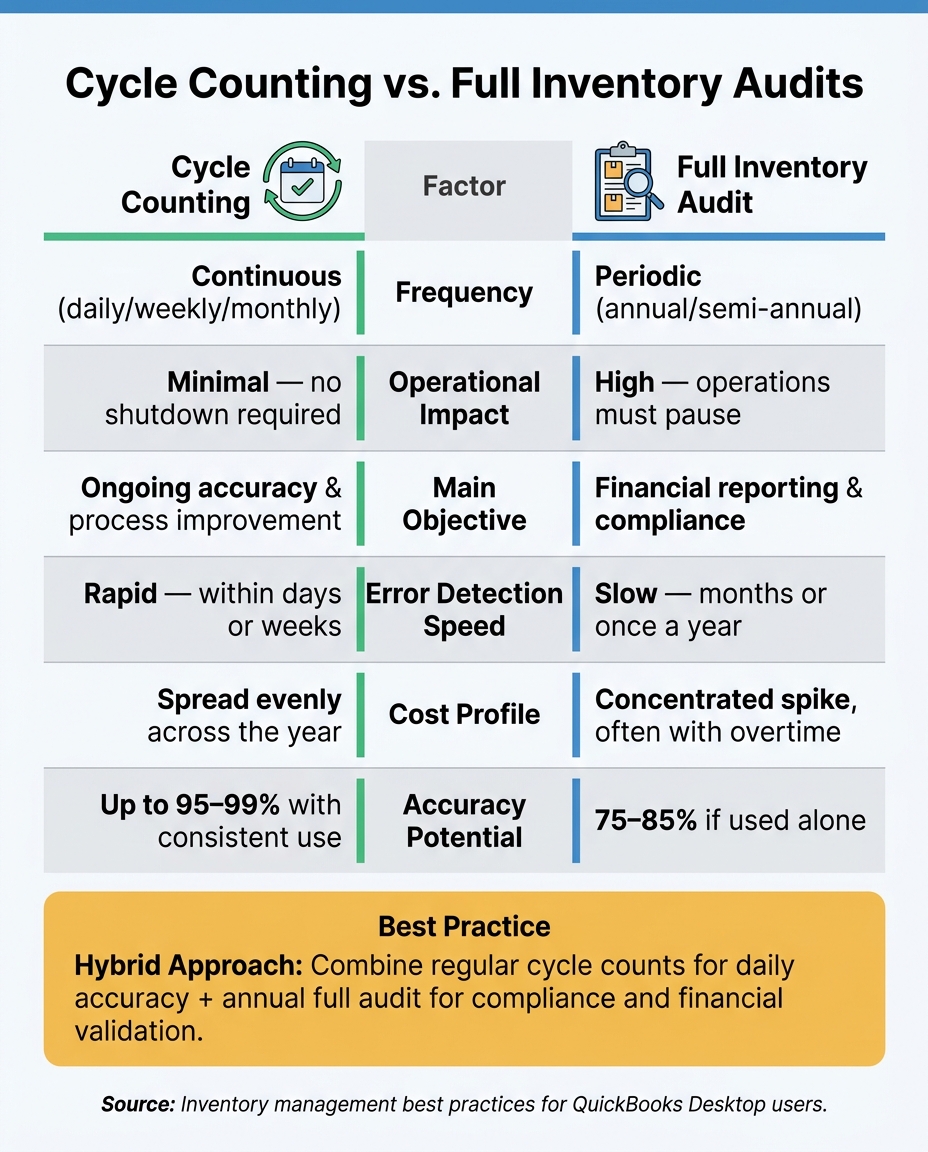
Cycle Counting vs. Full Inventory Audits: Key Differences at a Glance
Cycle Counting and Full Inventory Audits Explained
What Is Cycle Counting?
Cycle counting involves regularly counting a smaller portion of your inventory on a rotating schedule - whether that's daily, weekly, or monthly. By focusing on smaller, manageable segments, this method allows businesses to track inventory without interrupting daily operations.
The key advantage of cycle counting is spotting errors early. Frequent checks help identify discrepancies quickly, often within days or weeks, while documentation is still fresh, making it easier to resolve issues. Warehouses that consistently use cycle counting can see their inventory accuracy jump from about 63% to over 95% in just six months.
What Is a Full Inventory Audit?
Unlike cycle counting, a full inventory audit requires counting every single item in stock at the same time. Often referred to as a physical inventory count, this method involves taking stock of all SKUs at a specific point in time. Because it typically halts operations, businesses often schedule full audits during slower periods like weekends or holidays to minimize disruptions.
Lightspeed offers a great analogy for understanding the difference:
"Think of a physical count as a financial autopsy of your inventory... a Cycle Count is more like a regular health check up."
Full audits are crucial for financial reporting, tax compliance, and meeting regulatory standards. Under U.S. GAAP and IRS rules, businesses using perpetual inventory systems can substitute cycle counting for annual physical audits - provided the process is well-documented and consistently verified.
Why These Methods Matter for QuickBooks Desktop Users

For QuickBooks Desktop users, the choice between these methods has a direct impact on daily operations and financial accuracy. Discrepancies between physical inventory and QuickBooks records can skew key financial metrics like Cost of Goods Sold (COGS), gross profit margins, and tax filings. Essentially, inaccurate inventory data leads to unreliable financial reports.
This is where tools like Rapid Inventory come into play. It integrates seamlessly with QuickBooks Desktop, supporting both cycle counting and full audit workflows. Its two-way sync ensures that once a count is complete and any discrepancies are resolved, adjustments are automatically updated in your financial records - eliminating the need for manual data entry. With features like mobile barcode scanning and multi-location tracking, it simplifies the process, making consistent inventory checks far less of a hassle.
| Factor | Cycle Counting | Full Inventory Audit |
|---|---|---|
| Frequency | Continuous (daily/weekly/monthly) | Periodic (annual/semi-annual) |
| Operational Impact | Minimal; business continues | High; requires shutdown |
| Main Objective | Ongoing accuracy and process improvement | Financial reporting and compliance |
| Error Detection | Rapid (days or weeks) | Slow (months or once a year) |
| Cost Profile | Spread evenly across the year | Concentrated spike, often with overtime |
sbb-itb-19ed50f
How Cycle Counting Works
Common Cycle Counting Methods
Cycle counting can be tailored to meet specific goals, such as safeguarding high-value inventory, maintaining overall accuracy, or refining counting procedures. Here are some commonly used approaches:
- ABC analysis: This method divides inventory into three categories based on value and turnover rates. "A" items, which typically represent the top 20% of SKUs generating about 80% of revenue, are counted most frequently - up to 26–52 times annually. This ensures that critical inventory is closely monitored. On the other hand, "C" items, which have lower value and slower turnover, might only need quarterly counts.
- Random sample counting: By randomly selecting items during each cycle, this method helps uncover shrinkage or theft. Its unpredictability ensures that counting routines are not easily anticipated.
- Control group counting: This approach emphasizes evaluating the accuracy of the counting process itself. A small set of items is counted repeatedly over a short period, allowing you to identify and address recurring discrepancies in the procedure.
- Opportunity-based counting: This integrates seamlessly with everyday operations. For example, when a bin is emptied or a product is restocked, it triggers a count. By aligning counting with routine tasks, this method minimizes disruptions.
Choosing the right method is only the first step. Proper scheduling and process controls are essential to ensure consistent accuracy.
Scheduling and Running Cycle Counts
To avoid errors caused by stock movement, schedule counts during low-activity periods, such as before shipping or after the last pick of the day.
One key practice is freezing transactions in the area being counted. Temporarily pausing activities like receiving, picking, and putaway ensures accurate counts for items that are not in motion. Blind counts - where counters do not see expected quantities - encourage unbiased physical verification.
Rotating staff across different zones and immediately re-checking areas with large variances can help reduce bias and quickly address discrepancies. Setting variance thresholds is also important; any discrepancies that exceed these limits should trigger further investigation.
"When cycle counts run well, the annual physical becomes verification, not correction." - Martial A., Practitioner
Tools That Support Cycle Counting
Modern technology can significantly improve the efficiency and accuracy of cycle counting. Traditional methods are often slow and prone to mistakes, but tools like Rapid Inventory streamline the process. For QuickBooks Desktop users, Rapid Inventory offers features such as mobile barcode scanning, real-time updates, two-way QuickBooks integration, and multi-location tracking. These capabilities reduce manual data entry and ensure smooth data reconciliation.
When supported by the right tools and a structured approach, cycle counting accuracy can exceed 95%.
Cycle Counting vs Physical Inventory
How Full Inventory Audits Work
A full inventory audit, also known as a physical count, is an in-depth process where every item in your warehouse or store is counted at a specific point in time. Many businesses schedule these audits once or twice a year, often during slower periods when stock levels are lower. This timing helps reduce disruptions to daily operations. Unlike cycle counting, which is done in smaller, ongoing increments, a full audit takes a broader, all-at-once approach. Let’s break down how this process typically works.
Steps for Running a Full Audit
A full inventory audit is divided into three key phases: planning, execution, and reconciliation.
Planning is all about preparation. Start by organizing the warehouse - label shelves, group similar items, and separate damaged or outdated inventory. Clearly define the audit’s purpose, whether it’s for tax reporting, an external audit, or simply to correct your records. Use two-person teams, ideally pairing employees from different shifts, to reduce the likelihood of errors and discourage fraud.
Execution is when the actual counting happens. To ensure accuracy, pause all inventory movement during the audit. This "freeze" allows for a static snapshot of stock levels. Counters work from lists showing SKU locations but without the expected quantities, so the count reflects only what’s physically present. This step ensures clean data for the next phase.
Reconciliation involves comparing the physical counts to system records and resolving any discrepancies. If the variance for high-value items exceeds 1%, a recount by another team member is required. Investigate any differences, document the findings, and record adjustments with details like who made the change and why.
"A fresh pair of eyes is always advantageous - someone outside of the company who will be ruthless in asking questions." - Rick Hoskins, Founder, Filter King
Once reconciliation is complete, you’ll have an accurate inventory snapshot and can move on to evaluating the benefits and challenges of the audit.
Pros and Cons of Full Inventory Audits
Full inventory audits offer a detailed overview of your stock, but they come with their own set of challenges. Understanding both the advantages and drawbacks can help you decide how to balance full audits with other methods like cycle counting.
| Pros | Cons |
|---|---|
| Provides a complete, wall-to-wall snapshot of all assets | Time-intensive and labor-heavy |
| Crucial for GAAP compliance, tax reporting, and external audits | Requires a pause in operations, delaying orders and potentially impacting sales |
| Resets messy records, creating a clean data baseline | High chance of errors when processing large volumes quickly |
| Identifies long-term issues like shrinkage, theft, or misplaced items | Often involves overtime or hiring third-party counters |
Relying solely on annual audits can lead to significant discrepancies - often 10% to 15% - by the time the count takes place, as small errors tend to build up over the year.
For those using QuickBooks Desktop, tools like Rapid Inventory can simplify the process. Features like automated transaction freezes, digital reconciliation, and real-time updates help keep records accurate and make full audits more manageable.
Cycle Counting vs. Full Audits: A Direct Comparison
Cycle counting and full audits represent two distinct approaches to inventory management: one focuses on ongoing accuracy, while the other emphasizes periodic financial validation. These methods aren’t just different in frequency - they reflect contrasting philosophies in how businesses maintain and verify inventory.
Comparing Goals and Objectives
Cycle counting revolves around maintaining continuous accuracy. The goal is to catch and correct errors as they happen, often within days, while transaction records are still fresh. With a disciplined approach, businesses can achieve inventory record accuracy (IRA) levels exceeding 99% throughout the year.
Full audits, however, are tailored for financial validation and compliance. They’re essential for year-end reporting, tax filings, and satisfying external auditors. A full audit offers a one-time snapshot of all inventory, which is critical for accountants and regulatory purposes.
"Inventory accuracy is not a one-time task - it is an ongoing discipline that supports long-term business success." - Raeann Salter, QuickBooks Advanced ProAdvisor
While cycle counting ensures daily operational accuracy, full audits provide a comprehensive financial overview. Together, they address different but complementary needs.
Comparing Day-to-Day Impact
The day-to-day implications of these methods are starkly different. Full audits often require halting operations entirely - shipping, receiving, and other activities are paused. Staff must be reassigned to counting tasks, making the process labor-intensive and disruptive.
Cycle counting, by contrast, fits seamlessly into daily workflows. Teams can complete counts in specific zones in as little as 30 minutes, often at the start or end of a shift, without interrupting operations. Dedicating just 2–3 hours weekly to cycle counts can eliminate the need for a full annual inventory count, which might otherwise demand over 40 hours of labor.
| Feature | Cycle Counting | Full Inventory Audit |
|---|---|---|
| Frequency | Continuous (daily/weekly) | Annual or biannual |
| Downtime | None; operations continue | High; requires shutdown |
| Labor Impact | Evenly spread | High short-term labor |
| Error Detection | Within days | Errors may accumulate over months |
| Scope | Small subsets | 100% of inventory |
| Primary Goal | Daily process control | Financial compliance |
Traditional annual stocktakes often result in accuracy rates of 75%–85%. In contrast, a well-executed cycle counting program can push accuracy levels above 99%.
How Technology Supports Both Methods
Advancements in technology enhance both methods. For cycle counting, tools like mobile barcode scanners and real-time discrepancy alerts are game-changers. Staff can scan items directly at their storage location, with the system immediately flagging variances. This eliminates transcription errors and speeds up investigations into root causes.
Full audits also benefit from technology, which enables blind counting (concealing expected quantities to prevent bias), automated reconciliation, and digital audit trails. These features log every adjustment with timestamps and user information, streamlining compliance and accountability.
For QuickBooks Desktop users, Rapid Inventory offers tools that support both workflows. With features like two-way QuickBooks sync, mobile barcode scanning, and multi-location tracking, the software simplifies everything from mid-week cycle counts to year-end physical audits. By automating inventory adjustments directly into QuickBooks, businesses can reduce manual reconciliation errors, turning the annual audit into a process of verification rather than correction.
Choosing the Right Inventory Method for Your Business
Deciding between cycle counting and full audits isn’t about choosing one as "better" than the other - it’s about finding what fits your business needs. Factors like the size of your operations, transaction volume, compliance requirements, and how much disruption your business can handle all play a role. Here’s how you can determine the best approach for your QuickBooks Desktop setup.
When Cycle Counting Works Best
Cycle counting is ideal for businesses with fast-moving inventory and little room for downtime. If you’re an e-commerce seller, an omnichannel retailer, or a distributor handling high transaction volumes daily, this method ensures discrepancies are caught quickly - often within days rather than months. For teams that are constantly shipping and receiving, stopping everything for a full inventory count just isn’t practical.
Once your Inventory Record Accuracy (IRA) hits 90% or higher, cycle counting can become your go-to method for year-round accuracy. Many warehouses see their IRA climb to 95% or more within six months of implementing this approach. To make it even more efficient, use ABC analysis: check high-value "A" items weekly or bi-weekly, "B" items monthly, and "C" items quarterly. This strategy helps you manage labor costs while avoiding the overtime often associated with full audits.
When a Full Audit Is the Right Call
Full audits, on the other hand, are crucial in certain scenarios. For example, year-end financial reporting, tax filings, and GAAP compliance often require a detailed physical count to confirm inventory values on your balance sheet. External auditors typically expect a full count, so skipping it isn’t an option in these situations.
A full audit also becomes necessary when your records are significantly out of sync - perhaps after a system migration, a warehouse relocation, or a period of rapid growth that’s outpaced your tracking processes. In these cases, a full count helps reset your inventory baseline, making it easier to return to regular cycle counting. To minimize disruptions, plan full audits during slower periods when inventory levels are lower.
Combining Both Methods
A hybrid approach can offer the best of both worlds: regular cycle counts for day-to-day accuracy paired with an annual full audit for compliance and verification. This combination tackles the recurring challenge of balancing operational efficiency with regulatory requirements, ensuring your QuickBooks Desktop records stay accurate.
For QuickBooks Desktop users, tools like Rapid Inventory make this hybrid method easier to manage. Its cycle counting workflows let you schedule counts by location or SKU category, with results syncing directly into QuickBooks. When it’s time for a year-end audit, the same mobile barcode scanning tools and two-way QuickBooks sync simplify the process, turning the audit into a confirmation exercise rather than a last-minute scramble.
Conclusion: Picking the Method That Works for You
Choosing the right inventory method depends on factors like your transaction volume, the complexity of your SKUs, compliance requirements, and how much operational disruption you can handle. The key is to make a deliberate choice rather than defaulting to habit.
As outlined earlier, if your Inventory Record Accuracy (IRA) is above 90%, cycle counting is your best bet. If it dips below 90%, it’s time for a full audit to reestablish a reliable baseline. Martial A. explains it well:
"When cycle counts run well, the annual physical becomes verification, not correction."
Your year-end audit should confirm what you already know - not uncover unexpected issues. Cycle counting can maintain an impressive 95%–98% accuracy rate, while relying solely on annual audits may result in discrepancies of 10%–15%.
For QuickBooks Desktop users, your inventory method also affects daily operations and year-end reporting. Rapid Inventory makes managing both approaches seamless. With features like cycle counting workflows, mobile barcode scanning, and two-way QuickBooks syncing, it helps ensure accuracy every day. Whether you’re conducting weekly counts on high-value items or preparing for a full audit ahead of a system migration, this tool simplifies the process.
FAQs
How do I know if cycle counting will satisfy my audit requirements?
Consult with your internal or external auditors to determine if your cycle counting process aligns with audit requirements. While cycle counting is a great way to maintain accuracy throughout the year, some auditors may still insist on a full physical inventory count for compliance or financial reporting purposes. If your cycle counting method is consistent and dependable, auditors might consider it an acceptable alternative. However, many businesses opt for a hybrid approach, combining cycle counting with occasional full physical counts.
What should I do if a cycle count doesn’t match my QuickBooks Desktop inventory?
If your QuickBooks Desktop inventory doesn’t align with a cycle count, the system will mark it as Pending Review. Here’s how to address it:
- Navigate to your dashboard and choose Batch Actions > Adjust Quantity/Value on Hand.
- Carefully review the adjustments and save them to update both your inventory counts and your general ledger.
For discrepancies that go beyond your acceptable range (like 2%-5%), take a closer look to identify and fix any procedural problems.
How do I decide what to count first in a cycle counting program?
Most businesses rely on ABC analysis to prioritize inventory. This method involves ranking items based on their sales value or how quickly they move. High-value or fast-moving items, known as A-items, are counted more often, while low-value or slower-moving items, or C-items, are checked less frequently.
There are other ways to set priorities for inventory counts too, such as:
- Location: Organize counts by specific zones or bins within the warehouse.
- Usage: Focus on items that are critical to operations or production.
- Exceptions: Schedule counts when issues arise, like stockouts or discrepancies.
Each approach helps ensure efficient inventory management tailored to your business needs.



