
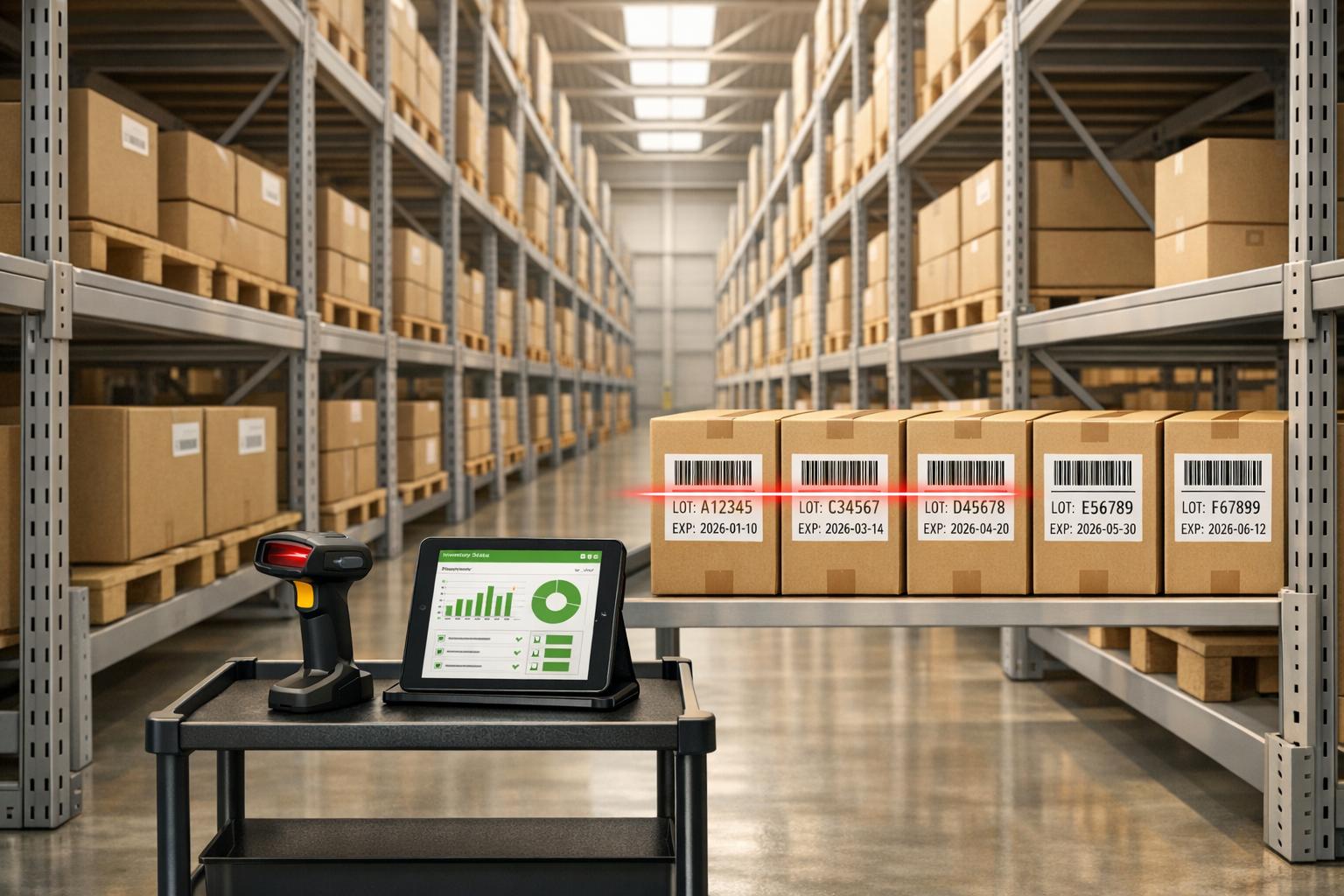
Efficient inventory management is critical for businesses dealing with perishable or time-sensitive goods. FEFO (First Expired, First Out) ensures products with the earliest expiration dates are used first, reducing waste, preventing financial losses, and maintaining compliance. Unlike FIFO, which prioritizes stock based on arrival dates, FEFO focuses on expiration dates - essential for industries like food, pharmaceuticals, and cosmetics.
For QuickBooks users, managing FEFO can be challenging as QuickBooks lacks expiration tracking. This article compares three tools - Rapid Inventory, Acctivate, and HandiFox Online - that integrate with QuickBooks and offer solutions for FEFO tracking, lot management, and mobile functionality. Here's a quick summary:
- Rapid Inventory: Best for QuickBooks Desktop users. Offers mobile barcode scanning, optimized pick lists, and flat pricing ($90/user/month or $900/month for unlimited users).
- Acctivate: Works with QuickBooks Desktop, supports lot tracking, Android-based mobile tools, and flexible pricing tailored to business needs.
- HandiFox Online: Designed for QuickBooks Online users. Includes mobile apps, barcode scanning, and FEFO features in the Pro plan ($109/month).
Quick Comparison
| Tool | QuickBooks Compatibility | FEFO Support | Mobile Functionality | Pricing (Starting) |
|---|---|---|---|---|
| Rapid Inventory | Desktop (Pro, Premier, Enterprise) | Yes | Barcode scanning | $90/user/month |
| Acctivate | Desktop (Pro, Premier, Enterprise) | Yes | Android tools | Custom Quote |
| HandiFox Online | Online, Desktop (via HandiFox Desktop) | Yes (Pro Plan) | iOS/Android apps | $109/month (Pro Plan) |
Each tool caters to different needs, helping businesses streamline inventory workflows while minimizing waste and errors. Choose the one that aligns with your QuickBooks version and operational requirements.
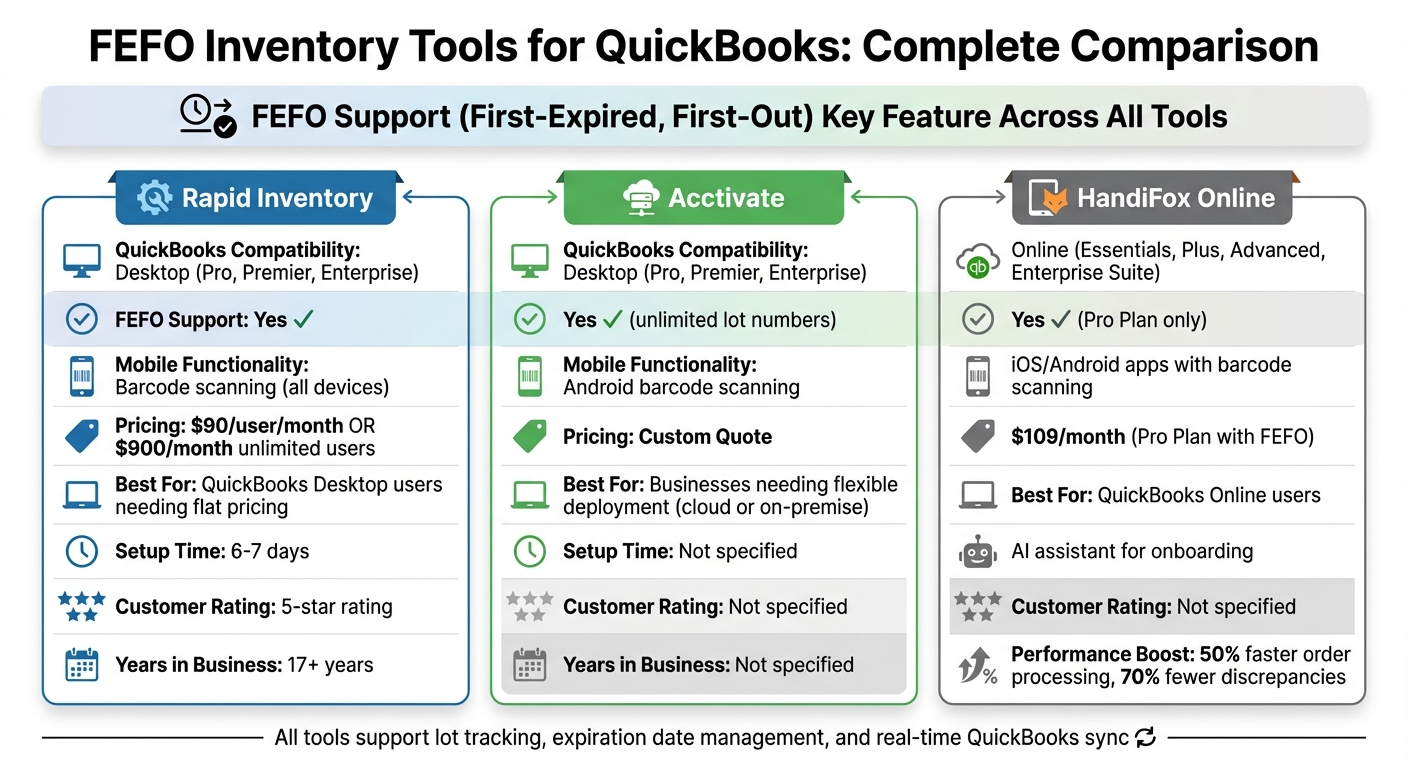
FEFO Inventory Tools for QuickBooks: Feature and Pricing Comparison
1. Rapid Inventory
QuickBooks Integration
Rapid Inventory seamlessly connects with QuickBooks Desktop, including Enterprise, Pro, and Premier versions. This eliminates the need for manual data entry as items, orders, and inventory actions are continuously updated. Plus, it offers web access to warehouse data and works with popular QuickBooks hosting providers like Rightworks, Swizznet, Whizz, and Visory.
The onboarding process is designed to be smooth and efficient, with a six- to seven-day setup that maps your QuickBooks data directly to Rapid Inventory's lot and expiration tracking fields. This integration sets the stage for streamlined FEFO (First Expiration, First Out) processing.
FEFO Support
Rapid Inventory is equipped to handle FEFO picking by tracking lot numbers, batch numbers, and expiration dates. When fulfilling orders, the system generates pick lists that prioritize items nearing expiration and suggest efficient picking routes. This helps warehouse staff maintain accuracy and ensures expired products don’t make it to customers.
Mobile Functionality
The platform supports mobile barcode scanning for all key warehouse tasks - receiving, picking, counting, and transferring. Workers can scan barcodes to verify locations, items, quantities, lot numbers, and expiration dates, making it easy to prioritize older or soon-to-expire stock.
One satisfied customer shared:
"My team was up and running in a few days. Very straightforward and easy to use." – Jacob, CEO
Managers aren’t left out either. Thanks to its web-based design, they can access inventory reports and activity logs from any device, keeping operations running smoothly.
Pricing
The Pro Plan costs $90 per user per month (billed monthly) for teams of 1–9 users. It includes features like lot, serial, and expiration tracking, as well as barcode scanning. For larger teams, the Unlimited Plan is available at $900 per month and covers 10 or more users. This plan also offers custom inventory reports and a dedicated account manager. Both plans come with free training, onboarding, and support - no contracts or hidden fees. Trusted by over 400 customers for more than 17 years, Rapid Inventory maintains a 5-star rating.
2. Acctivate Inventory Management
QuickBooks Integration
Acctivate works seamlessly with QuickBooks Desktop (Pro, Premier, Enterprise) through a real-time, two-way sync. This setup allows businesses to maintain their financial records and General Ledger in QuickBooks while tackling more complex inventory tasks like tracking stock levels, managing sales orders, handling fulfillment, and streamlining purchasing - all without the hassle of manual data entry. One user shared, "The greatest way Acctivate provides visibility into the business is through its integration with QuickBooks. Knowing I have an inventory software package that's accurate and gives me the information I need in QuickBooks is very assuring." Plus, with QuickBooks Enterprise, the system supports up to 30 users, making it a solid option for growing teams. This integration also enhances its ability to support FEFO tracking.
FEFO Support
Acctivate is designed to handle FEFO (First Expired, First Out) picking strategies by managing unlimited lot numbers and expiration dates. This feature ensures full traceability, which is critical for industries that require quick recalls and strict quality standards [13,14]. Miranda DeMaso, an Office Manager, highlights the peace of mind it provides: "The ability to just pull up a product and have all the lot numbers listed out for me – it takes a lot of my worry away." Additionally, Acctivate supports a variety of costing methods, including FIFO, LIFO, Average, Standard, and Specific Identity, making it easy to locate specific lots within seconds during recalls [11,13]. This functionality is particularly valuable for businesses managing perishable inventory.
Mobile Functionality
Acctivate equips warehouse teams with Android-based barcode scanning tools for tasks like receiving, picking, packing, shipping, and cycle counting. These mobile features allow staff to update inventory data directly from the warehouse floor, ensuring accurate and up-to-date records. Marc Tull, Warehouse Manager at Grande Cosmetics, shares, "Acctivate makes my life a lot easier. I can accomplish a lot more things in a lot less time."
Pricing
Acctivate offers flexible pricing options tailored to meet individual business needs. To get a specific license cost, businesses can request a custom quote through a guided tour or an on-demand demo. The software supports both cloud-based and on-premise deployment, giving companies the freedom to choose the setup that works best for them [11,12,14].
3. HandiFox Online
QuickBooks Integration
HandiFox Online connects seamlessly with QuickBooks Online through a 24/7 two-way sync, ensuring that items, vendors, customers, and sales data stay consistently updated across both platforms. It supports QuickBooks Essentials, Plus, Advanced, and Enterprise Suite, making it a versatile choice for businesses. As Bob Hogan puts it:
"HandiFox is an ideal solution for our clients who are satisfied with the functionality of QuickBooks but need a way to update the inventory in QuickBooks with a mobile device when away from their PC."
The system simplifies inventory management by automatically updating stock levels during cycle counts or physical inventories using mobile barcode scanning. For QuickBooks Desktop users, HandiFox Desktop provides a tailored alternative.
FEFO Support
The First Expired, First Out (FEFO) fulfillment feature is included in the Pro plan and is designed for businesses managing lot- or serial-tracked items. With SLED (Serial, Lot, and Expiration Date) tracking, the software helps reduce waste, minimize spoilage, and simplify product recalls. During order picking, the mobile app identifies the correct lots or serial numbers using barcode scanning and verifies shipments through a two-stage "Picking and Packing" process. Users have reported processing orders up to 50% faster and cutting discrepancies by over 70% thanks to barcode-based automation.
Mobile Functionality
The HandiFox Online mobile app, available for iOS and Android, empowers warehouse and field staff to handle inventory tasks from anywhere. Workers can create pick lists, scan barcodes to confirm lot numbers or expiration dates, and even process invoices and payments on the spot. Lisa M. from Ohio shares her thoughts:
"HandiFox is our top choice - it is easy to use and integrates seamlessly with QuickBooks."
The app supports various devices, including built-in smartphone cameras, Bluetooth scanners, and rugged industrial handhelds from brands like Zebra, Socket Mobile, and CipherLab. To make onboarding smoother, a built-in AI assistant offers real-time guidance for new users. These mobile features align perfectly with the software's focus on efficient FEFO operations.
Pricing
HandiFox Online provides three subscription options, with FEFO fulfillment and expiration date tracking available exclusively on the Pro plan:
| Plan | Annual Price | Monthly Price | Devices & Users | Locations | FEFO Support |
|---|---|---|---|---|---|
| Start | $39/month | $49/month | 1 device, 2 users | 1 | No |
| Optima | $79/month | $89/month | 2 devices, 4 users | 3 | No |
| Pro | $109/month | $139/month | 3 devices, 5 users | 100 | Yes |
For businesses needing more capacity, additional users can be added for $15 per month, and extra devices cost $40 per month. The Pro plan unlocks essential features like serial, lot, and expiration tracking, as well as the picking and packing tools that are crucial for FEFO workflows.
sbb-itb-19ed50f
Pros and Cons Comparison
Rapid Inventory provides features designed to simplify FEFO workflows for QuickBooks Desktop users. Here's a quick look at its strengths and one limitation:
| Tool | Strengths | Weaknesses |
|---|---|---|
| Rapid Inventory | Integrates seamlessly with QuickBooks Desktop (Pro, Premier, Enterprise), supports both FEFO and FIFO strategies, offers mobile barcode scanning with near-perfect picking accuracy, optimized pick lists for efficient warehouse routes, flat pricing at $90 per user/month or $900/month for unlimited users, and includes hands-on onboarding and migration support. | Limited to QuickBooks Desktop; does not support QuickBooks Online. |
This comparison underscores how Rapid Inventory can enhance warehouse efficiency while keeping costs predictable. As Zack P. from Kink BMX shares:
"Advanced Inventory keeps us organized. We can print [order lists] according to where they are, so our employees in the warehouse don't have to zigzag to fill orders... That's been a big time saver and [helpful] for accuracy as well."
For businesses using QuickBooks Desktop, Rapid Inventory stands out with its dedicated FEFO capabilities and unlimited device support. However, keep in mind that switching to FEFO might involve extra expenses, such as filing IRS Form 3115 and meeting subscription requirements for QuickBooks Desktop Enterprise.
Conclusion
FEFO tracking brings three key benefits to the table: cutting down on waste, boosting cash flow, and meeting compliance requirements more effectively.
Hadleigh Reid from DCL Logistics highlights its importance:
"FEFO represents a crucial inventory management technique for businesses handling perishable products. By focusing on expiration dates rather than arrival times, organizations can significantly reduce waste, improve product quality, and enhance customer satisfaction."
For QuickBooks Desktop users, Rapid Inventory offers a tailored solution to meet FEFO demands. It provides tools like dedicated picking strategies, mobile barcode scanning, and straightforward pricing - $90 per user per month or $900 monthly for unlimited users.
To make FEFO work seamlessly, businesses should integrate barcode systems, set up automated reorder points, and conduct regular cycle counts.
If you're considering switching cost methods, it's essential to consult your accountant about IRS Form 3115 to address any tax-related implications. For those already using QuickBooks Desktop Enterprise, Pro, or Premier, moving to automated FEFO tracking can eliminate manual errors and free your team to focus on strategic priorities rather than day-to-day warehouse tasks.
FAQs
What is the difference between FEFO and FIFO in inventory management?
FEFO (First Expired, First Out) is all about prioritizing products based on their expiration dates. The idea is simple: items that are closest to expiring are used or sold first. This approach is critical in industries like food, pharmaceuticals, and cosmetics, where freshness and safety are non-negotiable.
FIFO (First In, First Out), on the other hand, organizes inventory based on when it was received. The oldest stock, regardless of expiration date, is used or sold first. This method is often a go-to for non-perishable goods or products that don’t have strict expiration concerns.
Both methods are effective for managing inventory, but which one works best depends on the type of products you’re dealing with and your business’s specific needs.
What are the main advantages of using FEFO tracking for managing perishable inventory?
FEFO, or First Expired, First Out, is a method that ensures items nearing their expiration dates are used or sold first. This practice is especially important for managing perishable goods, as it helps maintain freshness, prevents waste, and minimizes the chances of expired products reaching customers.
When businesses adopt FEFO tracking, they can achieve better inventory management, improve customer trust by delivering fresher products, and stay aligned with safety regulations for perishable items.
How can businesses effectively use FEFO inventory tracking with QuickBooks?
To make FEFO (First Expired, First Out) tracking work smoothly with QuickBooks, businesses can rely on inventory management tools that integrate directly with the platform. For instance, software like Rapid Inventory provides features such as lot and serial number tracking, barcode scanning, and real-time reporting. These tools make it easier to prioritize products based on their expiration dates while keeping inventory records in sync with QuickBooks.
Setting up QuickBooks to handle advanced inventory features is key. This includes enabling options like multi-location tracking and batch or lot management. When these settings are paired with an inventory tool, businesses can automate updates, track expiration dates effortlessly, and even get alerts for items that are running low or nearing expiration.
Using these tools and configurations not only improves inventory accuracy but also minimizes waste and ensures compliance with proper stock management practices.



