

Batch picking is a highly efficient method for warehouses, especially those managing multiple locations. Instead of processing one order at a time, workers pick items for several orders in a single trip, reducing travel time by up to 55% and boosting picking rates by 40%. This approach is ideal for high-volume operations with overlapping SKUs and can significantly cut labor costs while improving accuracy.
Key points:
- What is Batch Picking?: A method where pickers gather items for multiple orders in one trip and sort them later.
- Why Use It?: Reduces travel distance, increases efficiency, and lowers labor costs, particularly in multi-location setups.
- Technology's Role: Tools like Warehouse Management Systems (WMS), barcode scanners, and software like Rapid Inventory integrate real-time data, streamline processes, and ensure inventory accuracy.
- Common Mistakes: Inefficient batch sizes, inventory errors, and lack of proper training can derail operations.
- Solutions: Use real-time data, optimize batch sizes, implement barcode scanning, and train staff effectively.
Batch picking, paired with tools like Rapid Inventory, simplifies complex workflows, helping warehouses handle large order volumes with fewer errors and lower costs.
Batch Picking in Warehouses | How does it work?
sbb-itb-19ed50f
Tools and Components for Batch Picking
Setting up batch picking requires the right combination of software, hardware, and infrastructure. Without these essential pieces, even the most well-designed strategy can fall short.
Batch Picking Setup Requirements
A successful batch picking operation starts with careful planning and organization. Orders should be grouped based on shared SKUs, delivery dates, or shipping carriers. High-demand SKUs should be placed in easily accessible locations. Batch pick lists are essential - they consolidate instructions, detailing SKUs, quantities, and bin locations for streamlined operations. Sorting stations equipped with put-walls or automated sorters are also key for separating batched items into individual orders efficiently.
Physical tools play a big role in making the process more efficient. Multi-tier batch picking carts - whether manual or automated - allow pickers to handle 8 to 20 orders in a single trip. To keep everything organized, totes, bins, and LED-guided put-walls are invaluable, helping maintain order and speed up sorting.
Technology for Efficient Batch Picking
Technology is the backbone of real-time accuracy and efficiency in batch picking. Mobile barcode scanners and RF devices are essential tools that verify SKUs and quantities at the moment of picking. These devices reduce human error and instantly sync data with your central system, ensuring smooth operations. This tech also aligns with the goal of batch picking - minimizing picker travel time. For example, a standard rack and shelving setup might yield about 50 lines per hour, but integrating pick-to-light technology can increase productivity to approximately 400 lines per hour.
Other critical tools include real-time reporting systems and FIFO/FEFO controls. FIFO (First-In, First-Out) and FEFO (First-Expired, First-Out) protocols guide pickers to the correct bins based on receipt or expiration dates, which is especially important for businesses handling perishable items. Cloud-based solutions take this a step further by enabling real-time data sharing across multiple zones or facilities, helping prevent stockouts during high-volume batch operations.
How Rapid Inventory Integrates with Batch Picking Tools

Rapid Inventory works seamlessly with QuickBooks Desktop to support batch picking operations. Its multi-level organization features allow inventory tracking by building, zone, aisle, and bin - ideal for creating efficient pick paths in even the most complex warehouse setups. Using mobile barcode scanners, pickers can verify items in real time, with inventory levels automatically updated in both Rapid Inventory and QuickBooks Desktop.
The platform’s FIFO/FEFO functionality ensures older inventory is prioritized automatically, directing pickers to the correct bins without manual input. For warehouses with 10 or more users, the Unlimited plan ($900 per month) offers custom inventory reports that analyze batch picking performance across multiple locations. These reports help identify areas for improvement and fine-tune workflows. Managers can also access real-time dashboards online, allowing them to monitor picking progress and maintain inventory accuracy across all facilities.
Building Batch Picking Workflows for Multi-Location Warehouses
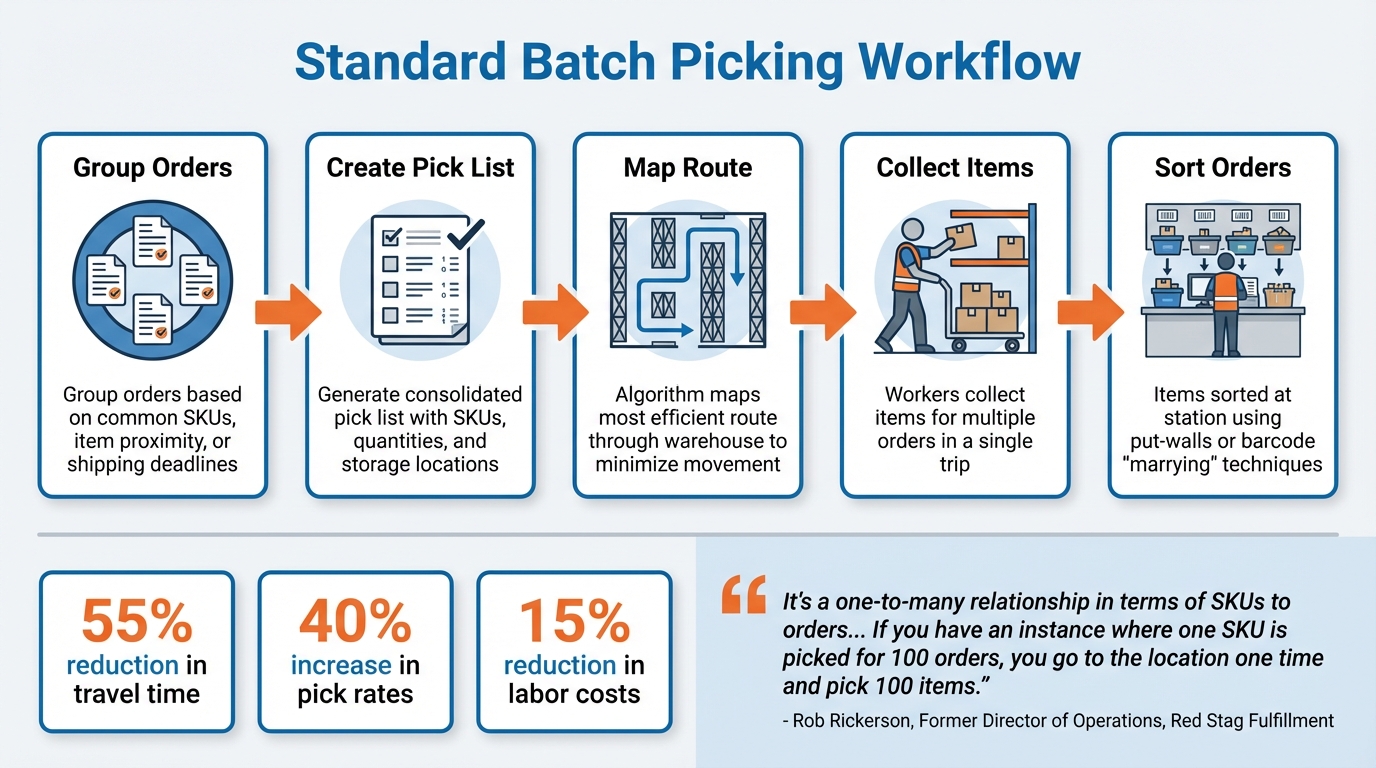
5-Step Batch Picking Workflow for Multi-Location Warehouses
Standard Batch Picking Workflow
A solid batch picking workflow typically involves five main steps. It begins with grouping orders based on common SKUs, item proximity, or shipping deadlines. From there, a consolidated pick list is created, detailing SKUs, total quantities, and storage locations. Algorithms then map out the most efficient route through the warehouse to minimize unnecessary movement. Workers collect items for multiple orders in a single trip, and finally, items are sorted at a station, often using put-walls or barcode "marrying" techniques to separate them into individual orders.
"It's a one-to-many relationship in terms of SKUs to orders. The benefit is heightened efficiency. If you have an instance where one SKU is picked for 100 orders, you go to the location one time and pick 100 items, which satisfies the requirement." - Rob Rickerson, Former Director of Operations and Analytics, Red Stag Fulfillment
The results of this approach can be striking. For example, a regional pharmacy distribution center that switched to batch picking saw worker travel time drop by 55%, while pick rates climbed by 40%. These improvements translated into a 15% reduction in labor costs. When paired with pick-to-light systems, throughput can skyrocket to about 400 lines per hour, compared to just 50 lines per hour with traditional manual picking.
This workflow serves as the backbone for adapting operations to the complexities of multi-location warehouses.
Adjusting Workflows for Multiple Locations
Managing batch picking across multiple locations introduces challenges that single-warehouse setups don’t encounter. To start, route orders to the warehouse closest to the customer to cut down on transit time. Within larger hubs, dividing the space into zones can reduce picker travel distances and prevent congestion in busy aisles.
Hybrid picking methods are particularly useful in these scenarios. For instance, batch-pick high-volume SKUs while using wave picking for time-sensitive shipments with tight carrier deadlines. For single-line orders with identical items, group them into one large container to skip the sorting stage altogether. Dynamic, real-time batching - where orders are grouped based on urgency, priority, and available labor - can help balance fluctuating demand across multiple sites.
"There is no best method for all businesses and there may be different picking methods within the same warehouse. You may have case picking at the order level and picking at the unit level in a cluster or pick-and-pass model." - David Haley, Director of Operations Consulting, Sharphurst LLC
Take Zalando as an example. To manage its massive SKU inventory, the company implemented a "Joint Order Selection, Allocation, Batching, and Picking Problem" framework. By using a Distance Greedy Algorithm and incorporating zoning, they streamlined their operations, cutting travel times and speeding up order processing.
These strategies can be seamlessly adapted using Rapid Inventory’s advanced tools.
Setting Up Workflows in Rapid Inventory
Rapid Inventory's multi-level organization tools make it easy to map inventory by building, zone, aisle, and bin, which is crucial for creating efficient pick routes in multi-location setups. You can configure inventory sites to reflect your warehouses and set rules to prioritize FIFO (First In, First Out) or FEFO (First Expired, First Out), ensuring pickers are directed to the right bins based on receipt or expiration dates.
With mobile barcode scanners integrated into Rapid Inventory, workers receive real-time instructions and can confirm picks immediately. Inventory levels are updated automatically in both Rapid Inventory and QuickBooks Desktop through two-way syncing, ensuring accurate stock visibility across all sites.
For warehouses on the Unlimited plan (priced at $900 per month for 10+ users), custom inventory reports offer insights into batch picking performance across locations. These reports can help identify bottlenecks and fine-tune batch sizes for better efficiency. Managers can also monitor progress in real time through web dashboards, ensuring accuracy and consistency across facilities.
Testing different batch sizes is key to finding the right balance for your operation. While larger batches can improve pick density, they can also make sorting more complex. Additionally, keep warehouse managers in the loop about upcoming sales or marketing campaigns, as changes in order profiles can impact batching processes. Using directed putaway to store popular items in easily accessible locations can further reduce travel time during picking runs.
Best Practices for Batch Picking Performance
Optimizing Batch Size and Composition
Finding the right batch size for your operation depends heavily on the picking technology you use. For instance, paper-based systems work best with 8–15 orders per batch, RF scanner–based systems handle 12–25 orders, and voice or light-directed systems can manage 20–40 orders effectively. However, pushing batch sizes too far can lead to sorting bottlenecks, which slows everything down.
Grouping orders that share common SKUs can significantly improve efficiency. When multiple orders require the same item, pickers can retrieve all the necessary quantities in one go. Start with a "seed order" and add other orders with overlapping SKUs or nearby bin locations to maximize the density of each batch. For single-line orders containing the same item, you can skip the sorting step entirely by picking them into a single container and sending them straight to the packing area.
Another key strategy is ABC slotting, which places your most frequently picked items - your "A" items - in easily accessible, central locations. This cuts down on travel time, a major factor since warehouse workers spend about 80% of their shifts walking.
Keep in mind that factors like cart capacity, product size, and weight will naturally limit your batch sizes. Testing different configurations based on your specific order profiles can help you find the balance where travel efficiency improves without introducing unnecessary sorting complexity.
Once you've determined the best batch parameters, standardizing your tools and processes ensures consistency across the board.
Standardizing Tools and Processes
Consistency is key to reducing errors and speeding up operations. Standardize cart setups, tote systems, and labeling conventions across all your warehouse locations. Tools like color-coded totes and put-to-light systems can minimize mental strain on workers while speeding up the sorting process.
"85% of the reasons for failure to meet customer expectations are related to deficiencies in systems and processes…rather than the employee." - W. Edward Deming
Documenting every step of your batch picking process in Standard Operating Procedures (SOPs) is essential. These should include detailed guidelines for batch creation, exception handling, and verification methods. This ensures that every shift operates under the same workflow, reducing inconsistencies. Additionally, involving warehouse managers during promotional planning can help avoid disruptions caused by sudden changes in order profiles.
Integrating barcode scanning at both the picking and sorting stages is another effective way to catch errors before they impact customers. Well-designed batch systems can boost order accuracy from the industry average of 96–97% to 99% or higher. Modular carts with adjustable dividers also help keep batches organized and adaptable to different product sizes as pickers move through their routes.
With standardized processes in place, you can take things a step further by using real-time data to refine your operations.
Using Rapid Inventory for Data-Driven Optimization
Rapid Inventory's real-time reporting tools are a game-changer for identifying bottlenecks across your warehouse network. By tracking performance at the building, zone, aisle, and bin levels, the system generates custom reports that highlight problem areas - whether it's a zone slowing down pickers or specific SKUs causing sorting delays.
The platform also supports cycle counting, ensuring that inventory records stay accurate and reliable for planning. Its FIFO (First In, First Out) and FEFO (First Expired, First Out) picking strategies guide workers to the right bins based on receipt or expiration dates, simplifying decision-making during picks.
"The most successful operations we work with view batch picking as an evolving process. They're constantly analysing data, making small adjustments, and testing new approaches." - David, Business Director, PALLITE
Another helpful feature is backorder tracking, which identifies SKUs that frequently run low. This allows you to adjust slotting and batch composition proactively, avoiding disruptions caused by stockouts. Real-time inventory visibility across all locations empowers managers to make smarter decisions about stock allocation and batch planning. Metrics like picks per hour, travel time, and error rates provide actionable insights to fine-tune your performance.
Common Batch Picking Mistakes and How to Avoid Them
Frequent Batch Picking Mistakes
One of the biggest challenges in batch picking is mixing orders with varying levels of complexity. For instance, combining orders with many unique items and those with just a few forces pickers into inefficient zigzagging patterns across the warehouse, which wastes time and energy. Another recurring issue stems from inventory inaccuracies - pickers often waste valuable time searching for items that simply aren’t there.
Miscommunication between departments can also derail even the best batching strategies. Imagine the sales team launching a surprise promotion or marketing suddenly shifting product priorities without informing the warehouse team. Such changes can render your carefully crafted batching rules useless overnight. On top of that, skipping essential validation steps - like scanning barcodes for both item location and the items themselves - often leads to mis-picks and sorting errors later in the process.
Insufficient training during the transition to batch picking is another common hurdle. Workers unfamiliar with optimized routes or sorting procedures can unintentionally slow everything down. Overcrowding can also occur when too many picking waves are launched at once, leading to clogged aisles and sorting bottlenecks. Lastly, static batching rules that aren’t reviewed or updated periodically become less effective over time, further dragging down efficiency.
Solutions for Common Challenges
The good news? These issues can be tackled with targeted strategies.
Start by implementing a two-step mobile barcode verification process. This method scans the bin, then the item, and confirms the quantity, catching most errors before orders even reach the sorting stage. For single-line orders (those with just one item), group them into separate batches to skip the sorting phase altogether.
Another effective approach is to test batch picking with a small team and a limited number of SKUs. This allows you to pinpoint bottlenecks and fine-tune your process before scaling up. Regularly reviewing order profiles with tools like the "ABC curve" analysis ensures your batching rules stay relevant, especially as demand shifts due to promotions or seasonal trends. To simplify sorting, consider using color-coded totes or assigning specific cart locations, which can reduce mental strain for workers.
Continuous training is also key - focus on teaching workers how to handle exceptions like missing items to prevent one error from stalling an entire batch. Be strategic about scheduling picking waves to avoid simultaneous launches that could lead to congestion in aisles or at sorting stations. Finally, set up a routine to periodically review and adjust your batching rules to keep the process efficient and adaptable.
By taking these steps, you’ll create a more streamlined operation and set the stage for integrating advanced technology solutions.
How Rapid Inventory Prevents Common Mistakes
Rapid Inventory offers built-in features that directly address these batch picking challenges.
For starters, its real-time mobile barcode scanning ensures pickers follow the correct sequence by verifying location, item, and quantity. This reduces errors and keeps operations running smoothly. Plus, its two-way sync with QuickBooks ensures inventory data stays accurate across locations, minimizing discrepancies.
The system’s FIFO (First In, First Out) and FEFO (First Expired, First Out) picking strategies guide workers to the right bins, whether based on receipt dates or expiration dates. This not only speeds up decision-making but also ensures items are picked in the proper order. Additionally, real-time inventory reports and cycle counting features help maintain data accuracy, enabling managers to identify and fix discrepancies before they escalate.
For businesses with multiple locations, Rapid Inventory provides centralized visibility, giving all departments access to real-time inventory updates. This means that if sales launches a promotion or inventory levels change, the warehouse team can adjust batching strategies immediately. The platform also tracks backorders, highlighting SKUs that frequently run low so you can proactively adjust slotting and batch composition to avoid disruptions.
These features make Rapid Inventory a practical tool for maintaining efficiency and accuracy in batch picking operations.
Conclusion
Batch picking has transformed multi-location operations by slashing travel time, increasing throughput, and lowering labor costs. In fact, warehouses using batch picking have reported productivity gains ranging from 30% to 65% compared to single-order methods. By cutting down on travel time, workers - who might otherwise walk up to 10 miles daily - face less physical strain and can handle more orders during their shifts.
The key to success lies in getting the basics right: fine-tuning batch sizes, standardizing equipment, implementing strong verification processes, and ensuring comprehensive training. However, manual batching alone can't keep up with the demands of modern operations. Advanced technology becomes the critical piece that ties it all together.
This is where you can try Rapid Inventory for free. With features like two-way QuickBooks sync, mobile barcode scanning, FIFO/FEFO strategies, and real-time reporting, the platform equips managers with the tools and insights they need to make continuous improvements. It’s designed to not just support these best practices but to elevate them.
FAQs
How do I know if batch picking is right for my warehouse?
Batch picking is a smart choice for warehouses managing numerous small, multi-item orders. By grouping multiple orders into one picking task, it cuts down on travel time and boosts efficiency. If your operation regularly processes smaller, frequent orders, this method can simplify workflows significantly. However, for larger or more diverse orders, other approaches might be more effective. Take a close look at your order sizes, variety, and potential travel time reductions to determine if batch picking aligns with your needs.
What’s the best way to choose a batch size without slowing sorting?
To keep sorting efficient, focus on selecting a batch size that groups orders with overlapping SKUs or similar items. This approach minimizes travel time and makes the picking process smoother. Begin with a batch size that aligns with the commonality of items and the capacity of your warehouse. Adjust as necessary based on performance. It's also important to regularly review order patterns to fine-tune batch sizes, maintaining a balance between efficiency and avoiding picker overload or confusion.
How can Rapid Inventory reduce mis-picks across multiple locations?
Rapid Inventory tackles the issue of mis-picks across various locations by integrating mobile barcode scanning. This approach boosts both accuracy and speed, achieving over 99% precision in item selection. The result? Fewer mistakes and smoother operations.



