If you use QuickBooks Desktop, the best fit for most businesses is simple: use cycle counts during the year, then do a full count at year-end. That helps you keep quantities, inventory value, and COGS closer to what you actually have on hand without stopping warehouse work every time you check stock.
Here’s the short version:
- Cycle counting means counting small groups of SKUs on a set schedule
- Full inventory reconciliation means counting all inventory at one cutoff date, often at year-end
- Cycle counts find errors sooner
- Full counts give you a complete reset
- Cycle counts reduce shutdowns
- Full counts often require pausing shipping and receiving
- A hybrid approach fits many U.S. small and mid-sized businesses best
If inventory records are off, the problem does not stay in the warehouse. It can affect COGS, the balance sheet, and profit. That is why the choice matters.
Quick Comparison
| Criteria | Cycle Counting | Full Inventory Reconciliation |
|---|---|---|
| What gets counted | Part of inventory | All inventory |
| Schedule | Daily, weekly, or monthly | Annual or semi-annual |
| Impact on warehouse work | Low | High |
| Error timing | Found sooner | Found later |
| Labor pattern | Spread through the year | Heavy at one time |
| Best use | Fast-moving stock and active warehouses | Year-end close, audits, and tax work |
I’d sum it up this way: if you need daily control, choose cycle counting; if you need a period-end reset, choose full reconciliation; if you need both, use both.
Cycle Counting vs. Full Inventory Reconciliation: Side-by-Side Comparison
Cycle Counting vs Physical Inventory
sbb-itb-19ed50f
Cycle Counting: Definition, Process, and Use Cases
Cycle counting groups SKUs into scheduled count batches, often based on item value or how fast items move. The point is simple: keep on-hand quantities accurate all year, not just after a full physical count.
The standard approach is ABC classification. A items get counted most often, B items monthly, and C items quarterly. Many teams also layer in movement rate, so fast-moving items get counted more often, even if they do not rank as top-value items.
Some teams use opportunity-based counting too. In that setup, a count starts when an item hits a low-stock level or when a bin appears empty. Empty bins should not be ignored. Confirming zero counts helps catch misplaced inventory much sooner.
When you find a variance, do not rush to post an adjustment. First, check the cause. It could be a shipping mistake, a data entry error, or shrinkage. After that, update the record. Many teams set variance thresholds by unit count or dollar amount, which helps them decide whether a gap needs a formal review or just a quick fix. That steady rhythm creates the tradeoff with a full count, which checks everything in one shot.
What You Need to Run a Reliable Cycle Count Program
Before you count even one SKU, your system needs clean SKU, bin, shelf, and warehouse location data. If location data is off, cycle counts get slower and much harder to reconcile. In QuickBooks Desktop, clean location data also keeps quantity adjustments accurate and easier to match back to records.
You also need a clear schedule and firm controls around item movement while a section is being counted. Even a small number of transactions during the count can throw off the snapshot, so it is best to freeze activity for the specific items being counted.
Mobile barcode scanning can cut entry mistakes and send count adjustments straight into QuickBooks Desktop. For QuickBooks Desktop users, Rapid Inventory supports mobile barcode scanning and two-way QuickBooks sync.
If the schedule slips, the data is messy, or movement controls are loose, the whole process gets harder to trust.
Cycle Counting: Pros and Cons
| Pros | Cons |
|---|---|
| Operations keep running; no need to halt the warehouse | Requires strict scheduling and consistent follow-through |
| Errors and shrinkage are caught early, before they compound | Staff must be trained on specific workflows to ensure accurate snapshots |
| Labor stays steady; no overtime spikes tied to a single count event | Employees can view frequent counts as an added burden |
| Order fulfillment accuracy improves over time | Manual data entry creates accuracy gaps without proper system integration |
| Ongoing inventory record accuracy stays high throughout the year | Requires reliable SKU, bin, and location data as a foundation |
That makes cycle counting a steady-control method, not a warehouse-wide reset.
Full Inventory Reconciliation: Definition, Process, and Use Cases
Full inventory reconciliation, also called a physical inventory count, is a wall-to-wall count of every item at one cutoff date, usually at year-end. Think of it as a one-time reset. You compare the physical count to what’s in the system, look into any variances, and post adjustments so the ledger matches what’s actually on the warehouse floor. That’s why prep work and tight cutoff control matter so much.
The process begins with an inventory cutoff date - the exact point when inventory records are frozen. After that, shipping and receiving usually pause so items don’t move during the count. Once the count is finished, the team reviews variances, looks for root causes like shrinkage or data entry mistakes, and then posts adjustments.
This method makes the most sense for smaller inventories, slow-moving stock, or year-end reporting and compliance. The downside is pretty clear: it can interrupt day-to-day operations, sometimes in a big way.
"Physical verification through... a full physical inventory count helps identify and rectify discrepancies between physical stock levels and recorded quantities. This ensures the accuracy of your financial statements." - Hadleigh Reid
What You Need to Run a Full Inventory Count
Before the count starts, clear pending transactions, split the warehouse into zones, and assign counters to each area. Barcode scanners can help a lot here. They speed up counting and cut down on manual entry mistakes, especially when you’re dealing with a large number of SKUs under a tight deadline. It also helps to set recount rules in advance for any variance outside the allowed tolerance before adjustments are posted.
Full Inventory Reconciliation: Pros and Cons
The core tradeoff is simple: better accuracy, more disruption.
| Pros | Cons |
|---|---|
| Provides a complete, wall-to-wall reset of inventory accuracy | Extremely time-consuming and labor-intensive |
| Essential for year-end financial reporting, audits, and tax purposes | Often requires halting shipping and receiving, and can slow or stop operations |
| Helps identify shrinkage, fraud, and obsolescence | High manpower needs, overtime costs, and possible employee burnout |
| Straightforward to organize for very small businesses | Errors can remain hidden between count events |
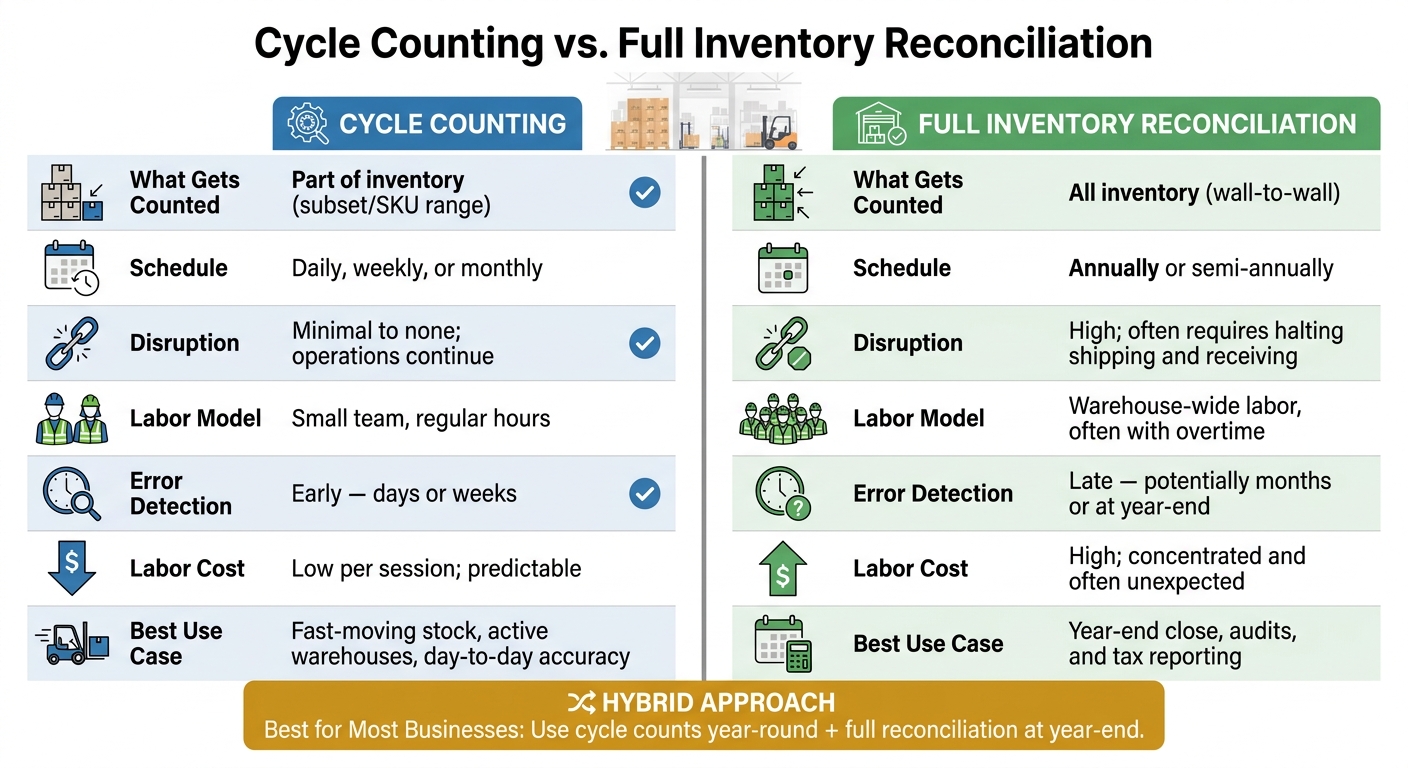
Cycle Counting vs. Full Inventory Reconciliation: Side-by-Side Comparison
These two methods differ most in disruption, cost, and how fast they expose errors. For QuickBooks Desktop users, the day-to-day impact comes down to on-hand accuracy, COGS, and how smoothly you can close the books.
| Feature | Cycle Counting | Full Inventory Reconciliation |
|---|---|---|
| Typical Schedule | Daily, weekly, or monthly | Annually or semi-annually |
| Scope | A specific subset or SKU range | All stock |
| Disruption | Minimal to none; operations continue | High; often requires halting shipping and receiving |
| Labor Model | Small team, regular hours | Warehouse-wide labor, often with overtime |
| Error Detection | Early - days or weeks | Late - potentially months or at year-end |
| Adjustment Timing | Continuous, incremental updates | Large, period-end adjustments |
| Labor Cost | Low per session; predictable | High; concentrated and often unexpected |
| Loss Recognition | Small, manageable corrections | Potentially large, unexpected losses |
The tradeoff is pretty straightforward: cycle counting supports continuity, while full reconciliation gives you a clean reset.
How Each Method Affects Inventory Accuracy and Financial Reporting
Cycle counting keeps QuickBooks Desktop inventory values current during the year. Full reconciliation fixes those values in one large adjustment. That timing changes a lot.
With cycle counting, errors and shrinkage get found sooner. As a result, your inventory valuation in QuickBooks Desktop stays closer to what’s actually on the shelf, and your monthly reports reflect current stock levels instead of stale numbers.
Full reconciliation works differently. If you only count once or twice a year, errors can pile up quietly for months. Then, when variances finally hit the books, you may be dealing with a large inventory adjustment that affects Cost of Goods Sold (COGS) and makes earlier trend reporting less useful.
That’s the main difference. It’s not only about how often you count. It’s about when the errors reach your books.
Cycle counting also cuts down year-end audit effort. When outside auditors see a steady record of verified counts during the year, they usually spend less time checking inventory from scratch.
Which Method Fits Small and Mid-Sized U.S. Businesses Best
For businesses with fast-moving inventory, or for teams that simply can’t stop operations, cycle counting is usually the better day-to-day option. It helps keep inventory records tight without shutting down shipping or receiving, and labor costs stay more even instead of spiking all at once.
Still, full reconciliation has a place. Year-end close, audit prep, and tax filing are all times when a wall-to-wall count can make sense. For many small and mid-sized U.S. businesses, the practical move is a hybrid setup: use cycle counts during the year to keep records in line, then do a more streamlined full count at year-end to support reporting and compliance.
The next step is choosing the method that fits your operation and building it into your QuickBooks Desktop workflow.
How to Choose the Right Method and Put It Into Practice
Use the comparison above to pick the method that matches how your inventory moves and what your reports need. For most small and mid-sized U.S. businesses, a mix of both methods works best: do cycle counts during the year, then complete a year-end reconciliation for financial close and tax reporting.
That setup gives you a practical middle ground. You keep inventory value, COGS, and year-end close on track without shutting down the whole operation.
ABC analysis helps you decide what to count more often. Put your time into the items with the highest risk of variance, where mistakes cost more and show up faster. Before any count starts, set variance thresholds. Small gaps can be posted right away, while larger or repeat gaps should be reviewed. Once those rules are in place, software can apply them the same way every time.
Rapid Inventory supports this process with two-way QuickBooks sync, mobile barcode scanning, multi-location tracking, and real-time inventory reports.
A Simple Decision Framework and Next Steps
Use this rule:
- Choose cycle counting when you need day-to-day accuracy and can't pause operations.
- Choose full reconciliation when you need a full asset check for year-end, an audit, or a major close.
FAQs
How often should I do cycle counts?
Cycle count frequency should match how fast items move, what they’re worth, and how much control your business needs. A common best practice is the ABC method.
With this approach, you count high-value or key revenue items weekly or monthly, mid-tier items quarterly, and less critical items once or twice a year.
That way, you can keep inventory records accurate and fix discrepancies without bringing daily operations to a halt.
When should I do a full inventory reconciliation?
Do a full inventory reconciliation when you need a complete snapshot for year-end reporting, audits, or tax filing. It also makes sense when inventory record accuracy drops below 90% and you need a baseline you can trust.
Once that baseline count is in place, cycle counting can take over as your main method. Full counts are also common when compliance rules require a statutory physical inventory.
Can I use both methods together?
Yes. Many businesses use a hybrid approach: regular cycle counts during the year, plus a periodic full inventory reconciliation as a broader audit.
That setup helps spread the workload, catch discrepancies early, and support long-term data accuracy. For QuickBooks Desktop users, Rapid Inventory can help automate parts of the process and sync physical counts with system records across multiple locations.