
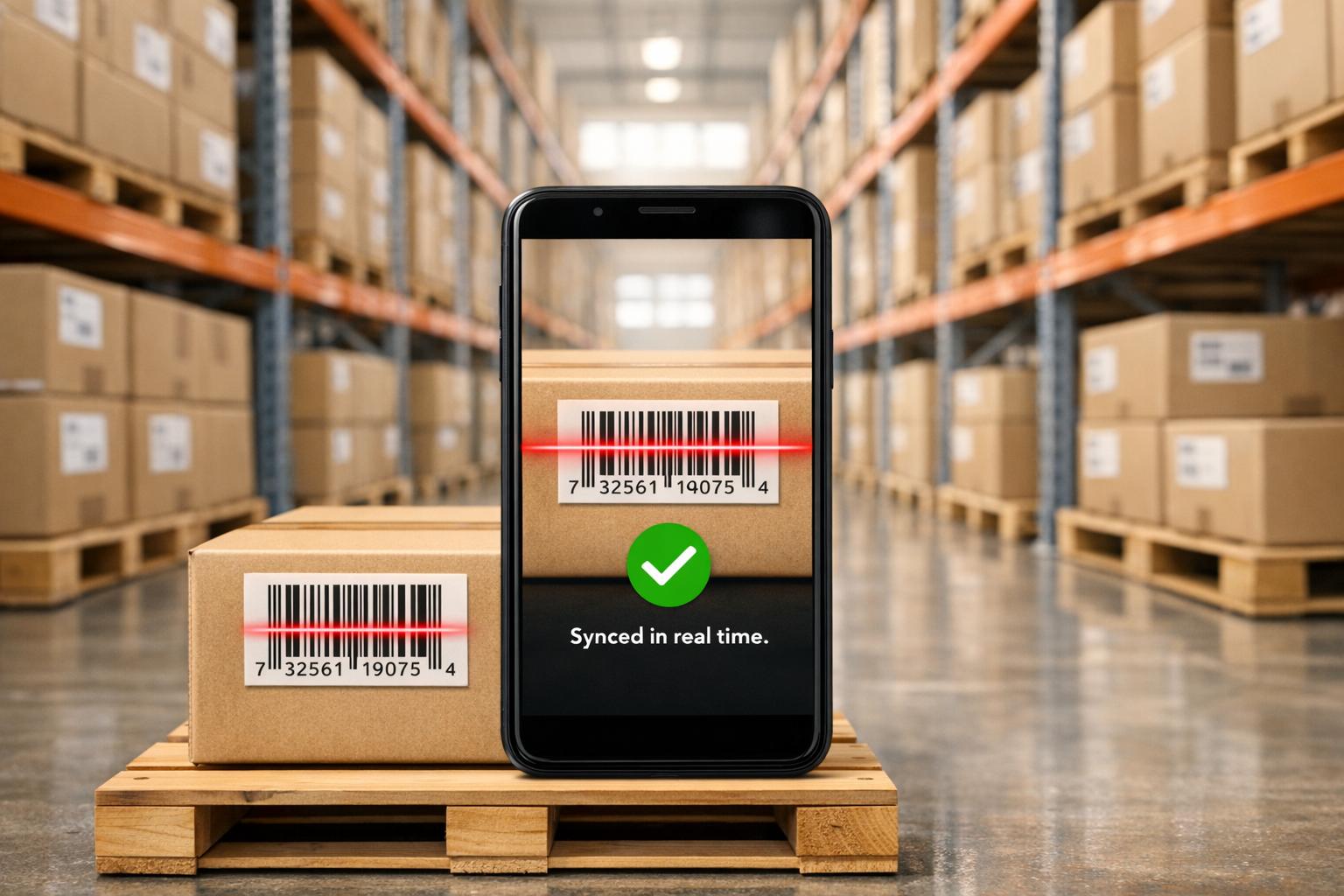
Managing inventory accurately is a major challenge for many businesses, but QuickBooks mobile apps make it easier with real-time tracking. These tools integrate with QuickBooks Desktop to provide instant updates, reduce errors, and improve efficiency.
Key Benefits:
- Accuracy: Reduce inventory errors from 10-30% (manual methods) to less than 1%.
- Time Savings: Cut inventory count times by 60-80% and order fulfillment by 25-50%.
- Better Decisions: Use up-to-date data to avoid stockouts, manage cash flow, and optimize stock levels.
Features:
- Two-Way Sync: Instant updates between mobile devices and QuickBooks Desktop.
- Barcode Scanning: Simplify receiving, picking, and shipping with mobile scanners.
- Real-Time Monitoring: Always know stock levels, movements, and alerts across locations.
Rapid Inventory, a popular tool for QuickBooks users, offers these capabilities and more. Setup takes about a week, and pricing starts at $90/user/month or $900/month for unlimited users. By switching to mobile inventory tracking, businesses can save time, reduce costs, and improve operational efficiency.
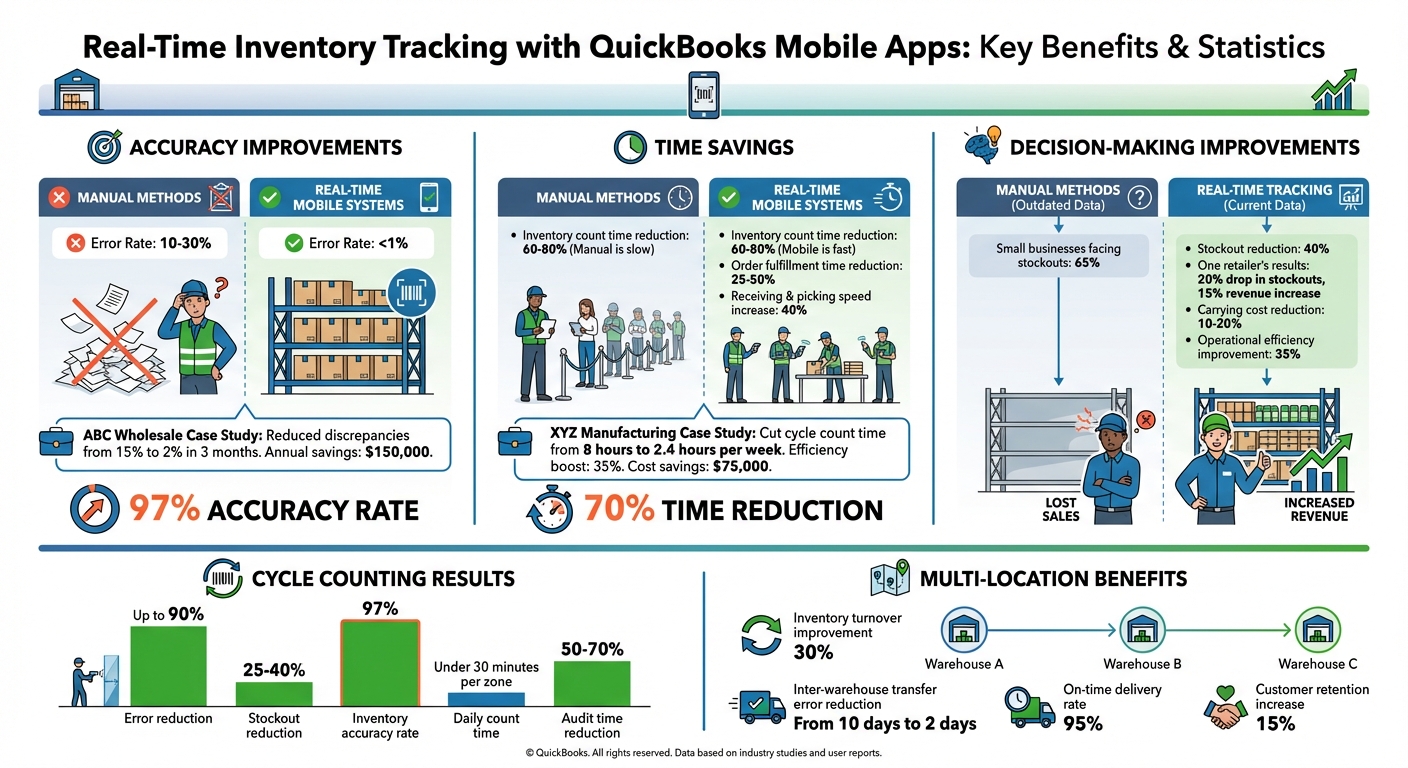
Real-Time Inventory Tracking Benefits: Key Statistics and ROI Metrics
Benefits of Real-Time Inventory Tracking
Better Accuracy and Fewer Errors
Relying on manual methods for inventory tracking can lead to a significant number of errors. When you’re managing spreadsheets and manually inputting data into QuickBooks Desktop at the end of the day, mistakes are almost inevitable. Research shows that manual tracking can result in error rates between 10–30%, often caused by delays and transcription issues. In contrast, real-time mobile systems bring this figure down to less than 1%.
Mobile apps with two-way synchronization ensure immediate updates to inventory levels. For instance, when a warehouse worker scans a barcode during receiving, the system automatically adjusts quantities in QuickBooks Desktop. This prevents common issues like overselling or missing in-stock items. A great example is ABC Wholesale, which adopted Rapid Inventory’s mobile app. Within three months, they reduced inventory discrepancies from 15% to just 2%, saving $150,000 annually.
Features like lot and serial number tracking further enhance precision. Instead of manually recording batch numbers, the mobile app captures this information through barcode scanning. This not only ensures accurate shipments but also helps maintain compliance with expiration requirements.
These improvements in accuracy translate into major time savings for inventory management processes.
Time Savings and Efficiency Gains
Automating stock counts and record updates with real-time tracking eliminates much of the manual work involved in inventory management. Tasks like counting and updating stock levels, which traditionally require significant staff time, are now handled by mobile barcode scanning. For example, Rapid Inventory’s mobile scanning technology speeds up receiving and picking by 40%, enabling employees to handle more items per shift with fewer errors.
Consider XYZ Manufacturing, which implemented QuickBooks mobile sync. They reduced their cycle count time from 8 hours to just 2.4 hours per week - a 70% time savings. Under the leadership of Operations Manager John Lee, the company also achieved a 35% efficiency boost and cut costs by $75,000. This shift eliminated the need for end-of-day reconciliations and duplicate data entry.
Automation doesn’t stop at counting. With sales orders syncing instantly from QuickBooks to mobile devices, warehouse teams can start picking and packing orders right away. Companies using mobile inventory apps have seen order fulfillment times drop by 25–50%, resulting in faster delivery times without requiring additional staff.
Better Decision-Making with Current Data
The combination of improved accuracy and faster processes leads to smarter, more timely decisions. Accurate and up-to-date inventory data forms the backbone of proactive decision-making.
Outdated data often results in poor choices, like reordering items already in stock or running out of high-demand products. In fact, 65% of small businesses face stockouts due to outdated data, but real-time tracking reduces this problem by 40%. Mobile apps provide instant visibility across warehouses or multiple locations. One mid-sized retailer using Rapid Inventory with QuickBooks Desktop saw a 20% drop in stockouts thanks to real-time reporting. This allowed them to place purchase orders on the spot during busy seasons, improving customer satisfaction and increasing revenue by 15%.
Real-time data also enhances cash flow management. For example, stock aging reports highlight slow-moving items, giving you the chance to run promotions or clear inventory before it becomes a financial burden. By keeping an eye on turnover ratios, identifying your most profitable products, and setting accurate reorder points, you can quickly react to sales spikes. This might include transferring stock from one warehouse to another to meet demand and avoid losing sales opportunities.
sbb-itb-19ed50f
Simplify inventory and fulfillment with mobile barcode scanning | QuickBooks Enterprise
Key Features of QuickBooks-Compatible Mobile Inventory Apps
These tools are designed to enhance the accuracy and efficiency of real-time inventory tracking while integrating seamlessly with QuickBooks Desktop.
Two-Way Sync with QuickBooks Desktop

A solid mobile inventory system depends on smooth data sharing between the mobile app and QuickBooks Desktop. With two-way sync, any new items or orders created in QuickBooks show up in the mobile app instantly - and changes made on the app, like stock updates or transfers, flow back into QuickBooks automatically.
This process is powered by a web connector that links QuickBooks Desktop to a cloud-based inventory system. For instance, Rapid Inventory uses this method to sync updates like lot numbers or warehouse adjustments without requiring manual input. This ensures your data stays consistent across all platforms. To avoid issues, make sure your SKUs are standardized and fields are mapped correctly before enabling sync. Performing regular checks before and after syncing can also help catch connectivity problems early.
Mobile Barcode Scanning
Mobile barcode scanning simplifies warehouse operations by replacing manual data entry with quick, accurate scans. Whether it's receiving, picking, or shipping, staff can use smartphones or scanners to instantly capture and verify item details - reducing the risk of human error.
To get started, opt for scanners that support common formats like Code-128 or EAN-13, and configure them for automatic registration of each scan. Rapid Inventory, for example, supports scanning for lot and serial numbers on both iOS and Android devices, instantly adjusting inventory levels and syncing with QuickBooks Desktop. According to Fernanda C., Director of Operations at a company using this system since 2015:
"We especially love the barcode scanning and mobile picking and we've implemented it for all our warehouse operations".
This functionality also feeds into real-time dashboards, giving your team a clear view of inventory activity.
Real-Time Inventory Monitoring
Real-time monitoring offers up-to-the-minute insights into stock levels, movements, and alerts across all locations. Mobile dashboards pull live data via two-way sync with QuickBooks, showing details like quantities on hand, sales order statuses, and purchase order updates as they happen. Managers can also track FIFO (First In, First Out) or FEFO (First Expired, First Out) compliance remotely and receive alerts for discrepancies, such as when scanned items exceed available stock.
Rapid Inventory provides web-accessible reports that update in real time whenever a mobile scan occurs. These reports offer visibility into multi-warehouse stock levels, reorder alerts, and sales order statuses. Having instant access to accurate data enables quicker decisions about transfers, reordering, or promotions, helping you stay on top of your inventory game.
How to Set Up Rapid Inventory with QuickBooks Desktop
Setting up Rapid Inventory with QuickBooks Desktop typically takes about a week, progressing through discovery, planning, staging, and final execution. This system integrates seamlessly with QuickBooks Desktop Enterprise, Pro, and Premier editions, using the QuickBooks Web Connector to establish a secure, automatic two-way sync between your desktop software and the cloud-based inventory platform.
Before starting, ensure your system meets the required specifications: a 64-bit Windows operating system, at least 8 GB of RAM (16 GB recommended), 2.5 GB of SSD storage, .NET 4.8, and Google Chrome. For mobile devices, Android 6.0/iOS 12 or later is necessary.
Installing and Configuring Rapid Inventory
The installation process kicks off during the staging phase (Days 4–5). At this stage, you'll set up users, warehouses, and locations in Rapid Inventory to align with - or expand on - your QuickBooks setup. It’s important to clean up your QuickBooks data beforehand by addressing issues such as negative quantities, inactive items, or duplicates to ensure a smooth initial sync.
When you reach the Go Live phase (Days 6–7), connect QuickBooks Desktop to Rapid Inventory through the Web Connector. This involves configuring the connector with proper authorization in QuickBooks. As Jacob, a CEO who implemented the system, shared:
"My team was up and running in a few days. Very straightforward and easy to use."
Connecting Mobile Devices for Barcode Scanning
Since Rapid Inventory operates via the web, mobile devices can access it through any web browser with a stable internet connection - no separate app is needed. Use certified mobile scanners that support Code-128 and EAN-13 barcode formats, and configure them to append an "Enter" command after each scan. During setup, assign user roles and permissions to ensure secure access.
Reliable Wi-Fi is crucial for uninterrupted syncing. Once devices are connected, staff can use them to scan barcodes for tasks like verifying locations, items, and quantities during receiving, picking, counting, or transferring. After connecting the devices, confirm that real-time data sync is functioning as expected.
Testing Real-Time Sync and Data Accuracy
Once everything is configured and mobile devices are connected, validate the setup to ensure QuickBooks Desktop reflects data changes in real time. Perform pre- and post-sync checks to verify data accuracy, and test the connection by scanning a few items to ensure updates appear in QuickBooks Desktop within seconds.
To enhance security, implement a checklist that includes multi-factor authentication (MFA), TLS certificate verification, and proper logging procedures. Regular cycle counts using mobile scanners can help achieve inventory accuracy rates of around 97%. During the first few days, monitor sync logs closely to identify and resolve any connectivity issues. Don’t hesitate to use the available technical support to address questions or concerns during the setup process.
Advanced Workflows for Mobile Inventory Management
QuickBooks Desktop offers advanced workflows that take your inventory management to the next level. Once your mobile devices are synced and connected, these features help streamline operations, improve accuracy, and manage inventory across multiple locations - all from a mobile device.
Cycle Counting for Regular Stock Updates
Cycle counting allows you to check inventory in smaller, manageable sections on a regular schedule, eliminating the need for a full shutdown to conduct annual physical counts. Using the mobile app, warehouse staff can initiate cycle counts, scan barcodes, and approve adjustments that sync instantly with QuickBooks Desktop.
This method is especially useful for high-value or fast-moving items, which can be counted daily or weekly without disrupting day-to-day operations. The results speak for themselves: up to 90% fewer errors, 25–40% fewer stockouts, and a 97% inventory accuracy rate in mid-sized warehouses. Plus, daily counts can be completed in under 30 minutes per zone.
Backorder and Partial Shipment Management
Handling stock shortages becomes much easier with integrated backorder tracking. The mobile app lets you scan partial shipments and automatically split orders in QuickBooks Desktop. For example, if only $1,250.00 of a $2,000.00 order is shipped, you can invoice for the shipped items while reserving the rest. Lot and serial number tracking ensures every detail is accounted for.
Real-time dashboards keep you updated on backorder statuses, and automated workflows notify customers about their orders. One distribution company using this system reduced backorder delays from 10 days to just 2 days, achieving a 95% on-time delivery rate and boosting customer retention by 15%. As Fernanda C., Director of Operations, explains:
"Rapid Inventory helps us run our warehouse operations. Easy to use and reliable. Using it since 2015, we especially love the barcode scanning and mobile picking and we've implemented it for all our warehouse operations".
Multi-Location and Warehouse Tracking
With Rapid Inventory, you can manage inventory across multiple locations by assigning stock to specific warehouses or sites. The mobile app enables staff to scan and transfer inventory between locations, with real-time updates syncing directly to QuickBooks Desktop. This provides a consolidated view of inventory levels across all sites.
The system supports location-specific reporting and FIFO/FEFO picking methods, even for operations with over 100 locations. To get started, configure locations in the web dashboard, link them to QuickBooks items, and assign users to specific sites. Staff can then scan transfers or perform counts for each location using the app.
One retail chain with five warehouses reported a 30% improvement in inventory turnover and an 80% reduction in errors during inter-warehouse transfers. The mobile interface also provides centralized visibility, allowing for smarter stock reallocations and optimized picking routes, which cut down on travel time within warehouses.
These advanced workflows use real-time data synchronization to expand the functionality of QuickBooks Desktop, ensuring seamless inventory management across all your locations.
Rapid Inventory Pricing Plans Comparison
Pricing and Feature Comparison
Rapid Inventory keeps it simple with two plans designed for teams of different sizes. The Pro plan costs $90 per user per month for teams with up to 9 users, while the Unlimited plan charges a flat $900 per month for teams with 10 or more users. Both options are month-to-month, with no contracts, onboarding fees, or surprise charges.
Here’s a breakdown of what each plan offers:
| Feature | Pro Plan | Unlimited Plan |
|---|---|---|
| Monthly Cost | $90 per user | $900 flat fee |
| Ideal For | 1–9 users | 10+ users |
| Warehouses/Locations | Unlimited | Unlimited |
| Inventory Tracking | Lot, serial, expiration | Lot, serial, expiration |
| Barcode Scanning | Included | Included |
| QuickBooks Sync | Two-way sync | Two-way sync |
| Reporting | Real-time reports | Custom inventory reports ($2,000 value) |
| Support | Email support | Priority phone & email support |
| Account Management | Help center & videos | Dedicated account manager |
| Onboarding | Included ($600 value) | Included ($600 value) |
| Data Migration | Included ($1,500 value) | Included ($1,500 value) |
Both plans come with free onboarding and data migration services, which typically take 6 to 7 days to complete.
If your team has exactly 10 users, the Unlimited plan is a no-brainer. It costs the same as 10 Pro plan users ($900) but adds perks like priority support, a dedicated account manager, and custom inventory reports. These extras can make a big difference for businesses that need tailored reporting and specialized data insights.
With over 17 years of experience and a 5/5 star rating from more than 400 customers, Rapid Inventory has built a reputation for reliability among QuickBooks Desktop users. These pricing options make it easy for businesses to manage real-time inventory tracking without breaking the bank.
Best Practices for Accurate Mobile Inventory Tracking
Regular System Updates and Maintenance
Keeping your system in top shape is essential for avoiding disruptions. Regularly run QuickBooks' Verify and Rebuild utilities to catch errors like assembly build issues or invalid characters before they cause sync problems. These tools help ensure your data flows smoothly between systems.
Make it a habit to review your integration logs weekly. This helps you catch potential issues early, such as duplicate records, inactive items in QuickBooks, or API connection errors that could disrupt real-time updates. Don’t forget to update your barcode scanner drivers and label printer firmware frequently. For instance, if you’re having trouble printing labels, check that your printer is properly detected and aligned, update its drivers, and, if needed, reset the printer spooler to resolve the issue.
Security is another critical aspect. Regularly verify that your multi-factor authentication (MFA) settings and TLS protocols are up to date. This ensures your mobile-to-QuickBooks connection remains secure and compliant with current data protection standards. Finally, make sure your team is well-trained on these systems to maintain accuracy and efficiency.
Training Staff for Mobile App Usage
Even the best mobile inventory system depends on the people using it. Proper training minimizes order picking errors and ensures employees fully understand how the two-way sync between mobile devices and QuickBooks Desktop works.
Focus your training on consistent scanning workflows. Teach staff to scan barcodes at every key stage - receiving, picking, counting, and transferring stock. This reduces manual entry errors that can throw off inventory counts. Additionally, employees should pause other warehouse transactions during physical counts to avoid discrepancies caused by overlapping activities. By sticking to a consistent scanning routine and performing regular cycle counts, businesses often achieve inventory accuracy rates as high as 97%. A combination of routine updates and well-trained staff is key to maintaining such high levels of accuracy.
Using Real-Time Reports for Decision-Making
Once your system is up-to-date and your team is trained, you can start using real-time reports to make informed decisions. These reports turn raw inventory data into actionable insights. For example, the On-Hand Inventory report offers instant visibility into stock levels across all warehouse locations. The Reorder Report helps you spot items that are running low, allowing you to reorder before stockouts occur. Meanwhile, the Stock Aging Analysis highlights slow-moving products that may be tying up cash unnecessarily.
To prevent stockouts, set location-specific reorder alerts based on these reports. Use the Sales/Purchase Order Status report to manage customer expectations and track incoming shipments. For financial planning, the Inventory Value report provides a clear picture of how much capital is tied up in your inventory, helping you make smarter cash flow decisions.
Conclusion
Real-time mobile inventory tracking has transformed how businesses manage stock, replacing the delays and errors of manual methods with instant accuracy. By integrating QuickBooks-compatible mobile apps like Rapid Inventory with QuickBooks Desktop, you gain immediate insight into stock levels, streamline your warehouse operations, and make better purchasing decisions based on up-to-date information.
This approach significantly reduces inventory discrepancies, saving businesses both time and money. Companies using these systems report inventory accuracy rates of around 97% and can cut audit times by 50–70%. Beyond just tracking, advanced workflows help optimize the entire supply chain for greater efficiency.
What makes this system even more appealing is the straightforward setup process. Most QuickBooks Desktop integrations are completed in about a week. Rapid Inventory also offers affordable plans with detailed onboarding and support, ensuring you're up and running quickly.
Take control of your inventory today by integrating Rapid Inventory with QuickBooks Desktop. With real-time data access from anywhere and seamless tracking across all warehouse locations, you can reduce carrying costs by 10–20% and improve operational efficiency by 35%. Centralizing data and simplifying workflows gives your business the agility to meet market demands head-on.
FAQs
Will it work with my QuickBooks Desktop edition?
Absolutely! Rapid Inventory works effortlessly with QuickBooks Desktop editions, including Enterprise, Pro, and Premier. It ensures real-time inventory synchronization and provides advanced tools to help simplify and improve your inventory management processes.
What happens if Wi‑Fi or internet drops during scanning?
If your Wi‑Fi or internet connection drops during a scan, the process might pause, leading to delays in updates until the connection is restored. Real-time syncing relies on a stable internet connection to keep inventory data accurate and up-to-date.
How do I choose between the Pro and Unlimited plans?
The Pro plan works well for small businesses that require straightforward inventory management. On the other hand, the Unlimited plan offers advanced tools, such as multi-location tracking, serial and lot number management, and improved support options. Your choice should depend on how complex your inventory system is and the specific needs of your operations.



