

Managing inventory across multiple locations is challenging, but the right tools can simplify the process. Here's what you need to know:
- Real-Time Tracking: Monitor inventory levels across all locations to prevent stockouts and overstocking.
- Centralized Dashboards: Combine data from all warehouses into one view for better decision-making.
- Two-Way QuickBooks Integration: Sync inventory updates with accounting records to save time and reduce errors.
- Mobile Barcode Scanning: Boost picking accuracy and speed by over 99%.
- Lot and Serial Tracking: Ensure compliance and traceability for industries like food and pharmaceuticals.
- Automated Alerts and Transfers: Set reorder points and automate stock movements to balance inventory efficiently.
- Demand Forecasting: Use data-driven insights to predict and meet customer needs.
- Custom Reports: Gain insights into stock levels, sales trends, and inventory valuation by location.
The solution? Tools like Rapid Inventory integrate with systems like QuickBooks to centralize and automate inventory management. This reduces manual work, improves accuracy, and supports business growth.
Multi-Location Inventory Management: Key Statistics and Benefits
QuickBooks Demo 2025: Multi-Location Inventory | QuickBooks Enterprise Advanced Inventory | Platinum
sbb-itb-19ed50f
Real-Time Inventory Visibility Across All Locations
Trying to manage inventory across multiple warehouses or stores without real-time insight can quickly spiral into chaos. Without knowing exactly what's on hand, what's in transit, or when stock levels are running low, businesses risk placing inaccurate orders and facing workflow disruptions that delay customer deliveries.
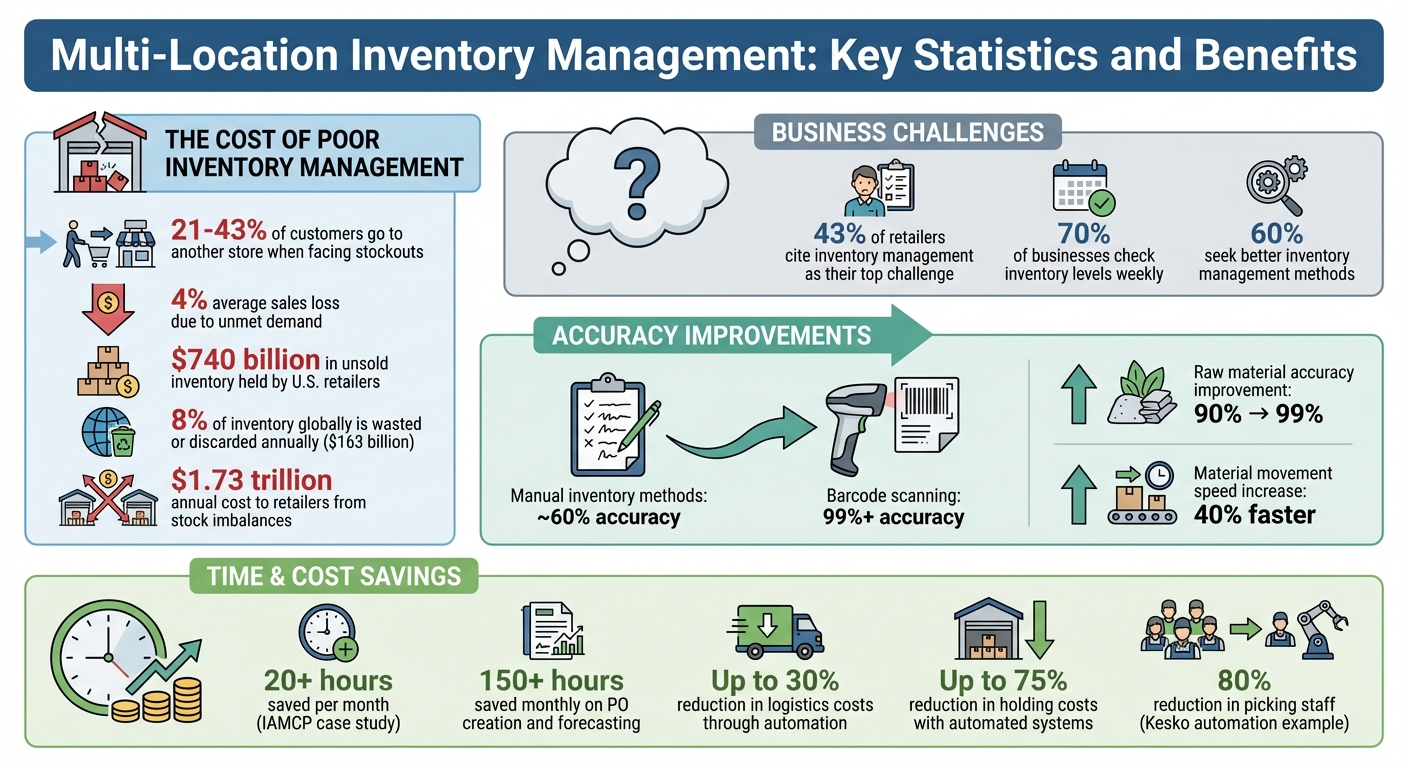
The numbers don’t lie: when customers encounter a stockout, 21–43% will simply head to another store, and businesses could lose an average of 4% in sales due to unmet demand. On top of that, U.S. retailers are sitting on over $740 billion in unsold inventory. Poor visibility doesn’t just hurt sales - it also leads to higher storage costs, increased insurance fees, and tied-up capital.
Benefits of Centralized Dashboards
A centralized dashboard pulls data from all your locations into one place, giving you a clear picture of stock levels, movements, and sales trends. No more juggling multiple systems or calling individual sites - you can immediately spot imbalances and shift inventory between locations efficiently.
Real-time low-stock alerts are another game-changer. These alerts notify you the moment stock levels dip below a set threshold, giving you time to reorder before running out. For instance, Millennium Physicians, which operates 39 offices, automated their inventory processes in 2024. This upgrade didn’t just streamline operations - it also allowed them to reassign a full-time accounting employee to focus on strategic financial analysis. Their CFO shared:
"Since automating AP with Rapid Inventory, we've been able to repurpose one full-time accounting employee to focus on more impactful strategic work like diving into financial performance and cash flow."
- CFO, Millennium Physicians
Without visibility into shipments, managers risk ordering products that are already on the way, leading to duplicate inventory and unnecessary costs. Real-time tracking from departure to arrival eliminates this "inventory limbo", ensuring you only order what’s truly needed.
And it doesn’t stop there - integrating with QuickBooks takes inventory accuracy to the next level.
Two-Way QuickBooks Sync
For QuickBooks Desktop users, two-way syncing between your inventory system and accounting software eliminates manual data entry errors. Every inventory change updates both systems in real-time, keeping your financial records precise and up-to-date. This seamless integration works hand-in-hand with real-time visibility to streamline inventory management.
The time savings can be huge. The International Association of Microsoft Channel Partners (IAMCP), which oversees 37 chapters across the U.S., reported that automating their processes in 2024 saved their treasurer at least 20 hours per month. As they put it:
"No way we would function at the level we do now without Rapid Inventory. It has saved me at least 20 hours per month because AP is automated from front to back."
- CPA and Treasurer, IAMCP
With Rapid Inventory’s two-way QuickBooks sync, your warehouse data and accounting records stay perfectly aligned. Forget spreadsheets and endless phone calls. You can set location-specific reorder points, use mobile barcode scanners for instant updates, and let the centralized dashboard handle the rest. It’s inventory management made simple.
Multi-Location and Warehouse Tracking
Managing inventory across multiple sites can be tricky. Without a unified system, some locations might end up overstocked while others face shortages, leaving you unsure of your total inventory picture.
This is where real-time dashboards and detailed site tracking come into play. By defining each location and monitoring precise inventory levels and values, you can ensure accuracy across all sites. Every transaction automatically updates the system, providing a single, reliable inventory record.
This approach isn’t just about accuracy - it’s about saving money. Keeping inventory closer to customers means faster shipping, lower transportation costs, and reduced labor expenses. Plus, spreading stock across multiple locations can protect your business from a complete loss if one site faces a disaster.
With QuickBooks integration, Rapid Inventory allows you to manage unlimited warehouses from one web-based dashboard. You can set reorder points tailored to the needs of each location, adjust stock levels instantly using mobile barcode scanning, and maintain smooth inter-location transfers - all from a single platform.
Streamlining Inter-Location Transfers
Once you’ve got detailed tracking in place, transferring stock between locations becomes much simpler. Automated workflows and demand planning ensure that transfers happen when and where they’re needed, keeping products in the right place at the right time.
Forget about endless phone calls or piles of paperwork. With Rapid Inventory, you can select the source and destination locations, choose items, enter quantities, and generate a tracking reference - all in one streamlined process. This eliminates double-counting and ensures both locations reflect accurate stock levels immediately.
Standardizing procedures is key to keeping everything running smoothly. Use consistent naming conventions, units of measure, and labeling protocols across all sites. Assign specific roles, like transfer coordinators or inventory leads, to oversee stock movements. Regular cycle counts can help confirm that physical inventory matches your digital records.
The "Duplicate Inventory Transfer" feature in Rapid Inventory speeds up recurring stock movements. Paired with mobile barcode scanning, it ensures data is updated instantly, cutting down on manual errors and keeping your operations efficient.
Lot and Serial Number Tracking with FIFO/FEFO Picking
Tracking lot and serial numbers is essential for managing inventory across multiple locations. This system lets you monitor individual items or batches from their arrival at a warehouse, through transfers between locations, all the way to the final sale. When paired with real-time dashboards and inter-location transfers, it offers a comprehensive view of your inventory's journey.
This level of precision is especially critical in industries like food, pharmaceuticals, and electronics, where regulations demand strict oversight. In the event of a recall, being able to identify affected batches across various sites is non-negotiable. That’s why detailed lot and serial number tracking is more than just useful - it’s a necessity.
Lot and Serial Number Traceability
Lot tracking organizes items by production batches, which is invaluable for identifying contaminated or defective units during a recall. On the other hand, serial tracking assigns unique identifiers to individual high-value items, offering even greater precision.
For businesses operating across multiple warehouses, centralized tracking eliminates data silos and ensures managers can instantly locate any serial-numbered item. Tools like Rapid Inventory’s mobile barcode scanning make it easy to verify lot and serial numbers at the point of activity, enhancing accuracy and efficiency.
"QuickBooks is powerful for accounting, but it falls short on advanced serial number and lot tracking. That leaves your business exposed to mistakes, operational disruptions, and risks that can erode customer trust." - SOS Inventory
Automated expiration alerts and mobile scanning further simplify tracking while maintaining stock accuracy. Role-based access controls add an extra layer of security, ensuring only authorized personnel can modify sensitive records.
FIFO/FEFO Picking for Perishable Goods
When managing perishable goods, FIFO (First In, First Out) ensures that older inventory is sold or used before newer stock, preventing obsolescence and maintaining proper stock rotation across all distribution centers. FEFO (First Expiration, First Out) goes a step further by prioritizing items with the earliest expiration dates, regardless of when they were received. This approach helps reduce waste and spoilage significantly.
Automated picking strategies take this process to the next level. Rapid Inventory supports FIFO/FEFO automation by generating optimized pick lists and ensuring near-perfect accuracy. Mobile barcode scanning verifies the correct lot or serial numbers during shipping, adding another layer of confidence.
For businesses handling food or pharmaceutical products, FEFO isn’t just about efficient operations - it’s also about meeting regulatory requirements. Automated stock rotation ensures compliance with strict standards, such as the FSMA 204 extension for food safety, while maintaining the detailed audit trails inspectors expect during regulatory checks.
Barcode Scanning and Mobile Access
Using mobile barcode scanning transforms how multi-location inventory is managed. Instead of manually entering data, employees can scan barcodes directly at the point of activity - whether they're receiving shipments, picking orders, or performing cycle counts. This approach not only streamlines data entry but also significantly improves accuracy.
Manual inventory methods typically hover around 60% accuracy. In contrast, mobile barcode scanning achieves over 99% accuracy. Case studies highlight improvements in raw material accuracy, jumping from roughly 90% to over 99%, while also speeding up material movements by up to 40%. With this level of precision, inventory operations become faster and far more dependable.
Mobile scanning also slashes transaction times - from minutes to mere seconds. For example, during receiving, employees can scan items as they arrive to instantly verify quantities against purchase orders. When it comes to order picking, mobile systems guide workers with optimal routes and precise inventory locations, ensuring perfect order fulfillment every time. The financial benefits are hard to ignore - mispicks alone cost businesses an average of $400,000 each year.
Efficiency with Mobile Devices
Web-based mobile access allows employees to manage inventory from anywhere, eliminating the need for desktop systems. Data syncs across all locations in real time, giving managers instant visibility into stock levels and item locations.
Many advanced mobile apps even work offline. They store scans locally when internet connectivity is unavailable and automatically sync the data once the connection is restored. This ensures that tasks like cycle counting and stock transfers aren't disrupted, even in large warehouses or remote areas. By supporting real-time scanning and updates, mobile access strengthens centralized inventory visibility, keeping operations seamless and efficient.
Demand Forecasting and Workflow Automation
Getting demand forecasting right is key to balancing inventory across multiple locations. By diving into historical sales data and understanding local demand, businesses can allocate products more effectively, replacing guesswork with data-driven decisions. Forecasting intervals - whether 30, 90, or 365 days - help balance immediate needs with long-term seasonal trends. For example, the Reorder Point (ROP) formula - (Average Daily Usage x Average Lead Time in Days) + Safety Stock - is a reliable way to know when to replenish stock.
This method isn’t just theoretical. Back in 2014, a consumer goods company working with Dan Sloan, a NetSuite technology expert at Eide Bailly, used demand planning to navigate a potential labor strike at the Long Beach port. By extending lead times and expediting orders based on forecasts, they brought in products early and achieved record sales during the two weekends leading up to Christmas.
Location-Specific Demand Forecasting
Breaking down sales data by location reveals patterns unique to each area. Factors like regional preferences, local economic trends, and even weather can shape customer behavior. Software that tracks these localized patterns helps businesses predict demand more accurately, cutting down on the need for excessive safety stock.
"Make sure that your demand planning engine is looking at where you fulfilled inventory from and where you sent it."
- Dan Sloan, NetSuite technology consulting manager, Eide Bailly
Accurate forecasting depends on clean, reliable data. Filtering out anomalies - such as one-off viral sales spikes - ensures predictions are based on sustainable trends. Collaborating across teams, especially with marketing and sales, allows businesses to incorporate upcoming campaigns and market shifts into their forecasts.
Automated Replenishment and Transfers
Automation takes the hassle out of managing inventory by replacing manual stock checks with smarter systems. When stock levels hit a predefined low threshold, software can automatically initiate transfers from surplus locations. This approach keeps inventory balanced without constant human intervention.
The financial impact of automation is hard to ignore. Globally, 8% of inventory is wasted or discarded each year, costing $163 billion, while stock imbalances cost retailers an estimated $1.73 trillion annually. Automation helps businesses avoid these pitfalls by preventing overstocking, which ties up capital, and stockouts, which result in lost sales.
A great example comes from April 2024, when Finnish grocer Kesko introduced an automated system at its Helsinki micro-fulfillment center. This upgrade doubled their daily delivery capacity and enabled same-day delivery within six hours - all while reducing picking staff by 80% compared to manual operations.
"Automation turns inventory from a manual, error-prone process into a strategic advantage - helping retailers optimize ordering, reduce waste and protect margins."
- Alix Fraser, Product Content Specialist, Lightspeed
Setting location-specific thresholds instead of relying on a one-size-fits-all approach and syncing inventory management software for QuickBooks with warehouse operations ensures a single source of truth across all locations. Managers can track stock levels in real time, including in-transit inventory, further simplifying multi-location management.
Real-Time Reporting and Analytics
Real-time reporting takes centralized dashboards and automated workflows to the next level, sharpening your approach to multi-location inventory management. Without up-to-date data, it’s nearly impossible to keep track of on-hand stock or understand how much capital is tied up. Advanced reporting tools provide critical insights into stock levels, transfer activities, and performance metrics unique to each location.
Automation plays a big role here. Streamlining supply chain and inventory operations can lower logistics costs by up to 30%, while automated inventory systems can slash holding costs by as much as 75%. When paired with Rapid Inventory’s real-time syncing and automated workflows, these reports turn raw data into actionable insights.
Customizable Reports for Multi-Location Insights
Customizing reports by site, product category, or date range allows you to zero in on stock levels, product values, and sales performance. For example:
- Quantity on Hand by Site: This report shows exactly how many units are stored at each warehouse or bin location, helping you avoid overstocking or running out of inventory.
- Inventory Valuation by Site: Break down asset costs and retail values by location to support financial analysis and tax reporting tailored to each site.
- Inventory Stock Status by Site: Purchasing managers can use this report to monitor reorder points, sales orders, and available quantities, ensuring reorders align with actual consumption.
Another valuable tool is the Inventory Sales by Site report, which highlights the most profitable locations and pinpoints products in higher demand in specific regions. This data is essential for smarter stock redistribution. As Beverly Lang, a QuickBooks ProAdvisor, puts it:
QuickBooks lets you quantify each location's sales to see which locations are more profitable than others, and which ones have a higher demand for certain products.
Filtering reports by inventory site or product category can simplify planning and cut through unnecessary data. Base your reorders on available quantities (on-hand stock minus sales orders) to avoid stockouts. Historical usage reports can help identify slow-moving items, allowing you to eliminate dead stock and free up working capital. For businesses dealing with assemblies, setting site-specific build points ensures inventory planning accounts for local demand.
Rapid Inventory integrates these real-time reports and activity logs into its plans. The result? Tailored insights that enable precise, data-driven inventory decisions across all your locations.
Integration with QuickBooks Desktop
Connecting QuickBooks Desktop with your inventory system bridges financial records and warehouse operations effortlessly. This integration provides real-time inventory updates directly into your financial records. With automatic two-way synchronization, any action taken in the warehouse is instantly reflected in QuickBooks, eliminating the need for manual data entry.
QuickBooks Desktop Enterprise supports inventory management for businesses handling anywhere from 5 to 50,000 products. Its Advanced Inventory features - available exclusively with the Platinum and Diamond subscription tiers - allow you to track both stock quantities and their dollar values across various locations, such as warehouses, service trucks, or staging areas. It also automates updates to inventory assets and cost of goods sold (COGS) using weighted average cost as items move between sites.
Two-Way Sync for Accurate Records
The automatic two-way sync ensures that updates in your inventory system are mirrored in QuickBooks and vice versa. Rapid Inventory describes this feature as:
Automatic 2 way sync with Quickbooks means that your items and orders are synced to Rapid Inventory and Rapid Inventory actions are synced back to Quickbooks. Eliminate spreadsheets and manual entry.
This seamless data exchange keeps your financial records accurate and eliminates duplicate entries. For businesses, especially those in retail where 43% cite inventory management as their top challenge, automation like this is a game changer for reducing human error and improving workflow efficiency.
Support for Assemblies and Partial Workflows
The integration also brings flexibility to more complex workflows. QuickBooks allows you to specify which site components are sourced from and where finished assemblies are stored. It also supports partial shipping and receiving workflows, enabling you to track orders fulfilled from multiple locations. For instance, Kink BMX, which manages three warehouses, 2,000 shops, and 30 distributors, saw major improvements after adopting QuickBooks Desktop Enterprise with Advanced Inventory. Zack P. from Kink BMX shared:
Advanced Inventory keeps us organized. We can print [order lists] according to where they are, so our employees in the warehouse don't have to zigzag to fill orders... That's been a big time saver and [helpful] for accuracy as well.
Rapid Inventory integration is offered through both its Pro plan ($90 per user/month) and Unlimited plan ($900 per month), which include white-glove onboarding and migration support. The platform uses a web connector to maintain smooth two-way synchronization, making multi-location inventory management more efficient than ever.
Cycle Counting and Inventory Workflows
Effective cycle counting plays a key role in maintaining inventory accuracy, complementing tools like real-time reporting and QuickBooks synchronization. This process involves regularly comparing digital records with physical inventory without interrupting daily operations. By catching issues like shrinkage, misplaced items, or unrecorded transfers early, cycle counting helps prevent small errors from escalating into major problems.
When standardized across multiple locations, cycle counting ensures consistency throughout your entire network. Centralized inventory platforms enable individual locations to perform their counts independently while still maintaining a unified, accurate data source. For example, location-based reporting can highlight warehouses with high variance rates, signaling potential areas for process improvements or staff training.
Mobile barcode scanning, integrated into Rapid Inventory's cycle counting workflow, simplifies updates and reduces manual errors. Retailers who’ve moved away from spreadsheets to automated systems report saving over 150 hours per month on tasks like purchase order creation and forecasting. These time savings free up resources for more strategic initiatives.
Accurate cycle counts also trigger automated reorder points and help prioritize pending orders. Rapid Inventory tracks backorders and partial shipments, providing clear visibility into sales order statuses. This means you can fulfill available inventory while keeping customers informed, all as part of a broader workflow automation system designed to simplify multi-location management.
While around 70% of businesses check inventory levels weekly, 60% still seek better methods for these processes. Automated, location-specific low-stock alerts activated after cycle counts ensure that stock levels remain consistent across sites. By integrating these streamlined procedures, Rapid Inventory strengthens the accuracy and reliability of multi-location inventory systems.
Web-Based Access and Support
Benefits of Web-Based Accessibility
Web-based inventory systems simplify operations by eliminating the need for local servers and manual backups. With these systems, managers and staff can access real-time inventory data from any device, no longer restricted to a single office computer. A centralized dashboard ensures all data is updated instantly across warehouses and retail locations, acting as the ultimate source of truth. Additionally, mobile access and cloud-managed security features - such as data encryption, regular updates, and remote backups - keep information secure while supporting operations on the go. This accessible framework is bolstered by expert support to ensure a hassle-free experience.
Free Training and Onboarding
Rapid Inventory enhances its efficient platform with complimentary "white-glove" onboarding and migration services. What typically takes months can be completed in just six to seven days. The process includes discovery sessions, action planning, staging for user and warehouse setup, and hands-on training before the system goes live. Beyond the initial setup, Rapid Inventory has earned a stellar reputation, serving over 400 customers and maintaining a 5-star rating for technical support. Both Jacob, the CEO of Rapid Inventory, and Frank, the Manager at Rapid Inventory, have highlighted the platform's easy setup process and the responsiveness of its support team. This combination of quick implementation and reliable assistance ensures QuickBooks Desktop users can transition effortlessly without interrupting their daily workflows.
Conclusion
Managing inventory effectively - whether across warehouses, retail stores, or distribution centers - becomes far more manageable with the right software. Tools that integrate real-time tracking and automation not only reduce manual errors but also provide accurate stock counts across every location.
For small and mid-sized businesses, the ability to scale is just as important as maintaining daily efficiency. Features like lot and serial number tracking, FIFO/FEFO picking strategies, and location-specific reorder points make it possible to expand without adding unnecessary complexity or increasing headcount. These tools help ensure operations remain efficient while supporting growth over time.
As inventory needs grow, streamlined processes help maintain accuracy and fuel business success. With 43% of retailers citing inventory management as their top challenge, it's clear how critical this area is. Features like two-way QuickBooks syncing keep financial records accurate as inventory moves between locations, while automated replenishment and cycle counting prevent costly issues like stockouts or excess inventory - without the need for disruptive full-scale audits.
Rapid Inventory brings all of these capabilities together for QuickBooks Desktop users. Trusted by over 400 businesses and boasting a 5-star rating, the platform offers plans designed to fit varying needs. The Pro plan starts at $90 per user per month, providing unlimited warehouses, while the Unlimited plan, priced at $900 per month, supports teams of 10 or more with advanced features like custom inventory reporting and a dedicated account manager. Both plans include white-glove onboarding, getting businesses up and running in just six to seven days.
Whether managing a single location or multiple sites, the combination of centralized control, mobile accessibility, and QuickBooks integration creates a reliable foundation for accurate, efficient, and scalable operations.
FAQs
How does real-time tracking help manage inventory across multiple locations?
Real-time tracking gives you a clear, up-to-the-minute view of your inventory across all locations. By updating stock levels instantly, it helps reduce the chances of stockouts, overstocking, and mistakes that can happen with manual updates or delayed information.
With this kind of visibility, businesses can make smarter decisions, simplify their operations, and adapt quickly to shifting inventory demands. Whether it's coordinating transfers between warehouses or ensuring customer orders are fulfilled promptly, real-time tracking keeps everything on track.
What are the advantages of connecting inventory management with QuickBooks?
Integrating inventory management with QuickBooks provides real-time updates, keeping your data synchronized across platforms. This not only cuts down on manual errors but also improves accuracy and simplifies your workflows.
By connecting these systems, businesses can avoid running out of stock, track orders with ease, and make smarter decisions - all while saving time and increasing productivity.
How does mobile barcode scanning enhance inventory management for multi-location businesses?
Mobile barcode scanning transforms inventory management by offering real-time data capture, reducing the need for manual entries and cutting down on errors. This ensures inventory records stay accurate and up-to-date. Tasks like inventory counts, stock updates, and order fulfillment become faster and more precise, saving valuable time.
For businesses operating across multiple locations, mobile barcode scanning makes it easier to track inventory between warehouses or stores. Employees can quickly access and update stock information from anywhere, ensuring smooth workflows and improved visibility of inventory across all sites.



