

Lot and serial number compliance is all about tracking products to ensure safety, meet regulations, and improve efficiency. Here's what you need to know:
- Lot Numbers: Used for groups of items (e.g., a batch of food). Helps with recalls and expiration tracking.
- Serial Numbers: Unique to individual items (e.g., electronics). Tracks warranties and ownership.
- Why It Matters: Accurate tracking prevents over-recalls, saves money, and ensures regulatory compliance (e.g., FDA, DSCSA).
- How It Works: Systems like QuickBooks Desktop Enterprise enable tracking, reporting, and integration with tools like barcode scanners.
- Best Practices: Use FIFO/FEFO for inventory rotation, require mandatory number entry, and run regular compliance reports.
For businesses in industries like food, pharmaceuticals, or electronics, this is not optional - it’s a must for operational success and legal adherence.
What Are Lot Numbers and How to Use Them?
sbb-itb-19ed50f
How Lot and Serial Numbers Work
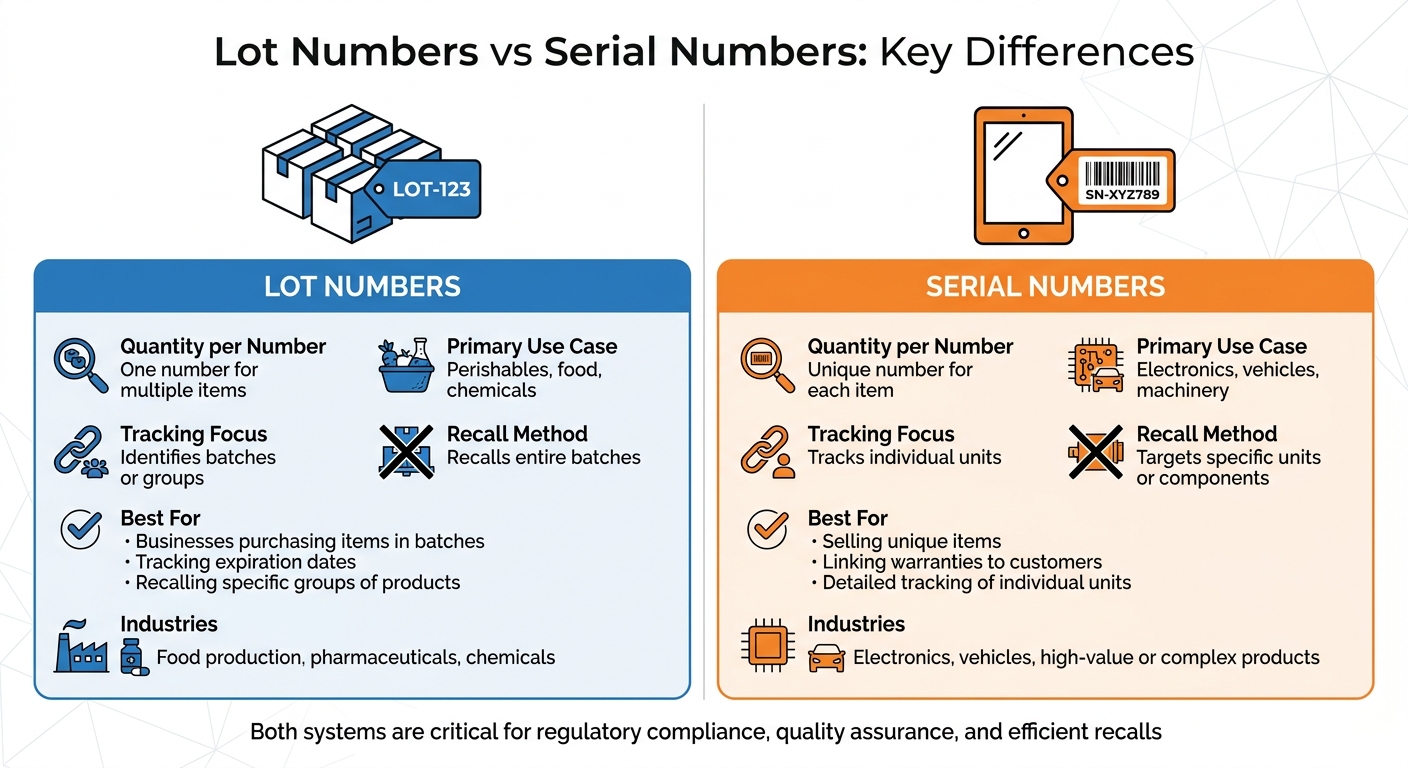
Lot Numbers vs Serial Numbers: Key Differences for Inventory Tracking
Lot Numbers vs. Serial Numbers
The key difference between lot and serial numbers boils down to quantity. Lot numbers are used to identify groups of products produced together with the same materials. On the other hand, serial numbers are assigned to individual items, making each product uniquely identifiable - even within the same batch.
Lot numbers are ideal for tracking product batches, monitoring expiration dates, and managing quality control across groups of items. Industries like food production, pharmaceuticals, and chemicals rely heavily on them. Meanwhile, serial numbers are designed to track the history, status, and location of individual units. This makes them essential for high-value or complex products like electronics and vehicles.
| Feature | Lot Numbers | Serial Numbers |
|---|---|---|
| Quantity per Number | One number for multiple items | Unique number for each item |
| Primary Use Case | Perishables, food, chemicals | Electronics, vehicles, machinery |
| Tracking Focus | Identifies batches or groups | Tracks individual units |
| Recall Method | Recalls entire batches | Targets specific units or components |
These distinctions influence how each system enhances operations and compliance.
If your business involves purchasing items in batches, tracking expiration dates, or recalling specific groups of products, lot numbers are the way to go. Alternatively, if you sell unique items, need to link warranties to specific customers, or require detailed tracking of individual units, serial numbers are the better fit.
How They Support Compliance
Both lot and serial numbers play a critical role in meeting regulatory requirements. They create the documentation regulators demand. Lot numbers enable businesses to perform targeted recalls by pinpointing affected batches and tracing their distribution. Serial numbers take this a step further by allowing recalls to focus on specific faulty components within a larger product. Industries like medical supplies, pharmaceuticals, and fireworks are legally required to use these systems to ensure safety.
These tracking systems also improve quality assurance. Serial numbers, for example, can connect customer complaints to specific lot numbers, helping businesses determine if an issue is isolated or affects an entire batch. As Kent Gigger explains:
"By tracking serial numbers, businesses can sometimes relate customer complaints back to certain lot numbers. This may indicate a problem with the production of certain batches, which may force a recall or a change in the manufacturing process".
Tracking expiration dates alongside lot or serial numbers prevents expired goods from being sold, which is crucial for compliance in food, beverage, and healthcare industries. Inventory management software for QuickBooks Desktop simplifies this by generating reports like "Inventory Expiration Status" or "Serial/Lot Numbers in Inventory", which are essential for regulatory audits. To avoid compliance issues, configure inventory software to require lot or serial number entry for all transactions, including receipts, invoices, and transfers.
Setting Up Tracking in QuickBooks Desktop

Turning On Tracking Features
To use tracking features in QuickBooks Desktop, you'll need the Enterprise edition - specifically the Platinum or Diamond version with the Advanced Inventory module. If you're using the Silver or Gold editions, you'll need to upgrade.
Here's how to enable tracking: Go to Edit > Preferences > Items & Inventory > Company Preferences > Advanced Inventory Settings. From there, open the Serial/Lot Number & Expiration Dates tab, check the box for Activate Lot or Serial Numbers, and select your preferred tracking type. Keep in mind that QuickBooks Desktop only supports tracking one type at a time - you can't track both serial and lot numbers in the same company file.
After enabling tracking, decide which transaction forms (such as Item Receipts, Bills, Invoices, or Sales Orders) will display these numbers. For added accuracy, enable the require entry of serial or lot numbers option to ensure users can't save forms without entering the necessary tracking data. If you need to track expiration dates, activate the Expiration Date setting, which is available in the Platinum and Diamond editions for 2023–2024.
Once you've turned on global tracking, the next step is to configure individual products for tracking.
Setting Up Products for Tracking
After enabling global tracking, you can set up tracking for specific products. Go to Lists > Item List, then either create a new item or edit an existing Inventory Part.
For items already in stock, use the Adjust Quantity/Value on Hand tool to assign serial or lot numbers. If you're working with a large number of items, you can streamline the process by pasting serial numbers directly from an Excel or CSV file using Quick View. If tracking number columns don't appear on your printed invoices, modify the document templates to include them.
Accurate configuration in QuickBooks Desktop is essential for maintaining compliance and ensuring your inventory process runs smoothly.
Managing and Reporting Lot and Serial Numbers
Assigning and Tracking Numbers
Once QuickBooks Desktop is set up for tracking, it’s time to assign numbers to your inventory. You can do this during inventory receipt by using barcode scanning, manual entry, or the system’s automatic assignment feature. For items already in stock, use the Adjust Quantity/Value on Hand workflow to assign tracking numbers retroactively.
It’s important to make serial or lot number entry mandatory for every transaction - whether it’s a receipt, invoice, or transfer. This ensures there are no gaps in your records, which could lead to compliance issues during audits or recalls. Tracking should cover the entire product lifecycle: from the moment items are received, through warehouse transfers, to their final sale.
"Tracking serial numbers, lot codes, and expiration dates is the only reliable way to protect your inventory quality, your customers, and your reputation." - HandiFox Team
For regulated goods, using FEFO (First Expired, First Out) helps minimize spoilage and ensures compliance with industry standards. For non-perishable items, FIFO (First In, First Out) is a reliable method to maintain proper stock rotation. Incorporating barcode scanning during picking and packing not only eliminates manual entry errors but also ensures that the correct serial or lot number is recorded for each customer.
With these systems in place, you’ll be able to generate detailed compliance reports with ease.
Creating Compliance Reports
Once inventory tracking is accurate, generating compliance reports becomes straightforward. QuickBooks Desktop offers several built-in reports tailored for this purpose. To access them, go to Reports > Inventory and select the specific lot or serial number report you need. Before running these reports, make sure the Inventory and purchase orders are active setting is enabled in Company Preferences.
One of the most useful tools is the Transaction List by Lot Number report, which is invaluable for recalls. It shows both the suppliers of a lot and the customers who purchased items from it. The Inventory Expiration Status report is another key resource, helping you monitor expiration dates and the time remaining before items expire - critical for avoiding the sale of expired goods. Lastly, the Inventory Stock Status by Lot Number report provides a clear view of quantities on hand, quantities on sales orders, and total availability for each lot.
| Report Name | Primary Compliance Use Case | Key Data Points Displayed |
|---|---|---|
| Transaction List by Lot Number | Recalls and Audit Trails | Suppliers, purchasers, and assembly usage |
| Inventory Expiration Status | Perishable Goods Compliance | Expiration dates and days left to expire |
| Inventory Stock Status by Lot Number | Inventory Availability | On-hand vs. sales order quantities |
You can customize these reports by applying filters for specific items, lot numbers, date ranges, or expiration statuses (e.g., “already expired” or “yet-to-expire”). Running the Serial/Lot Numbers in Inventory report regularly is a good practice to catch errors or missing entries before creating final compliance documentation. Additionally, updating your invoice and packing slip templates to include serial or lot numbers ensures that customers receive the necessary documentation for warranties or regulatory requirements.
Best Practices for Compliance
Using Rapid Inventory for Compliance
Efficient and precise inventory tracking plays a key role in ensuring compliance. Maintaining accurate lot and serial number records is non-negotiable. Rapid Inventory simplifies this process by integrating seamlessly with QuickBooks Desktop (Enterprise, Pro, and Premier) through two-way syncing and mobile barcode scanning. This eliminates manual double-entry and minimizes errors that could lead to compliance issues.
When warehouse staff scan barcodes during receiving or picking, they verify item locations, quantities, and shipments in real time. This ensures near-perfect accuracy and removes the risk of manual entry errors that could complicate audits. Such precision becomes even more critical during recalls or regulatory inspections, where a single incorrect lot number can lead to significant problems.
For businesses handling perishable or time-sensitive goods, Rapid Inventory supports FEFO (First Expiration First Out) and FIFO (First In First Out) picking methods. The system automatically prioritizes stock based on expiration or receipt dates, ensuring teams pick the correct lot without relying on manual checks. This not only keeps operations compliant but also reduces waste and prevents the sale of expired products.
"Rapid Inventory helps us run our warehouse operations. Easy to use and reliable... we especially love the barcode scanning and mobile picking." - Fernanda C, Director of Operations
The platform also offers detailed reporting, providing instant access to inventory levels, expiration dates, and activity logs. This is invaluable for quick responses during audits or recalls. With over 17 years of experience and more than 400 customers, Rapid Inventory has consistently demonstrated its ability to help businesses stay compliant while streamlining warehouse operations.
Avoiding Common Mistakes
To maintain compliance, avoiding data gaps is just as important as setting up your system correctly. One frequent mistake is failing to make data entry mandatory. If your system allows transactions to be saved without serial or lot numbers, gaps in your records are inevitable. QuickBooks Enterprise users can prevent this by going to Advanced Inventory Settings and enabling the "Make serial or lot number mandatory" option for all relevant transactions.
Another common issue is inconsistent tracking throughout the supply chain. Many businesses record lot numbers during receiving but neglect to do so during inventory transfers or assembly processes. This breaks the chain of custody, making it nearly impossible to trace products during a recall. To avoid this, ensure tracking numbers are recorded at every stage - from receipt to sale.
For perishable or time-sensitive goods, enabling expiration date tracking is essential. Failing to activate this feature or run regular "Inventory Expiration Status" reports can result in expired stock being sold, leading to regulatory violations and unhappy customers. Filtering these reports to focus on "Yet-to-expire items" can help prioritize stock that needs to move quickly.
Manual data entry is another risk factor. Typos in serial or lot numbers can lead to compliance issues. Instead of manually typing numbers, use barcode scanning or copy and paste data directly from Excel or CSV files into the inventory adjustment window.
Lastly, regular audits are a must. Running the "Serial/Lot Numbers in Inventory" report monthly allows you to compare physical stock with digital records and catch mistakes early. When discrepancies arise, the "Adjust Quantity/Value on Hand" tool can help make retroactive corrections, ensuring your records match your actual inventory. These steps form a solid foundation for a reliable compliance strategy.
Conclusion
Lot and serial number compliance isn't just about meeting rules - it's about safeguarding your business, customers, and reputation. With instant batch identification, you can handle crises efficiently and execute targeted recalls. Plus, tracking expiration dates prevents spoilage and ensures your products remain top-notch.
For high-value items requiring warranty verification, opt for serial numbers. For perishable goods, stick with lot numbers. Then, reinforce these systems with mandatory data entry, barcode scanning, and consistent reporting to stay prepared for audits. Automated inventory rotation using FEFO or FIFO logic helps cut down on waste and keeps costs in check.
"Traceability isn't a 'nice to have' - it's essential." - HandiFox Team
These practices do more than ensure compliance - they also provide the transaction history needed for warranty claims and continuous quality checks. Detailed tracking of lot locations and product age improves order accuracy and can even reveal patterns in product failures.
FAQs
Do I need lot numbers or serial numbers for my products?
Whether you should use lot or serial numbers largely depends on your industry, regulatory requirements, and specific business needs.
Lot numbers are used to track groups of items that share common characteristics, such as a production batch or an expiration date. They're particularly useful for industries dealing with perishable goods or products that might face recalls.
Serial numbers, on the other hand, are unique identifiers for individual products. These are essential for high-value items like electronics or medical devices, where precise tracking is required for purposes like warranties or theft prevention.
How do I handle inventory already on hand when I turn on tracking?
When setting up lot and serial number tracking in QuickBooks, you'll need to assign these numbers to your existing inventory. This can be done by either editing the item records directly or by adding the numbers during the process of receiving inventory. In QuickBooks Enterprise, it's especially important to assign lot numbers at the time of receipt. Doing so ensures your records are accurate and meet compliance requirements right from the beginning. Proper tracking at this stage is key for seamless reporting later.
What reports should I run to prepare for an audit or recall?
To get ready for an audit or recall, use the Inventory Stock Status by Lot Number report in QuickBooks Enterprise. This report organizes inventory items by lot numbers, making it easy to see which lots are in stock and their quantities.
You should also conduct routine lot and serial number audits and create recall reports. These steps help you track lot details and transaction histories, ensuring you're prepared for compliance checks and can respond quickly to recalls.



