
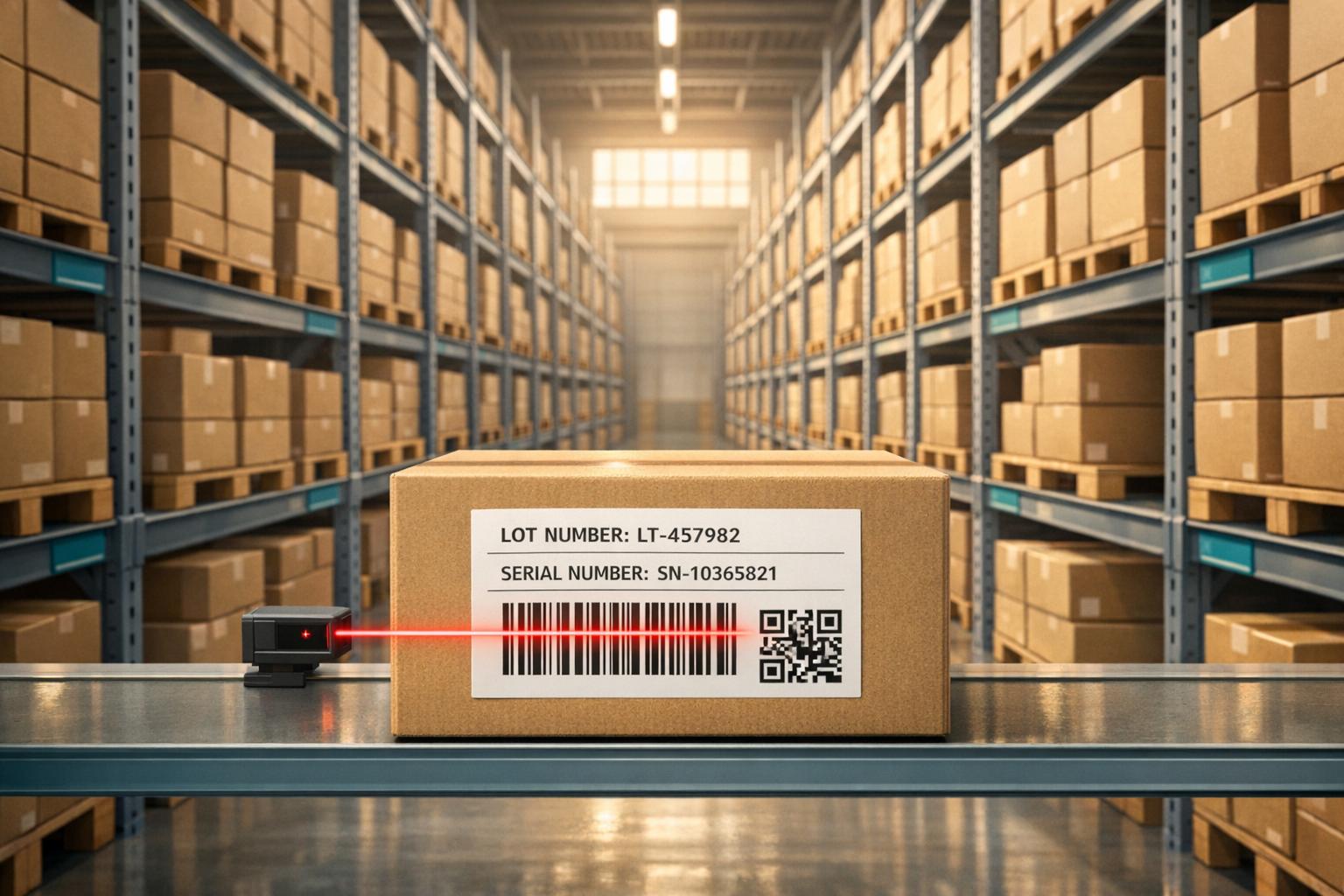
Lot and serial tracking systems help businesses trace products from production to delivery, ensuring accuracy, compliance, and efficient recalls. These systems are vital for industries like food, pharmaceuticals, and electronics, where traceability is critical for safety, quality, and regulatory requirements.
- Lot Tracking: Groups items by batch, simplifying recalls and quality control.
- Serial Tracking: Assigns unique IDs to individual items, ideal for high-value goods and warranty management.
- Key Benefits:
- Reduces recall time by 50% and manual errors by 40%.
- Improves inventory accuracy by up to 90%.
- Supports FIFO/FEFO strategies, cutting waste from expired goods.
Tools like barcode scanners and inventory management software enhance efficiency, offering real-time monitoring and automated alerts for expiration and recalls. Whether tracking batches or individual items, these systems streamline operations, protect brand reputation, and ensure compliance with FDA and USDA regulations.
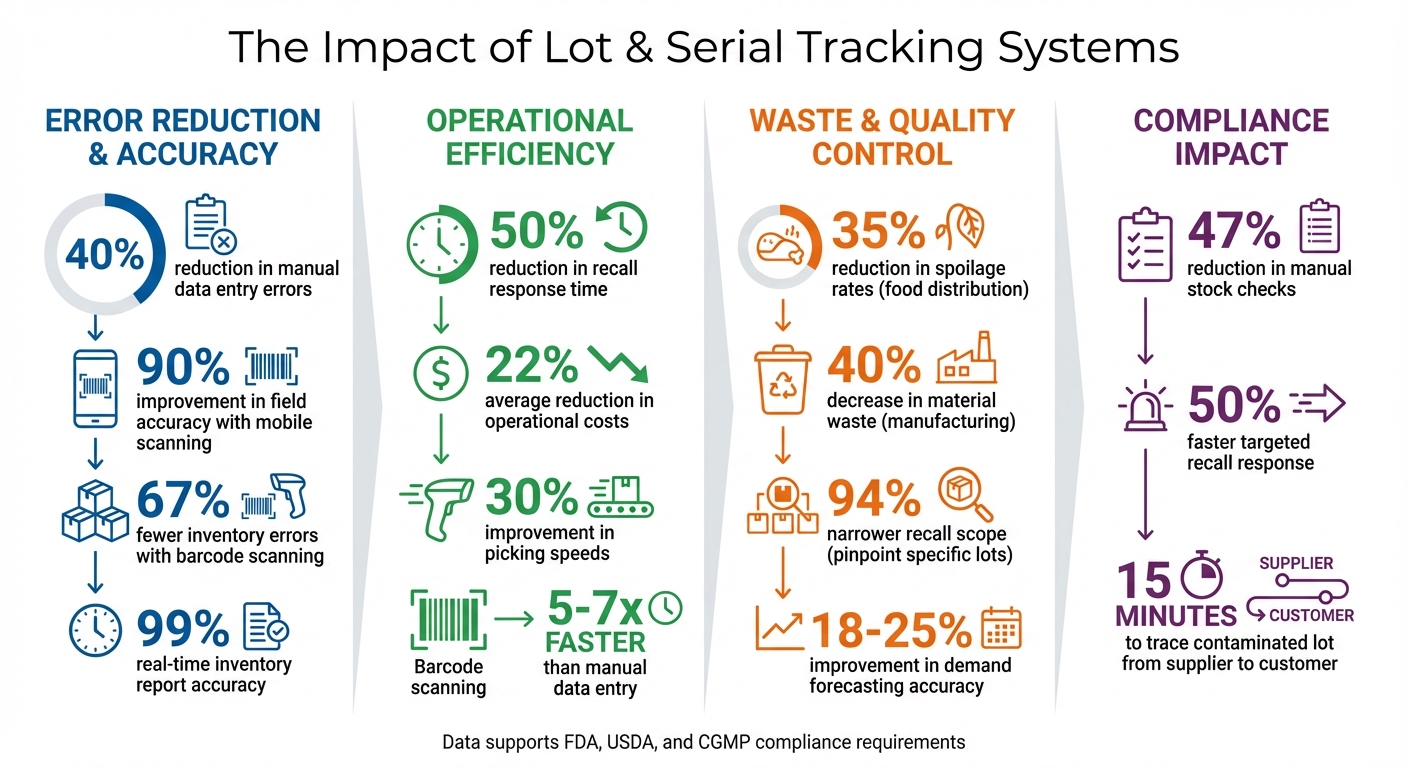
Lot and Serial Tracking Systems: Key Benefits and Impact Statistics
Track serial and lot numbers to enhance inventory management | QuickBooks Enterprise
sbb-itb-19ed50f
Benefits of Lot and Serial Tracking
Tracking systems can transform operations by reducing errors, improving accuracy, and cutting costs. For instance, businesses using automated lot tracking report 40% fewer manual data entry mistakes, while mobile scanning boosts field accuracy by 90% compared to manual processes. These technologies also lower operational costs by an average of 22%, thanks to better stock rotation and more precise recall management.
Better Traceability and Recall Management
When defects arise, tracking systems allow you to pinpoint the issue without disrupting your entire workflow. Instead of recalling thousands of units, you can narrow it down to a specific batch or even individual items. For example, a contaminated food lot can be traced back to the supplier and forward to affected customers in just 15 minutes. This level of precision minimizes the scope of recalls and helps safeguard your reputation.
"Lot tracking is also a powerful tool when managing product recalls, helping manufacturers to quickly identify, locate and recall defective goods to ensure the safety of their customers and mitigate any negative impact on their reputation." - Abby Jenkins, Product Marketing Manager, NetSuite
Integrated systems with features like temperature monitoring can reduce spoilage rates in food distribution by 35%. Similarly, precision lot management can decrease material waste in manufacturing by 40%. These tools also support FEFO (First Expiring, First Out) and FIFO strategies, ensuring older inventory is used first, which helps cut down on expired or wasted stock.
Warranty and Service Management
Serial numbers act like a digital fingerprint for every item, enabling you to verify returns and prevent fraudulent warranty claims. This eliminates the need for customers to keep paper receipts. Additionally, service teams can instantly access detailed product histories, including manufacturing dates, past repairs, and specific components used. This level of detail allows for quicker and more accurate troubleshooting.
Using serial tracking for targeted recalls can cut response times by 50% and reduce the need for manual stock checks (shelf walks) by 47%. When customers need support, your team can quickly identify compatible spare parts for their product version, simplifying repairs and improving customer satisfaction.
Fewer Errors and Faster Operations
Barcode scanning eliminates typos and data entry errors, ensuring expired or incorrect goods don’t get shipped. Serial tracking also prevents double-counting during audits, as each unique identifier can only be scanned once. If a worker accidentally scans the same item twice, the system immediately flags the mistake.
"Lot tracking software eliminates the need for [manual data entry]... In the worst case, such errors can lead to inaccurate orders and picking mistakes, like the shipment of expired or faulty goods." - Abby Jenkins, Product Marketing Manager, NetSuite
Real-time tracking speeds up inventory audits and order fulfillment. Additionally, analyzing expiration data through these systems improves demand forecasting accuracy by 18-25%, helping you maintain optimal stock levels.
How to Set Up Lot and Serial Tracking
Planning your tracking system is crucial to avoid data gaps and workflow disruptions. Start by identifying which products to track and setting up processes to capture transaction data effectively.
Selecting Products to Track
Serial numbers work best for high-value items like electronics, appliances, and vehicles. They allow for detailed service histories and warranty tracking. On the other hand, batch-produced goods - such as food, pharmaceuticals, chemicals, or textiles - are better suited for lot numbers. These numbers group items by production date and quality characteristics.
Regulatory requirements often guide these decisions. For instance, the FDA and USDA mandate tracking for food, beverages, and pharmaceuticals, while CGMP standards outline minimum manufacturing and packaging controls. Safety risks also play a role - products like car parts, medicines, and electronics should always be tracked to enable targeted recalls instead of wasting an entire inventory.
"Use serial numbers if you: Buy and sell inventory items with unique serial numbers [and] need a report with invoices for a specific serial number... to track down a serial number's history for a warranty." - Intuit QuickBooks Support
Perishable goods benefit significantly from lot tracking. Items with expiration dates can be managed using FIFO (First In, First Out) or FEFO (First Expired, First Out) methods to reduce waste. Lot tracking also strengthens quality control, helping you trace back to specific batches of raw materials in case of supplier issues.
Once you've identified what to track, focus on standardizing tracking codes to streamline operations.
Creating Tracking Number Formats
Standardized alphanumeric codes ensure consistency and minimize errors. Automating the generation of these codes can further simplify the process.
Tracking numbers should include key details like production dates and location identifiers. For example, a lot number might look like "LOT-2026-02-15-A1", where the date reflects production, and "A1" identifies the manufacturing line. Serial numbers, on the other hand, often use simpler formats like "SN-100001", with sequential numbering for each unit.
To maintain data accuracy, configure your system to require tracking numbers on receipts, invoices, and transfers. Platforms like QuickBooks Advanced Inventory allow you to activate tracking fields across all transaction forms, ensuring consistency.
These standardized formats lay the groundwork for smooth receiving and shipping workflows.
Building Receiving and Shipping Workflows
Begin tracking numbers as soon as items are received. Link these numbers to the corresponding purchase order to ensure traceability from the start. Record supplier details, production dates, and expiration dates at the time of receipt. For inventory already on hand, assign tracking numbers retroactively using tools like "Adjust Quantity/Value on Hand" or by importing data from Excel or CSV files.
During storage, group items with identical lot numbers in designated bins or sublocations. This simplifies picking and reduces the chance of errors. Barcode scanning at every stage - receiving, put-away, picking, and shipping - can further eliminate mistakes and speed up operations.
Include tracking numbers on internal pick lists to ensure accurate order fulfillment and enable effective recall tracking. When transferring stock between locations, maintain the same tracking numbers throughout the process to keep the chain of visibility intact. For returns, use pick list data to identify the specific lot or serial number, making it easier to perform root-cause analysis.
"Lot and serial number tracking isn't just a safeguard; it's a competitive advantage." - Thomas Wong, inFlow Inventory
Set up automated alerts for upcoming expiration dates or potential recall triggers to stay ahead of issues. Use formulas to calculate expiration or warranty dates automatically when items are received or produced. Regularly run reports - like "Serial/Lot Numbers in Inventory" or "Inventory Expiration Status" - to verify data accuracy and monitor items nearing expiration.
This structured approach ensures complete traceability across all inventory movements and sets the stage for integrating advanced technology tools.
Technology Tools for Lot and Serial Tracking
The right tools can turn tracking from a tedious task into a game-changer for your business. With barcode scanning and web-based inventory platforms, you can leave behind the errors of manual spreadsheets and gain real-time insights into your inventory.
Using Barcode Scanning for Accuracy
Manual data entry is prone to mistakes, but barcode scanning changes the game. Companies that adopt barcode scanning see up to 67% fewer inventory errors and improve picking speeds by about 30%. Plus, barcode scanning is 5 to 7 times faster than typing in data by hand.
If you're still using traditional 1D barcodes, consider upgrading to 2D barcodes like QR codes or Data Matrix. These pack more information - such as lot numbers, serial numbers, and expiration dates - into a smaller space. Even better, they remain scannable even when partially damaged, making them perfect for tough warehouse environments. Advanced scanners can even read GS1 barcodes to pull multiple data points in one quick scan.
This technology isn't just about speed and accuracy - it can have a huge impact on operations. For example, barcode tracking can narrow down recalls by 94%, allowing you to pinpoint affected lot numbers instead of discarding entire inventories.
When it comes to hardware, costs vary widely. A basic USB scanner might cost around $33, while a mid-range handheld scanner like the Zebra Symbol LS2208 averages $70. High-end, enterprise-grade scanners can go up to $5,000. For most small and mid-sized businesses, pairing mid-range scanners with cloud-based software (priced between $100 and $500 per month) offers the best balance of cost and functionality.
While barcode scanning improves accuracy on the warehouse floor, cloud-based platforms take these benefits to the next level by offering end-to-end inventory management.
Web-Based Inventory Management Systems
Cloud-based inventory systems build on the accuracy of barcode scanning by providing real-time control and flexibility. Unlike traditional desktop software, these platforms let you manage inventory from anywhere. For example, Rapid Inventory integrates seamlessly with QuickBooks Desktop, syncing financial and operational data automatically. Warehouse staff can even update inventory levels directly from the floor using mobile barcode scanners.
These systems come packed with features, such as:
- Multi-location tracking for warehouses and retail stores
- FIFO/FEFO picking to prioritize the oldest or soonest-to-expire stock
- Expiration date alerts to avoid compliance headaches
With real-time inventory reports offering 99% accuracy, you can trust your stock levels and ensure smooth order fulfillment.
"For the first time in 20 years of running an inventory-based business, I TRUST what my inventory management system tells me I have in stock."
- Brett Haney, President of Microfiber Wholesale
This trust stems from automated traceability. Every scan creates a digital record of an item's journey, including its history, location, and status changes - crucial for managing recalls or warranty claims.
Rapid Inventory's pricing is straightforward. The Pro plan starts at $90 per user/month for 1–9 users, covering unlimited warehouses, lot and serial tracking, barcode scanning, real-time reports, and free onboarding. For larger teams, the Unlimited plan costs $900 per month, offering custom reports, a dedicated account manager, and priority support.
Maintaining Compliance and Accuracy
Getting tracking systems up and running is just the first step. Keeping records accurate and meeting regulatory requirements demands constant attention. Industries like pharmaceuticals, food, and medical devices face particularly strict oversight. For instance, the FDA's Food Safety Modernization Act (FSMA) gives the agency the power to mandate recalls or even shut down operations if your tracking data doesn't hold up. Similarly, FDA 21 CFR Part 820 requires control numbers for high-risk medical devices. Pharmaceutical companies must comply with the Drug Supply Chain Security Act (DSCSA), which mandates electronic lot tracking from production all the way to patient delivery.
By maintaining compliance, you not only meet legal obligations but also sustain the operational improvements and error reduction discussed earlier. Accurate tracking builds trust with customers and partners who prioritize safety and reliability. To ensure this, configure your software to require lot or serial numbers and expiration dates for every transaction, eliminating gaps in your records. Implementing FIFO (First-In, First-Out) or FEFO (First-Expired, First-Out) protocols ensures proper stock rotation and reduces waste. Beyond setup, regular checks and audits are essential to verify your tracking data remains reliable.
Regular Audits and Spot Checks
Audits are key to ensuring your digital records align with actual inventory. Instead of shutting down operations for full counts, cycle counting allows you to check portions of your inventory on a regular basis, keeping disruptions to a minimum while maintaining accuracy. Spot checks are equally important, helping to catch human errors like misplaced items, duplicate scans, or incorrect counts before they escalate into larger issues. They also reveal when it’s time to adjust your tracking processes to match your business’s growth.
"Audits also help flag issues, prompting corrective action before they become bigger problems." - Abby Jenkins, Product Marketing Manager, NetSuite
Using barcode or RFID scanners during audits can eliminate mistakes caused by manual data entry. Regularly running reports, such as "Serial/Lot Numbers in Inventory" or "Inventory Expiration Status", can help you identify entry errors or items nearing expiration. Advanced lot tracking systems can boost field accuracy by as much as 90% compared to manual methods. While audits are critical for compliance, adding more details to your tracking numbers can further enhance data accuracy.
Adding Details to Tracking Numbers
Basic lot and serial numbers provide essential information, but adding more attributes can make your records far more effective. Including date-based details like manufacturing dates, expiration dates, or warranty periods helps manage shelf life and service eligibility. Character-based attributes, such as lot grade, color, country of origin, or supplier lot numbers, allow for better quality control and sourcing traceability. Numeric attributes like dimensions, volume, or weight can assist with precise storage planning and allocation rules.
For serial items, tracking maintenance details - such as cycle counts, repair history, or time since overhaul - is invaluable for warranty claims and refurbishments. When splitting or merging lots, ensure that child lots inherit critical attributes like country of origin or grade from their parent lots. Additionally, enabling system-level auditing to log every change made to lot and serial attributes creates a complete audit trail, showing what was changed, when, and by whom. This level of detail not only supports regulatory compliance but also strengthens internal processes and operational efficiency. By enriching your tracking numbers with detailed data, you can refine your operations while ensuring you meet industry standards.
Conclusion
This guide has detailed how lot and serial tracking can transform inventory management by replacing outdated manual methods with automated systems that offer real-time visibility and precise accuracy. Modern systems, leveraging barcode and RFID scanning technologies, have been shown to cut manual data entry errors by 40% and improve field accuracy by as much as 90%. These tools allow businesses to trace products both backward to suppliers and forward to customers, ensuring more efficient recall management and safeguarding brand reputation.
The advantages go far beyond traceability. Features like automated expiration alerts and FIFO/FEFO protocols help reduce spoilage in food distribution, while accurate lot tracking minimizes material waste in manufacturing. Real-time integration with accounting systems prevents stockouts and overstocking, while maintaining audit-ready records ensures compliance with FDA, USDA, and other regulations. These benefits don’t just streamline operations - they also give your business a competitive edge.
Consider your specific needs: serial tracking may be ideal for individual high-value items, while lot tracking works better for batches and perishables. Standardize tracking number formats, require mandatory entries for all transactions, and integrate barcode scanning at every stage, from receiving to shipping. If you’re using QuickBooks Desktop and need advanced features like automated numbering, expiration alerts, and multi-location tracking, Rapid Inventory offers solutions such as two-way QuickBooks sync, FIFO/FEFO strategies, mobile barcode scanning, and free training to get your team up to speed quickly. These steps can set your business up for efficient, long-term success.
Investing in a robust tracking system can deliver real returns - businesses see an average cost reduction of 22% through optimized stock rotation and better recall management. By adopting the tools and practices outlined in this guide, you’ll build a solid foundation for growth while meeting the quality and safety expectations of your customers.
FAQs
Do I need lot tracking, serial tracking, or both?
You need lot tracking to monitor groups of items and serial tracking to keep tabs on individual, unique items. Each plays a specific role in inventory management, and using both can be essential if your processes demand tracking at both group and individual levels.
What data should I capture at receiving to stay recall-ready?
To be prepared for potential recalls, make sure to record essential details during the receiving process. These include lot and serial numbers, expiration dates, supplier-provided lot and serial numbers, and any other relevant product characteristics. This practice helps maintain precise tracking and ensures traceability, which are crucial for both compliance and effective recall management.
How do I keep lot/serial data accurate over time?
To keep lot and serial data accurate, assign numbers during each transaction, activate advanced inventory settings to require them, and review the data regularly. These steps help minimize mistakes and ensure compliance with tracking standards.



